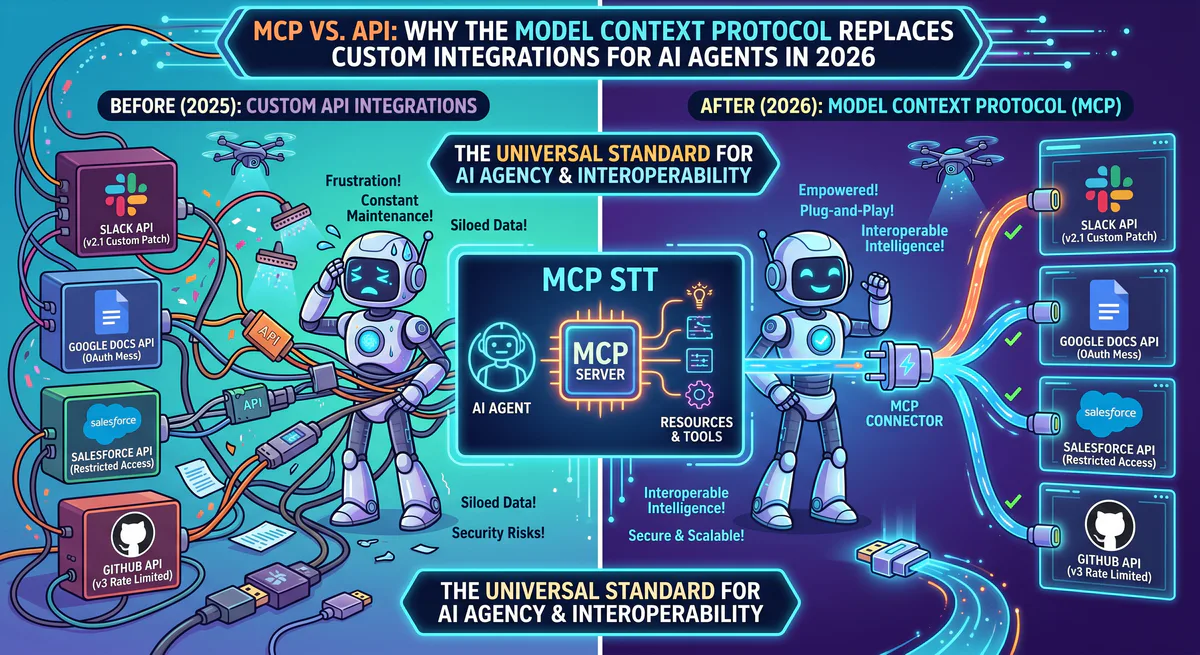
If you’ve built any AI integration in the last two years, you’ve written some version of this code: an HTTP client that calls a REST API, parses the JSON response, handles authentication, deals with rate limiting, manages pagination, and wraps everything in a try-catch because the API changes without warning every six months.
Then you do it again for the next tool. And the next. And the next.
The Model Context Protocol exists because this approach doesn’t scale. Not for one developer integrating five tools, and certainly not for teams connecting AI agents to dozens of business systems. According to Postman’s 2025 State of APIs Report, the average enterprise maintains 347 internal API integrations, and 62% of engineering time on API projects is spent on maintenance — not building new features.
MCP solves this with a fundamentally different architecture. Instead of the developer writing a custom integration for every tool, the AI agent dynamically discovers and uses tools at runtime through a standardized protocol. The difference is structural, not cosmetic.
This article explains what that difference means in practice, when MCP is the right choice, and when traditional APIs still win.
The Fundamental Architecture Difference
How Traditional API Integrations Work
You decide your AI agent needs Slack, GitHub, and Stripe. You write:
# Traditional approach: custom code per tool
import requests

class SlackClient:
    def __init__(self, token):
        self.token = token
        self.base_url = "https://slack.com/api"

    def post_message(self, channel, text):
        resp = requests.post(f"{self.base_url}/chat.postMessage",
            headers={"Authorization": f"Bearer {self.token}"},
            json={"channel": channel, "text": text})
        return resp.json()

class GitHubClient:
    def __init__(self, token):
        self.token = token
        self.base_url = "https://api.github.com"

    def list_pull_requests(self, repo):
        resp = requests.get(f"{self.base_url}/repos/{repo}/pulls",
            headers={"Authorization": f"Bearer {self.token}"})
        return resp.json()

# ... and another class for Stripe
# ... and another for HubSpot
# ... and another for every new tool
For every tool, you write a custom client class. You manage authentication tokens. You handle API versioning. When Slack adds a new method, you update your client. When GitHub deprecates an endpoint, your integration breaks at runtime.
The LLM doesn’t understand any of this code. To make the AI use these tools, you write additional wrapper functions, tool schemas, and prompt instructions. The total integration cost for a single tool — from API research to production-ready wrapper — is typically 4-8 hours of engineering time.
How MCP Integrations Work
With MCP, you don’t write tool-specific code:
# MCP approach: one connection pattern for all tools
from langchain_mcp_adapters.client import MultiServerMCPClient

MCP_SERVERS = {
    "slack":  {"url": "https://edge.vinkius.com/mcp/slack?token=TOKEN"},
    "github": {"url": "https://edge.vinkius.com/mcp/github?token=TOKEN"},
    "stripe": {"url": "https://edge.vinkius.com/mcp/stripe?token=TOKEN"},
}

client = MultiServerMCPClient(MCP_SERVERS)
tools = await client.get_tools()  # AI discovers all available tools
Three tools connected. Zero tool-specific code. The AI discovers available functions at runtime through MCP’s built-in tool discovery protocol. When Slack adds a new capability, the MCP server exposes it — your code doesn’t change.
Feature-by-Feature Comparison
| Characteristic | Traditional REST API | MCP |
|---|---|---|
| Integration model | Static: developer defines endpoints, schemas, and mappings at build time | Dynamic: AI discovers tools at runtime |
| Code per tool | 100-500+ lines (client, auth, error handling, pagination) | 2-3 lines (URL + connection) |
| Schema definition | Manual: developer writes OpenAPI spec or tool schema | Automatic: server declares capabilities |
| Authentication | Token in code/config — developer manages lifecycle | Token in secure vault — managed by platform |
| Versioning | Breaking changes require code updates | Server handles backward compatibility |
| Multi-tool reasoning | Developer writes orchestration logic | AI decides which tools to call and in what order |
| Adding a new tool | Write new client class + wrapper + schema | Add one URL to config |
| Maintenance | Ongoing — API changes, deprecations, rate limit adjustments | Near-zero — MCP server maintainer handles updates |
Dynamic Tool Discovery: The Real Breakthrough
The most important difference isn’t the reduced code — it’s dynamic tool discovery.
When an AI agent connects to a traditional API, it can only use the functions you explicitly programmed. If you integrated Slack’s chat.postMessage but forgot reactions.add, the AI can’t add emoji reactions — even if it would be the right action for the user’s request.
With MCP, the server declares all its capabilities at connection time:
{
  "tools": [
    {"name": "post_message", "description": "Send a message to a Slack channel"},
    {"name": "add_reaction", "description": "Add an emoji reaction to a message"},
    {"name": "list_channels", "description": "List all channels in the workspace"},
    {"name": "search_messages", "description": "Search message history"},
    {"name": "set_channel_topic", "description": "Update a channel's topic"}
  ]
}
The AI reads this manifest and can use any tool that matches the user’s intent — including tools the developer never specifically coded for. When the MCP server adds a new tool (e.g., create_canvas when Slack ships Canvas support), the AI can use it immediately. Zero code change on the client side.
This is why MCP fundamentally changes the capability ceiling of AI agents. The agent’s capabilities are bounded by the server’s tools, not by the developer’s integration code.
Security: The Credential Isolation Gap
This is the largest practical difference, and the reason many teams are migrating to MCP.
Traditional API Approach
API Key → Developer's code → .env file → Git repo → AI contextAt every step, the credential is exposed. The developer sees it when creating the integration. It sits in a file that can be committed to version control. Frameworks like LangChain may include environment variables in debug output. The API key can appear in LLM provider logs.
According to GitGuardian’s 2025 report, 12.8 million secrets were exposed in public GitHub repos in a single year. Slack tokens, Stripe keys, and database credentials are disproportionately represented.
MCP Approach (Governed)
API Key → Encrypted vault (server-side) → Proxy → AI only sees dataThe credential never leaves the server. The AI agent connects through a proxy URL that handles authentication. The agent receives data — never keys, never tokens, never connection strings.
We wrote an entire guide on this architecture: MCP API Key Management: From Plaintext to Zero-Trust. For teams in regulated industries, the credential isolation gap alone justifies the migration.
When to Use MCP
This is the honest assessment. We built our entire platform on MCP and operate 2,500+ servers — but we recognize MCP is not the right choice for every integration scenario.
Use MCP when:
- Your AI agent needs to use business tools dynamically based on user prompts
- You’re connecting 3+ tools and don’t want to maintain custom client code for each
- Security matters — you can’t afford API keys in plaintext config files
- Your team isn’t large enough to maintain custom API integrations for every tool
- You want the AI to discover and use new capabilities without code changes
- You need audit trails for compliance (SOC 2, HIPAA, GDPR)
Keep direct APIs when:
- You need microsecond-level latency (MCP adds a proxy hop — typically 50-150ms)
- You’re building a non-AI application (MCP is designed for AI agents)
- You need deep control over every API call (custom headers, specific pagination strategies)
- Your integration is a single, stable API that rarely changes
- You’re building batch data pipelines (ETL) where AI reasoning isn’t needed
The decision isn’t binary. Many teams use both: MCP for AI-facing tool access, traditional APIs for backend data pipelines and batch processing. The key question is: “Does an AI agent need to decide when and how to call this tool?” If yes, MCP. If the call pattern is fixed and predictable, a direct API is simpler.
Total Cost of Ownership: A Real Comparison
The code difference is visible. The cost difference is harder to see — but more consequential. Based on our experience deploying MCP for engineering teams of 5 to 500, here’s what the real cost breakdown looks like:
Integration Cost (Per Tool)
| Phase | Traditional API | MCP (Governed) |
|---|---|---|
| Research — Read docs, understand auth, find endpoints | 2-4 hours | 0 (server already built) |
| Build — Write client, auth handler, error handling, tests | 4-12 hours | 5 minutes (subscribe + paste URL) |
| LLM wrapper — Tool schema, prompt engineering, testing | 2-4 hours | 0 (MCP auto-discovery) |
| Security review — Credential handling, access scoping | 1-2 hours | 0 (platform-managed) |
| Total initial cost | 9-22 hours | 5 minutes |
Maintenance Cost (Per Tool, Per Year)
| Activity | Traditional API | MCP (Governed) |
|---|---|---|
| API version updates / breaking changes | 4-16 hours/year | 0 (server maintainer handles) |
| Token rotation and credential management | 2-4 hours/year | 0 (dashboard, one-click) |
| Bug fixes from API changes | 2-8 hours/year | 0 |
| Monitoring and uptime | Ongoing | Platform-managed |
| Total annual maintenance | 8-28 hours/year | ~0 hours |
For a 10-Tool Stack
| Metric | Traditional API | MCP |
|---|---|---|
| Initial build | 90-220 engineering hours | 50 minutes |
| Annual maintenance | 80-280 engineering hours | ~0 hours |
| At $150/hour engineering cost | $25,500-$75,000 | ~$0 (platform subscription) |
The numbers are stark. For a Series A startup with 3 engineers, spending 220 hours building custom API integrations means 5.5 weeks of a full-time engineer — about 14% of their annual capacity — doing plumbing work instead of building product. This is why teams migrate to MCP.
Performance: Latency and Throughput
A fair comparison must address performance. MCP adds a layer — the proxy — between your client and the API. How much does this cost?
Latency Comparison
| Operation | Direct API Call | Governed MCP Call | Delta |
|---|---|---|---|
| Slack: post_message | ~120ms | ~180ms | +60ms |
| GitHub: list_pulls | ~200ms | ~260ms | +60ms |
| Stripe: get_balance | ~150ms | ~210ms | +60ms |
| Supabase: SQL query | ~80ms | ~140ms | +60ms |
The proxy adds approximately 50-80ms of overhead. For AI agent conversations — where the LLM inference itself takes 1-5 seconds — this overhead is imperceptible. The user asking “Show me my open PRs” will never notice a 60ms difference when the total response takes 2.5 seconds.
Where this matters: High-frequency trading bots that need sub-millisecond execution. But if you’re building a trading bot that executes 1,000 trades per second, you shouldn’t be using an LLM to make those decisions — you should be using direct exchange APIs with co-located servers. The use cases are fundamentally different.
For the vast majority of AI agent applications — portfolio monitoring, business intelligence, team coordination, content management — the latency overhead is invisible within the LLM response time.
Migration: From Custom API Code to MCP
Before
# 300+ lines of custom integration code
slack_client = SlackClient(os.getenv("SLACK_TOKEN"))
github_client = GitHubClient(os.getenv("GITHUB_TOKEN"))
stripe_client = StripeClient(os.getenv("STRIPE_KEY"))

# Manual tool definitions for the LLM
tools = [
    create_slack_tool(slack_client),
    create_github_tool(github_client),
    create_stripe_tool(stripe_client),
]
After
# 5 lines — same capabilities, zero custom code
client = MultiServerMCPClient({
    "slack":  {"url": os.getenv("VINKIUS_SLACK_URL")},
    "github": {"url": os.getenv("VINKIUS_GITHUB_URL")},
    "stripe": {"url": os.getenv("VINKIUS_STRIPE_URL")},
})
tools = await client.get_tools()
The migration path is straightforward:
- Subscribe to MCP servers for your tools in our App Catalog
- Replace custom client code with MCP connections
- Remove API keys from your codebase (they live in our vault now)
- Delete the old integration code — the MCP server handles it
For teams currently using Zapier, Composio, or n8n for AI integrations, we wrote a detailed migration comparison: Vinkius vs. Composio vs. Zapier vs. n8n.
The MCP vs. GraphQL Distinction
Developers who have worked with GraphQL sometimes ask: “Isn’t MCP just another query language like GraphQL?”
No. The distinction is fundamental:
- GraphQL is a query language for applications to request specific data shapes from a server. The developer writes the query. The data structure is defined at build time.
- MCP is a tool discovery and execution protocol for AI agents to dynamically find and use capabilities. The AI decides which tools to call based on the user’s natural language intent. The capabilities are discovered at runtime.
GraphQL answers: “How can my application efficiently request data?” MCP answers: “How can an AI agent discover and use tools it has never seen before?”
They solve different problems. If you’re building a traditional web app dashboard, use GraphQL. If you’re building an AI agent that needs to interact with business tools dynamically, use MCP.
The Protocol Standard Behind MCP
MCP is built on JSON-RPC 2.0 over Streamable HTTP transport. The protocol defines three primitives — Tools (functions the AI can call), Resources (data the AI can read), and Prompts (reusable instruction templates) — and a capability negotiation handshake that allows the server and client to agree on supported features before exchanging data.
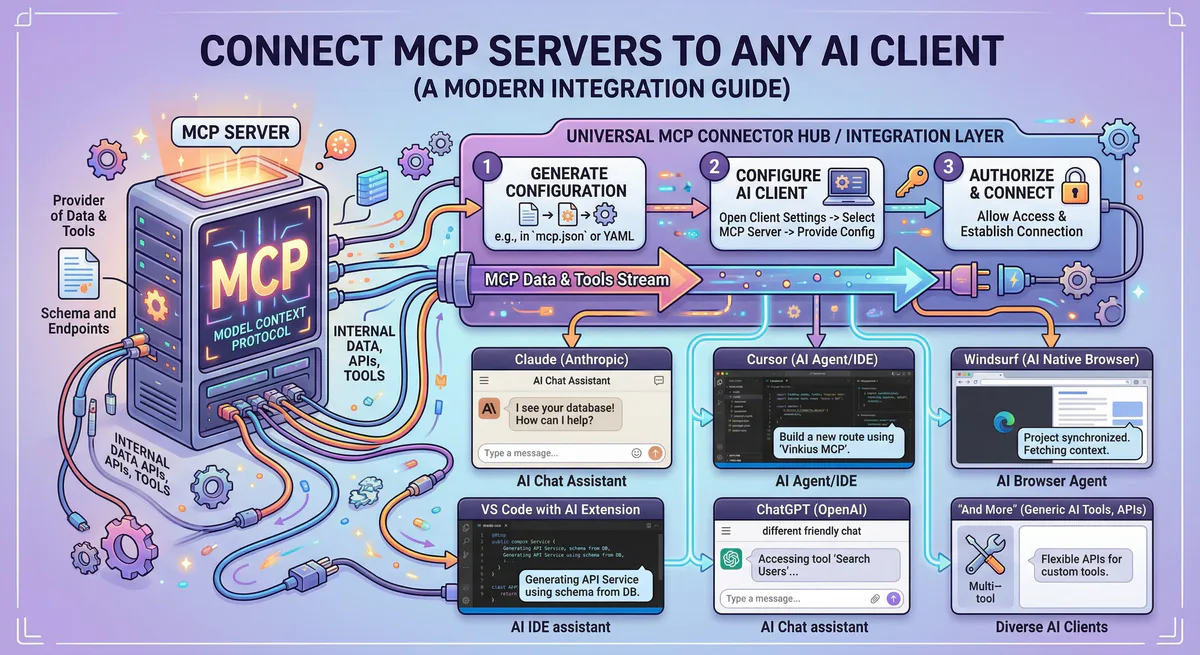
The protocol is open-source and maintained by Anthropic. It is now supported by Claude, Cursor, VS Code, ChatGPT, Windsurf, and an expanding ecosystem of AI clients. For the deep technical dive — wire format, initialization sequence, primitive schemas — read our architecture guide: Architecture of MCP Servers: JSON-RPC 2.0, SSE, and the 3 Primitives.
For step-by-step setup instructions across all AI clients, see our How to Connect MCP Servers guide.
What This Means for Your Team
The shift from APIs to MCP for AI integrations follows the same pattern as previous infrastructure abstractions:
- Teams used to manage their own servers → AWS/GCP abstracted that away
- Teams used to write their own auth → Auth0/Clerk abstracted that away
- Teams used to build their own CI/CD → GitHub Actions abstracted that away
Now: teams write custom API integrations for AI agents → MCP abstracts that away.
The abstraction always wins when: (1) the underlying task is commodity work, (2) security improves with centralization, and (3) the builder’s time is better spent elsewhere. Custom API integration code for AI agents checks all three boxes.
For hands-on tutorials showing MCP in action with real code, see our Crypto Portfolio Manager with CrewAI + MCP — a complete working example of multi-tool AI agents powered by governed MCP connections. If you want to build your own MCP server, see How to Build MCP Servers with FastMCP.
Start Connecting
Stop writing custom API integrations. Start connecting.
Related Guides
- How to Connect MCP Servers → — Setup for Claude, Cursor, VS Code, ChatGPT
- Build Your Own MCP Server → — FastMCP Python + TypeScript tutorial
- Convert OpenAPI to MCP → — Turn any REST API into an MCP server
- Architecture of MCP → — JSON-RPC 2.0, transports, primitives
- 25 Best MCP Servers 2026 → — Curated guide by category
- Vinkius vs. Composio vs. Zapier → — Platform comparison
- CISO Guide to MCP Security → — Enterprise governance
- The Complete MCP Server Directory → — 2,500+ apps
Your agents need tools. We make them safe.
Pick an MCP server from the catalog. Subscribe. Copy the URL. Paste it into Claude, Cursor, or any client. One URL — DLP, audit trail, and kill switch included.
V8 sandbox isolation · Semantic DLP · Cryptographic audit trail · Emergency kill switch