Open ~/.cursor/mcp.json on your laptop right now.
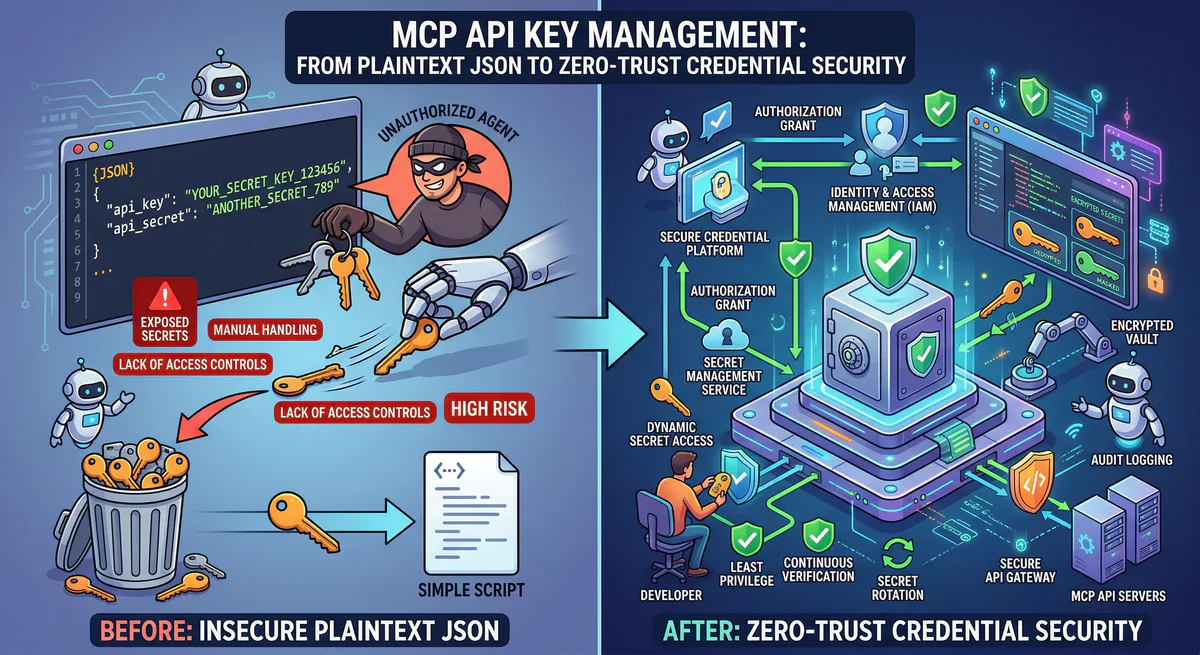
Every API key, every database password, every OAuth token for every MCP server you have ever connected — they are all sitting in a single, unencrypted JSON file. No encryption. No access control. No expiration. No audit log of who read them.
This is not a misconfiguration. This is the standard architecture of the MCP ecosystem in 2026.
Every MCP client — Cursor, Claude Desktop, VS Code, Windsurf — stores credentials the same way: plaintext JSON on disk. And every tutorial, every getting-started guide, every “connect your AI agent to X” article teaches developers to paste raw secrets directly into these files.
This guide explains why this is a crisis, how Vinkius eliminates it, and what a zero-trust credential architecture actually looks like in production.
The Problem: Your Secrets Are Sitting in Plaintext
Here is a typical .cursor/mcp.json file for a developer who uses five MCP servers:
{
  "mcpServers": {
    "github": {
      "command": "npx",
      "args": ["-y", "@modelcontextprotocol/server-github"],
      "env": {
        "GITHUB_PERSONAL_ACCESS_TOKEN": "ghp_xxxxxxxxxxxxxxxxxxxxxxxxxxxxxxxxxxxx"
      }
    },
    "slack": {
      "command": "npx",
      "args": ["-y", "@anthropic/mcp-server-slack"],
      "env": {
        "SLACK_BOT_TOKEN": "xoxb-xxxxxxxxxxxx-xxxxxxxxxxxx-xxxxxxxxxxxxxxxxxxxxxxxx"
      }
    },
    "postgres": {
      "command": "npx",
      "args": ["-y", "@modelcontextprotocol/server-postgres"],
      "env": {
        "DATABASE_URL": "postgresql://admin:S3cretP@ss!@prod-db.company.com:5432/production"
      }
    },
    "stripe": {
      "command": "npx",
      "args": ["-y", "mcp-server-stripe"],
      "env": {
        "STRIPE_SECRET_KEY": "sk_live_xxxxxxxxxxxxxxxxxxxxxxxxxxxxxxxxxxxxx"
      }
    },
    "aws": {
      "command": "npx",
      "args": ["-y", "mcp-server-aws"],
      "env": {
        "AWS_ACCESS_KEY_ID": "AKIAIOSFODNN7EXAMPLE",
        "AWS_SECRET_ACCESS_KEY": "wJalrXUtnFEMI/K7MDENG/bPxRfiCYEXAMPLEKEY"
      }
    }
  }
}
Count the secrets: GitHub PAT, Slack bot token, production database credentials, Stripe live key, AWS access keys. Five services, five attack vectors, zero protection.
Where This File Lives
| Client | Default Path | Encrypted? |
|---|---|---|
| Cursor | ~/.cursor/mcp.json | No |
| Claude Desktop | ~/Library/Application Support/Claude/claude_desktop_config.json | No |
| VS Code | .vscode/mcp.json (per project) | No |
| Windsurf | ~/.windsurf/mcp.json | No |
Every path is readable by any process running under the user’s account. Malware, browser extensions with filesystem access, backup scripts that sync to cloud storage — all can read these files silently.
The Blast Radius
One compromised laptop does not expose one secret. It exposes every secret in the file simultaneously:
- GitHub PAT → full repository access, code exfiltration
- Slack token → read/send messages across all channels
- Database URL → full read-write access to production data
- Stripe key → charge customers, read payment data
- AWS keys → provision infrastructure, access S3 buckets
This is not a theoretical attack. It is the default state of every developer machine running MCP clients in 2026.
Why Standard Solutions Do Not Work
.env Files
Some developers move secrets to .env files and reference them in the MCP config. This changes the location of the plaintext secret. It does not encrypt it. The .env file is still unencrypted, still on disk, still readable by any process.
System Keychains
macOS Keychain and Windows Credential Manager can store secrets securely, but MCP clients do not integrate with them. The MCP config format expects inline values or environment variables — not keychain references.
HashiCorp Vault / AWS Secrets Manager
Enterprise secret managers solve the storage problem, but they require a client-side agent or SDK to retrieve secrets at runtime. MCP servers do not have this integration. You would need to build a wrapper script that fetches from Vault, injects into env, and then launches the MCP server — for every server, on every developer machine. This is fragile, non-standard, and unmanageable at scale.
The Vinkius Model: Opaque Tokens, Zero Secrets on Disk
On our platform, the developer’s config file contains zero secrets:
{
  "mcpServers": {
    "github": {
      "url": "https://mcp.vinkius.com/{YOUR_TOKEN}/github"
    },
    "slack": {
      "url": "https://mcp.vinkius.com/{YOUR_TOKEN}/slack"
    },
    "postgres": {
      "url": "https://mcp.vinkius.com/{YOUR_TOKEN}/postgres"
    },
    "stripe": {
      "url": "https://mcp.vinkius.com/{YOUR_TOKEN}/stripe"
    },
    "aws": {
      "url": "https://mcp.vinkius.com/{YOUR_TOKEN}/aws"
    }
  }
}
The token is an opaque session identifier. It contains no API keys, no passwords, no secrets of any kind. It is a reference — like a hotel keycard that opens a door but contains no information about the lock mechanism.
The actual secrets (GitHub PAT, Slack token, database password, Stripe key, AWS credentials) live encrypted in our vault. They are injected into the MCP server’s execution environment at runtime, through a secure bridge that never exposes them to disk, to environment variables, or to the developer.
If the laptop is compromised: The attacker gets a token, not a secret. The token can be revoked in one click. The revocation propagates in under 100ms. No passwords to rotate. No config files to update across 50 machines.
Connection Tokens: Generate, Scope, Revoke
Every MCP server is protected by Connection Tokens — granular access credentials that are fundamentally different from raw API keys.
Token Properties
| Property | Raw API Key | Vinkius Connection Token |
|---|---|---|
| Contains secret | Yes — the actual credential | No — opaque identifier |
| Scope | Whatever the key allows | Per-server, per-permission |
| Revocation | Change the key everywhere | One-click, instant propagation |
| Expiration | Manual (if at all) | Configurable auto-expiry |
| Audit | None | Every usage logged with context |
| Status | Always active | Enable/Disable toggle per token |
| Quota | None | Enforced per plan |
Token Lifecycle
Generate: Each server has a quota of connection tokens based on your plan (e.g., 5 on Free, 20 on Team, unlimited on Business). Tokens are created with a human-readable name — "cursor-laptop", "ci-pipeline", "staging-agent" — so you always know which client is using which token.
Monitor: Every token shows its last_used_at timestamp. If a token has not been used in 30 days, it is likely stale and should be revoked. Tokens that are actively in use show "3m ago", "1h ago" — real-time visibility.
Disable: The toggle switch on each token lets you temporarily disable it without revoking it entirely. A disabled token rejects all connections but can be re-enabled later. This is ideal for debugging — disable a specific client’s token to isolate issues without permanently revoking access.
Revoke: Permanent deletion. The token is removed from the system. All active sessions using that token are terminated. The audit trail records the revocation event.
This is not theory. This is the actual UI that runs in our dashboard — a table of tokens with their names, masked hints (vk_...a3b7), status toggles, last-used timestamps, and revoke buttons.
Emergency Kill Switch: One Click, Zero Connections
When something goes wrong — a compromised token, an anomalous agent behavior, a suspected breach — you need to stop everything instantly. Not one token at a time. Everything.
The Emergency Kill Switch halts the entire MCP server in one click:
- All connection tokens are blocked simultaneously
- All active sessions are terminated
- A red banner appears:
SERVER HALTED — All connections terminated - The server enters a locked state — no new connections are accepted
- The audit trail records the kill event with full context
Recovery: When the incident is resolved, the “Restore Connections” button re-enables the server. All tokens that were previously active resume functioning. The halt/restore cycle is logged for compliance.
No competitor offers this. Smithery, Composio, Portkey — none of them have a one-click kill mechanism that simultaneously terminates all active sessions. If a token is compromised on those platforms, you are revoking tokens one at a time and hoping you get them all.
SIEM Integration: Splunk, Datadog, and Webhooks
Tokens and kill switches protect individual servers. But enterprise security teams need centralized visibility across every MCP server, every token, every tool call. They need data flowing into their existing security infrastructure — their SIEM.
We support three log streaming destinations, configurable per server:
Splunk HEC (HTTP Event Collector)
Direct integration with Splunk’s HEC endpoint. Every tool call, every connection event, every DLP redaction is streamed in real-time to your Splunk instance:
- Endpoint: Your Splunk HEC URL (e.g.,
https://splunk.company.com:8088) - Authentication: HEC token (encrypted at rest)
- Events: Tool calls with status codes, latency, DLP redaction counts, connection/disconnection events with client IP, transport type, session duration
Datadog
Native Datadog Logs integration with automatic site selection:
- Supported Sites: US1, US3, US5, EU1, AP1, GOV
- Authentication: Datadog API key (encrypted at rest)
- Events: Same event payload as Splunk, formatted for Datadog’s log intake API
Webhook (HTTPS + HMAC)
For custom integrations — send events to any HTTPS endpoint with HMAC signature verification:
- Endpoint: Any HTTPS URL
- Authentication: HMAC shared secret for payload verification
- Use cases: Custom alerting pipelines, internal dashboards, compliance systems, PagerDuty integration
Operational Features
Each destination shows:
- Health status: Green (healthy) or amber (failures detected)
- Failure count: How many delivery attempts have failed
- Last success: When the last event was successfully delivered
- Test button: Send a test event to verify connectivity before going live
- Enable/Disable toggle: Temporarily pause streaming without deleting the configuration
This means your SOC team sees MCP activity in the same Splunk dashboards where they monitor API abuse, IAM anomalies, and network intrusions. MCP is not a blind spot anymore — it is a first-class data source in your security stack.
Audit Trail: Every Token Usage, Cryptographically Signed
Every action taken through a connection token produces an audit event. We provide two views:
Summary View — Agent Performance Dashboard
A per-token aggregated view showing:
| Token Name | Requests | Errors | Error Rate | Avg Latency | Top Tools | Last Active |
|---|---|---|---|---|---|---|
| cursor-laptop | 1,247 | 3 | 0.2% | 142ms | github_search, slack_post | 3m ago |
| ci-pipeline | 892 | 0 | 0.0% | 89ms | postgres_query | 1h ago |
| staging-agent | 45 | 12 | 26.7% | 3,201ms | stripe_charge | 2d ago |
At a glance: staging-agent has a 26.7% error rate and 3.2s average latency. Something is wrong. Click to drill down.
Timeline View — Forensic Event Feed
Drill into any token to see a chronological event log:
2026-04-13 14:23:07.142  REQUEST  github_search     READ        200  142ms  cursor-laptop
2026-04-13 14:23:08.891  REQUEST  slack_post_msg     DESTRUCTIVE 200  203ms  cursor-laptop
2026-04-13 14:23:09.003  REQUEST  postgres_query     READ        200   89ms  cursor-laptop  DLP 3
2026-04-13 14:23:09.445  CONNECT  Cursor v0.48.1     HTTP        192.168.1.42             cursor-laptop
2026-04-13 14:22:01.200  DISCONNECT  Cursor v0.48.1  HTTP        192.168.1.42  12m 34s    cursor-laptop
Every entry includes:
- Timestamp with millisecond precision
- Event type: Request (tool call) or Connection (connect/disconnect)
- Tool name and semantic verb (READ, DESTRUCTIVE)
- Status code (200, 400, 500) with color-coded severity
- Response time in milliseconds
- DLP redactions — how many fields were
[REDACTED]in this response - Client metadata: name, version, IP address, transport (HTTP/SSE)
- Session duration for connection events
Filters
The audit log supports real-time filtering:
- By type: All, Requests only, or Connections only
- By tool: Filter to a specific tool (e.g., only
postgres_querycalls) - By date range: Presets (Today, Last 7 days, Last 30 days) or custom range with calendar picker
Retention by Plan
| Plan | Log Retention |
|---|---|
| Free | Real-time only (no history) |
| Team | 7 days |
| Business | 30 days |
DLP: Automatic PII Redaction Before It Reaches the LLM
Even with tokens, kill switches, and audit trails, there is still a risk: the data itself. When an agent queries a database or fetches customer records, sensitive fields (SSN, credit card numbers, API keys) can leak into the LLM’s context window.
We include a built-in DLP (Data Loss Prevention) engine that intercepts every response before it reaches the agent:
DLP Patterns: ["ssn", "credit_card", "api_key", "password_hash"]Response transformation:
{
  "name": "Jane Smith",
  "email": "jane@company.com",
  "ssn": "[REDACTED]",
  "credit_card": "[REDACTED]",
  "api_key": "[REDACTED]",
  "last_order": "2026-03-15"
}
Every redaction is counted and visible in the audit trail (DLP 3 in the timeline view). Your compliance team can verify that sensitive data was protected without reviewing every individual response.
Side-by-Side: The Standard MCP Stack vs Vinkius
| Capability | Standard MCP | Vinkius |
|---|---|---|
| Credential storage | Plaintext JSON on laptop | Encrypted vault, runtime injection |
| Token management | None — raw API keys | Generate, scope, toggle, revoke |
| Kill switch | Does not exist | One-click server halt, instant propagation |
| SIEM integration | Does not exist | Splunk HEC, Datadog, Webhook (HMAC) |
| Audit trail | None | Summary + Timeline, per-token, filtered |
| DLP redaction | None | Configurable field-level [REDACTED] |
| Credential rotation | Manual, per developer machine | One-click revoke + new token |
| Client visibility | None | Client name, version, IP, transport |
| Anomaly detection | None | Error rate monitoring, quota enforcement |
| Compliance | Manual evidence collection | SOC 2 Type II ready, cryptographic signatures |
From Plaintext to Zero-Trust in Five Minutes
The migration path is simple:
Step 1: Create a free Vinkius account at cloud.vinkius.com
Step 2: Connect your MCP servers — paste the API keys once into our vault (encrypted at rest, never stored in plaintext)
Step 3: Generate a connection token for each client (your laptop, your CI pipeline, your staging environment)
Step 4: Replace your plaintext config:
- "github": {
-   "command": "npx",
-   "args": ["-y", "@modelcontextprotocol/server-github"],
-   "env": {
-     "GITHUB_PERSONAL_ACCESS_TOKEN": "ghp_xxxxxxxxxxxx"
-   }
- }
+ "github": {
+   "url": "https://mcp.vinkius.com/{YOUR_TOKEN}/github"
+ }
Step 5: Delete the plaintext secrets from your laptop. They no longer need to exist on any developer machine.
Total time: under five minutes. Zero plaintext secrets. Full audit trail. Kill switch ready. SIEM streaming optional.
Start Securing Your MCP Credentials
Every MCP server is protected by encrypted credential vaults, scoped connection tokens, emergency kill switches, SIEM log streaming, DLP redaction, and cryptographic audit trails.
{
  "mcpServers": {
    "my-server": {
      "url": "https://mcp.vinkius.com/{YOUR_TOKEN}/my-server"
    }
  }
}
Create a free account at cloud.vinkius.com and eliminate plaintext secrets from your infrastructure today.
Your agents need tools. We make them safe.
Pick an MCP server from the catalog. Subscribe. Copy the URL. Paste it into Claude, Cursor, or any client. One URL — DLP, audit trail, and kill switch included.
V8 sandbox isolation · Semantic DLP · Cryptographic audit trail · Emergency kill switch