If you’re building AI agents that interact with external systems — whether calling APIs, querying databases, or executing workflows — you need to understand the Model Context Protocol at the architectural level. Surface-level knowledge (“MCP connects AI to tools”) will get you through a demo. Production deployment requires understanding the communication protocol, transport negotiation, capability handshake, lifecycle management, and the security surface area.
This guide serves as the definitive technical reference for MCP architecture. We’ll walk through the protocol layer by layer — from the JSON-RPC wire format to transport selection, from the initialization handshake to tool execution semantics, and from the three core primitives to the governance mechanisms required for production.
The Communication Protocol: JSON-RPC 2.0
MCP is built on JSON-RPC 2.0 — a lightweight, transport-agnostic remote procedure call protocol. This wasn’t an arbitrary choice. JSON-RPC 2.0 was selected because it provides:
- Strict separation between requests and responses — every request has a unique
id, and every response references thatid - Notifications — one-way messages that don’t expect a response (used for events like
initialized) - Batch support — multiple requests can be sent in a single payload
- Error semantics — standardized error codes and messages
The Wire Format
Every MCP message is a JSON object with a jsonrpc: "2.0" field. There are three types:
Request — sent by the client, expects a response:
{
  "jsonrpc": "2.0",
  "id": "req-001",
  "method": "tools/call",
  "params": {
    "name": "get_customer",
    "arguments": { "id": "C-12345" }
  }
}
Response — sent by the server in reply to a request:
{
  "jsonrpc": "2.0",
  "id": "req-001",
  "result": {
    "content": [
      {
        "type": "text",
        "text": "{\"name\": \"Acme Corp\", \"plan\": \"Enterprise\"}"
      }
    ]
  }
}
Notification — one-way message, no id field, no response expected:
{
  "jsonrpc": "2.0",
  "method": "notifications/initialized"
}
Error Handling
When a tool call fails, the server returns a JSON-RPC error with a standardized code:
{
  "jsonrpc": "2.0",
  "id": "req-001",
  "error": {
    "code": -32602,
    "message": "Invalid params: 'customer_id' is required",
    "data": {
      "field": "customer_id",
      "constraint": "required"
    }
  }
}
Standard JSON-RPC error codes:
| Code | Meaning | When it occurs |
|---|---|---|
-32700 | Parse error | Malformed JSON |
-32600 | Invalid request | Missing jsonrpc or method field |
-32601 | Method not found | Tool name doesn’t exist |
-32602 | Invalid params | Wrong parameter types or missing required params |
-32603 | Internal error | Server-side exception during tool execution |
MCP extends these with application-specific codes for capability negotiation failures and transport errors.
Transport Layers
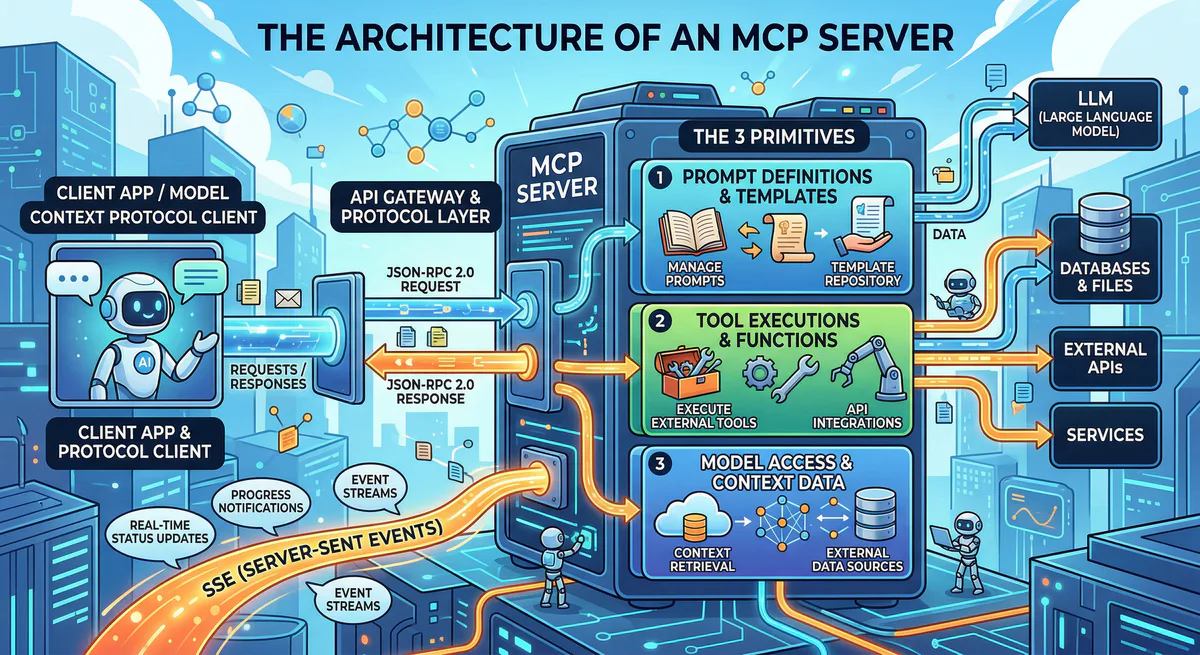
MCP is deliberately decoupled from its transport layer. The protocol defines the message format; the transport defines how those messages travel between client and server. In 2026, there are three transport options, each suited to different deployment models.
1. Streamable HTTP (Production Standard)
Streamable HTTP is the 2026 industry standard for production MCP deployments. It uses standard HTTP request/response semantics with optional Server-Sent Events (SSE) streaming for long-running operations.
How it works:
- The client sends JSON-RPC requests as HTTP POST bodies
- The server responds with JSON-RPC responses
- For long-running operations, the server can stream progress updates using SSE
- Each request is stateless — no persistent connection required
- Compatible with standard HTTP infrastructure: load balancers, CDNs, edge networks, firewalls
Why it matters for production:
- Scalable: Stateless requests distribute effortlessly across server clusters
- Edge-native: Works on Cloudflare Workers, Deno Deploy, Vercel Edge Functions, and our own edge network
- Firewall-friendly: Standard HTTPS traffic on port 443 — no special network configuration
- Observable: Every request is a standard HTTP transaction visible to logging, monitoring, and security tools
Client                          Server
  │                               │
  │── POST /mcp ─────────────────>│  (JSON-RPC request)
  │                               │
  │<── 200 OK ────────────────────│  (JSON-RPC response)
  │                               │
  │── POST /mcp ─────────────────>│  (long-running tool call)
  │                               │
  │<── 200 OK (SSE stream) ──────>│  (progress events + final result)
  │    data: {"progress": 0.5}    │
  │    data: {"progress": 0.9}    │
  │    data: {"result": {...}}    │
  │                               │
2. Server-Sent Events (SSE) — Legacy Streaming
SSE transport was the original production transport for MCP. The client establishes a persistent HTTP connection, and the server pushes events through the stream. The client sends requests via a separate POST endpoint.
How it works:
- Client connects to a
/sseendpoint — this is a long-lived HTTP connection - Server pushes JSON-RPC responses and notifications through this stream
- Client sends JSON-RPC requests via POST to a
/messagesendpoint - Session state is maintained server-side
When to use it:
- Clients that don’t support Streamable HTTP yet (some older MCP clients)
- Scenarios where you need server-initiated events (real-time dashboards, live data feeds)
- Development and testing environments
Limitations:
- Requires persistent connections — harder to scale across servers
- Not edge-native — SSE connections can’t be load-balanced as easily
- Session affinity required — client must reconnect to the same server instance
3. stdio (Local Development Only)
stdio transport communicates through standard input/output streams of a child process. The MCP client spawns the server as a subprocess and communicates via stdin/stdout.
How it works:
- Client runs
npx @modelcontextprotocol/server-githubas a child process - JSON-RPC messages are written to the process’s stdin
- JSON-RPC responses are read from the process’s stdout
- The server process lives and dies with the client session
When to use it:
- Local development and debugging
- IDE integrations (Claude Desktop, Cursor) for locally-installed servers
- Testing MCP servers before deploying to production
Limitations:
- Cannot run on a remote server — tightly coupled to the client machine
- No network security — communication happens in-process
- Cannot be shared — each client session runs its own instance
- Environment variables (including API keys) are visible to the spawned process
In production, we exclusively use Streamable HTTP. It’s the only transport that supports edge deployment, horizontal scaling, and the security controls required for enterprise workloads.
The Initialization Handshake
Every MCP session begins with a structured handshake that establishes the operational contract between client and server. This handshake is non-negotiable — no tool calls can be made until it completes successfully.
Step 1: Client Sends initialize
The client sends its protocol version, capabilities, and identity:
{
  "jsonrpc": "2.0",
  "id": 1,
  "method": "initialize",
  "params": {
    "protocolVersion": "2025-03-26",
    "capabilities": {
      "roots": { "listChanged": true }
    },
    "clientInfo": {
      "name": "Claude Desktop",
      "version": "3.2.0"
    }
  }
}
Step 2: Server Responds with Capabilities
The server declares what it supports — which of the three primitives it offers:
{
  "jsonrpc": "2.0",
  "id": 1,
  "result": {
    "protocolVersion": "2025-03-26",
    "capabilities": {
      "tools": { "listChanged": true },
      "resources": { "subscribe": true, "listChanged": true },
      "prompts": { "listChanged": true }
    },
    "serverInfo": {
      "name": "salesforce-sales",
      "version": "1.0.0"
    }
  }
}
The capabilities object is the contract. If a server declares "tools": {}, the client knows it can call tools/list and tools/call. If it doesn’t declare "resources", the client must not attempt to read resources.
Step 3: Client Sends initialized Notification
Once the client processes the server’s capabilities, it sends a notification (not a request — no id) confirming the handshake:
{
  "jsonrpc": "2.0",
  "method": "notifications/initialized"
}
Only after this notification can the client begin normal operations: listing tools, reading resources, or executing prompts.
Version Negotiation
If the client and server support different protocol versions, the server must respond with the highest version it supports that is also supported by the client. If there’s no overlap, the server returns an error and the session cannot be established.
The 3 Core Primitives
MCP servers expose functionality through three distinct primitives. Each has a different control model — who decides when and how it’s used — which is fundamental to the security architecture.
1. Tools (Model-Controlled)
Tools are executable functions that the AI model decides to call. This is the most powerful — and most dangerous — primitive. When the AI determines that it needs to perform an action (query a database, send an email, create an invoice), it selects a tool from the available list and constructs the call.
Lifecycle:
1. Client calls tools/list → Server returns available tools with schemas
2. AI model analyzes user request + available tools
3. AI model selects a tool and constructs the arguments
4. Client sends tools/call with tool name + arguments
5. Server executes the function
6. Server returns the result
7. AI model incorporates the result into its response
Tool definition example:
{
  "name": "create_invoice",
  "description": "Create a new invoice in the billing system",
  "inputSchema": {
    "type": "object",
    "properties": {
      "customer_id": {
        "type": "string",
        "description": "The customer's unique identifier"
      },
      "amount": {
        "type": "number",
        "description": "Invoice amount in cents"
      },
      "currency": {
        "type": "string",
        "enum": ["usd", "eur", "gbp"],
        "description": "Three-letter ISO currency code"
      }
    },
    "required": ["customer_id", "amount", "currency"]
  }
}
Why this matters for security: The AI model — not the human user — decides which tool to call and with what arguments. A prompt injection attack can cause the model to call delete_all_customers with valid arguments. Without governance, the MCP server will execute it.
2. Resources (Application-Controlled)
Resources are read-only data entities that the host application fetches to provide context. Unlike tools, resources are not called by the AI model — they are loaded by the client application to ground the model’s responses in real data.
Resources are addressed by URIs and are structurally read-only:
{
  "uri": "postgres://production/schema",
  "name": "Production Database Schema",
  "mimeType": "application/json",
  "description": "The current database schema for the production environment"
}
Reading a resource:
{
  "jsonrpc": "2.0",
  "id": "req-42",
  "method": "resources/read",
  "params": {
    "uri": "postgres://production/schema"
  }
}
Why resources are safer than tools: Because the host application controls when resources are loaded, not the AI model. A prompt injection cannot cause a resource to be read — the application decides. Resources also support subscription (the client subscribes to changes) and list notification (the server notifies when the resource list changes).
3. Prompts (User-Controlled)
Prompts are reusable, server-defined instruction templates that the user selects. They are the safest primitive because neither the AI model nor the application chooses them — the human user explicitly selects a prompt from the available list.
Prompts encode domain-specific workflows. Instead of the user typing a complex instruction, they select a pre-built prompt template that the server fills with live data:
{
  "name": "incident_postmortem",
  "description": "Generate a structured postmortem from PagerDuty incident data",
  "arguments": [
    {
      "name": "incident_id",
      "description": "The PagerDuty incident ID to analyze",
      "required": true
    }
  ]
}
When the user selects this prompt, the server hydrates it with real data:
{
  "jsonrpc": "2.0",
  "id": "req-55",
  "result": {
    "messages": [
      {
        "role": "user",
        "content": {
          "type": "text",
          "text": "Analyze the following PagerDuty incident and generate a structured postmortem. Incident ID: INC-2847. Started: 2:34 PM. Root cause: Database connection pool exhaustion. Duration: 45 minutes. Impact: 3,200 users affected..."
        }
      }
    ]
  }
}
The Control Model Summary
| Primitive | Controlled by | Can mutate state? | Security risk |
|---|---|---|---|
| Tools | AI Model | Yes | Highest — model selects and executes |
| Resources | Application | No (read-only) | Low — application decides when to load |
| Prompts | Human User | No | Lowest — user explicitly selects |
Understanding this triad is the foundation of MCP security architecture. Tools are powerful but dangerous. Resources are safe but limited. Prompts are the most controlled but least flexible.
The Governance Gap: Why Raw MCP Is Not Production-Ready
The MCP specification — intentionally — provides zero native security guarantees. It defines the protocol, not the policy. A raw MCP server is a highly privileged, unauthenticated proxy executing requests dictated by a non-deterministic language model.
The specification does not include:
- Authentication — no mechanism to verify who is making the tool call
- Authorization (RBAC) — no concept of “this user can call
read_customerbut notdelete_customer” - Tenant isolation — no separation between users, teams, or organizations
- Data Loss Prevention (DLP) — no scanning or filtering of sensitive data in responses
- Rate limiting — no protection against the AI calling the same tool thousands of times in a loop
- Audit logging — no cryptographic record of which tools were called with which arguments
This is not a criticism of the spec. MCP is a communication protocol — like HTTP. HTTP doesn’t include authentication either; that’s what TLS, OAuth, and application-level security layers provide. MCP needs the same layered security approach.
How We Close the Gap
Every MCP server operating through our gateway inherits governance that the raw protocol lacks:
Semantic Triage: Before a tools/call is executed, the gateway classifies the operation:
QUERY— read-only operations (safe, auto-approved)MODIFY— creates or updates data (logged, potentially gated)DESTRUCTIVE— deletes data or performs irreversible actions (requires approval or is blocked)
DLP Pipeline: Every tool result passes through our Data Loss Prevention engine before reaching the AI. The engine scans for 30+ sensitive patterns (SSNs, credit cards, API keys, email addresses, phone numbers, IBAN numbers) and redacts them according to your configured rules.
Egress Firewalls (Presenters): MCP servers built with Vurb.ts use schema-driven Presenters that act as constructors, not filters. If a field isn’t declared in the Presenter schema, it is structurally destroyed in RAM before serialization. This prevents the Context Bleeding vulnerability that affects servers using JSON.stringify().
Cryptographic Audit Trail: Every tool call — the method, parameters, timestamp, user identity, and response hash — is logged with tamper-proof cryptographic signatures. If an AI agent makes a problematic API call, you can trace exactly what happened, when, and through which tool.
Internal Linking: Related Guides
- How to Convert OpenAPI to MCP Server — Automated and manual conversion approaches
- How to Connect MCP Servers to Any AI Client — Claude, Cursor, VS Code, ChatGPT setup
- MCP Server Security: Attack Vectors & Defense — Prompt injection, credential theft, confused deputy
- Context Bleeding: How JSON.stringify() Leaks Databases — The CWE-200 vulnerability in tool responses
- What is MCP? The Complete Guide — Non-technical introduction to the protocol
Start Building
Want to deploy your first MCP server? Browse our App Catalog for 2,500+ pre-built, governed servers — or build your own with Vurb.ts and deploy to our managed edge.
The protocol is elegant. The architecture is well-defined. The only remaining decision is whether you deploy it raw — or govern it from day one.
Your agents need tools. We make them safe.
Pick an MCP server from the catalog. Subscribe. Copy the URL. Paste it into Claude, Cursor, or any client. One URL — DLP, audit trail, and kill switch included.
V8 sandbox isolation · Semantic DLP · Cryptographic audit trail · Emergency kill switch