There’s an enterprise panic happening right now. CTOs are being told that their thousands of existing REST APIs are suddenly obsolete because AI agents need “native tool-calling capabilities.” Engineering managers are estimating 6-12 month migration projects. Budgets are being allocated to rewrite perfectly working backend services.
This panic is manufactured, and it’s costing companies millions.
Your REST APIs are not obsolete. They are sitting on decades of battle-tested business logic — payment processing, inventory management, user authentication, regulatory compliance. That logic doesn’t need to be rewritten. It needs to be translated.
The Model Context Protocol (MCP) is a JSON-RPC 2.0 interface. Your REST APIs speak HTTP. The translation layer between them is well-defined, automatable, and — in many cases — achievable in minutes, not months.
This guide covers three approaches to converting OpenAPI/Swagger specifications into MCP servers, from fully automated to hand-crafted, with the security considerations that matter for production deployment.
Why the Conversion Is Simpler Than You Think
An MCP server, at its core, does three things:
- Declares tools — a list of functions the AI can call, with parameter schemas
- Receives JSON-RPC calls — the AI sends
tools/callwith a tool name and arguments - Returns structured results — the server responds with text or data
An OpenAPI specification, at its core, declares:
- Endpoints — a list of HTTP operations the client can call, with parameter schemas
- Receives HTTP requests — the client sends GET/POST/PUT/DELETE with parameters
- Returns structured responses — the server responds with JSON data
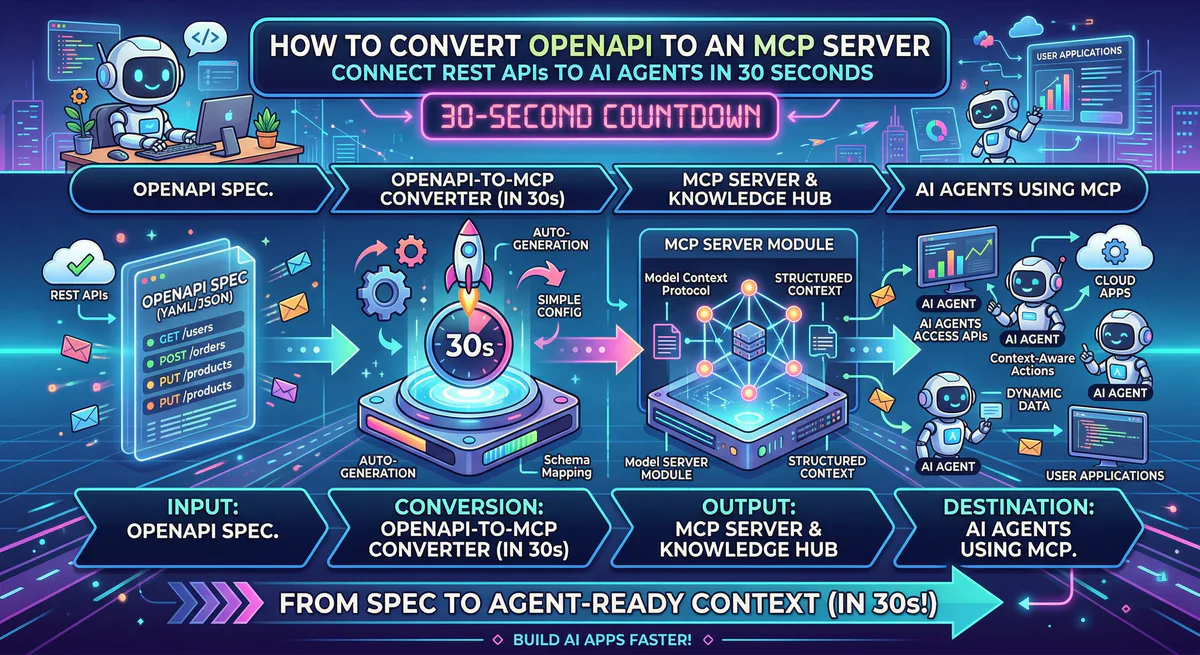
The structural mapping is nearly 1:1. Every REST endpoint can become an MCP tool. Every parameter schema maps directly to a tool input schema. Every JSON response maps to a tool result.
Here’s what the mapping actually looks like:
| OpenAPI Concept | MCP Equivalent |
|---|---|
GET /users/{id} | Tool: get_user with id parameter |
POST /orders | Tool: create_order with body schema |
PUT /products/{id} | Tool: update_product with id + body |
DELETE /invoices/{id} | Tool: delete_invoice with id param |
| Parameter schema (JSON Schema) | Tool input schema (identical JSON Schema) |
| Response schema | Tool result format |
| Authentication (Bearer, API Key) | Server-side credential injection |
The protocol is different. The shape of the data is the same.
Approach 1: Automated Conversion (30 Seconds)
If your API has a standard OpenAPI 3.0+ or Swagger 2.0 specification — and most modern APIs do — you can convert it automatically through our gateway.
How It Works
Step 1. Find your OpenAPI spec.
Most APIs publish their spec at a standard location:
/api/docs/swagger.json/openapi.json/v2/swagger.json
For example: https://api.yourcompany.com/openapi.json
If you don’t know where yours is, check your API documentation. It’s almost always linked from the developer docs page.
Step 2. Paste the URL into our dashboard.
In the Vinkius dashboard, select “Create from OpenAPI” and paste your spec URL. Our system:
- Parses the entire OpenAPI document
- Identifies every endpoint, method, parameter, and response schema
- Generates an MCP tool for each operation
- Names each tool using the
operationIdfrom the spec (or generates a descriptive name ifoperationIdis missing) - Maps parameter schemas directly to tool input schemas
Step 3. Add authentication — once.
Your API requires authentication. Instead of baking API keys into config files or environment variables where the AI can see them:
- Enter your API credentials in our encrypted vault
- The gateway injects authentication headers server-side on every request
- Your AI agent never sees, handles, or can leak your credentials
This is the critical difference between a raw OpenAPI-to-MCP wrapper and a governed one. In a raw wrapper, your BEARER_TOKEN sits in a config file on the same machine as the AI. In our gateway, the credential exists in a hardware-backed vault, miles from the AI’s context window.
Step 4. Deploy.
Click deploy. In under 4 seconds, your REST API is live as a production MCP server on our global edge network. You get a connection URL:
https://edge.vinkius.com/YOUR_TOKEN/your-api-mcpPaste that URL into Claude, Cursor, ChatGPT, or any MCP-compatible client. Your AI can now call every endpoint in your API through natural language.
What the AI Sees
After conversion, if your API had an endpoint like:
# OpenAPI spec
paths:
  /customers/{id}:
    get:
      operationId: getCustomer
      summary: Retrieve a customer by ID
      parameters:
        - name: id
          in: path
          required: true
          schema:
            type: string
Your AI sees a tool called getCustomer with one parameter: id (string, required). When a user asks “Show me the details for customer C-12345”, the AI calls getCustomer with id: "C-12345", our gateway translates that to GET /customers/C-12345 with the proper authentication headers, and the API response flows back through our DLP engine to the AI.
The user never knew which endpoint was called. They just asked a question and got an answer.
Approach 2: Selective Wrapping (For Complex APIs)
Not every API should be fully converted. Some APIs have 400+ endpoints, and exposing all of them to an AI agent creates confusion (the agent doesn’t know which tool to use) and security risk (the agent can call dangerous endpoints).
For these APIs, selective wrapping gives you fine-grained control.
The Problem with Full Conversion of Large APIs
Consider the Salesforce REST API. It has hundreds of endpoints covering objects, metadata, bulk operations, tooling, and admin functions. If you convert all of them to MCP tools, your AI agent receives a tool list of 300+ functions. LLMs struggle with tool selection at this scale — they hallucinate tool names, confuse parameter schemas, and make worse decisions because there’s too much choice.
The Solution: Curated Tool Sets
Instead of converting everything, you create a focused MCP server that exposes only the operations your AI needs:
// Selective Salesforce MCP server
// Only exposes 5 of 300+ possible operations

import { createServer, createTool } from '@vurb/core';

const server = createServer({
  name: 'salesforce-sales',
  version: '1.0.0',
  description: 'Salesforce Sales Cloud — opportunities, contacts, and activities',
});

// Tool 1: Search contacts
server.addTool(
  createTool('search_contacts')
    .description('Search Salesforce contacts by name, email, or account')
    .input({
      query: { type: 'string', description: 'Search term' },
      limit: { type: 'number', description: 'Max results', default: 10 },
    })
    .handler(async ({ query, limit }) => {
      const response = await fetch(
        `${SF_BASE}/services/data/v59.0/search/?q=FIND+{${query}}+IN+ALL+FIELDS+RETURNING+Contact(Id,Name,Email,Account.Name)+LIMIT+${limit}`,
        { headers: { Authorization: `Bearer ${SF_TOKEN}` } }
      );
      return response.json();
    })
);

// Tool 2: Get opportunity details
server.addTool(
  createTool('get_opportunity')
    .description('Get details of a specific Salesforce opportunity')
    .input({
      id: { type: 'string', description: 'Opportunity ID' },
    })
    .handler(async ({ id }) => {
      const response = await fetch(
        `${SF_BASE}/services/data/v59.0/sobjects/Opportunity/${id}`,
        { headers: { Authorization: `Bearer ${SF_TOKEN}` } }
      );
      return response.json();
    })
);

// ... 3 more curated tools
This approach gives the AI agent a clean, focused tool set. The agent knows exactly what it can do, parameters are clear, and dangerous admin operations are never exposed.
When to Use Selective Wrapping
| Scenario | Use Full Conversion | Use Selective Wrapping |
|---|---|---|
| API has < 30 endpoints | ✅ | — |
| API has 30-100 endpoints | ✅ (with filtering) | ✅ |
| API has 100+ endpoints | — | ✅ |
| API has destructive operations (DELETE, admin) | — | ✅ (exclude dangerous ops) |
| You need custom business logic (aggregation) | — | ✅ |
| Internal API with no published spec | — | ✅ (write tools manually) |
Approach 3: Manual Construction (For Internal APIs)
Some APIs don’t have OpenAPI specs. They’re internal microservices with undocumented endpoints, legacy systems with SOAP interfaces, or GraphQL APIs that don’t map cleanly to REST semantics.
For these, you build an MCP server from scratch using our open-source framework, Vurb.ts. But “from scratch” doesn’t mean months of work. A functional MCP server with 5 tools typically takes 1-2 hours.
// Manual MCP server for an internal inventory API
import { createServer, createTool, createPresenter, t } from '@vurb/core';

// Presenter = Egress Firewall
// Only declared fields survive. Everything else is destroyed.
const ProductPresenter = createPresenter('Product')
  .schema({
    id: t.string(),
    name: t.string(),
    sku: t.string(),
    stock_quantity: t.number(),
    price: t.number(),
  })
  .redactPII([]); // No PII fields in this schema

const server = createServer({
  name: 'inventory-api',
  version: '1.0.0',
});

server.addTool(
  createTool('check_stock')
    .description('Check current stock level for a product by SKU')
    .input({ sku: { type: 'string', description: 'Product SKU code' } })
    .handler(async ({ sku }) => {
      const product = await internalApi.get(`/inventory/${sku}`);
      return ProductPresenter.render(product);
      // ↑ Internal fields like `cost_price`, `supplier_id`, `margin`
      //   are structurally destroyed before the AI sees them.
    })
);
The key insight: even with manual construction, the Presenter pattern ensures that undeclared fields from your internal API never reach the AI’s context window. This is the defense-in-depth layer that raw OpenAPI-to-MCP converters lack.
Security: The Critical Difference Between Raw and Governed Conversion
Every OpenAPI-to-MCP converter available today — whether open-source or commercial — can translate endpoints to tools. The structural mapping is straightforward. Where they differ dramatically is in what happens to the data that flows through.
What a Raw Converter Does
AI → MCP Server → Your API → Response → MCP Server → AI
                                                   ↑
                                        EVERYTHING passes through.
                                        SSNs, credit cards, internal IDs,
                                        API keys in response bodies —
                                        all enter the AI's context window.
What a Governed Converter Does
AI → Vinkius Gateway → MCP Server → Your API → Response
                                                    ↓
                                        Gateway DLP Engine
                                        - SSNs → [REDACTED]
                                        - Credit cards → [REDACTED]
                                        - Internal IDs → preserved
                                        - API keys in response → [REDACTED]
                                                    ↓
                                        AI receives clean data
This matters because your API responses contain data that was never designed to be read by a language model. Customer records include SSNs. Payment responses include card fingerprints. Error messages include internal server paths. Debug headers include version numbers and infrastructure details.
A raw converter treats all of this as “just JSON.” Our gateway treats it as data that needs classification, filtering, and — in some cases — redaction before it enters a model’s context window.
The Security Stack for Every Converted API
| Protection | What it does |
|---|---|
| Credential Isolation | API keys stored in encrypted vault — never in config files, never near the AI |
| DLP Engine | Scans every API response for PII, credentials, and sensitive patterns |
| Semantic Classification | Each tool call is classified as QUERY, MODIFY, or DESTRUCTIVE |
| Request Logging | Every API call logged with timestamp, parameters, and response hash |
| Rate Limiting | Per-tool rate limits prevent AI agents from hammering your API |
| Kill Switch | Disable any converted API with one click |
The Migration Path: From REST to MCP Without Disruption
The most important thing to understand: converting your API to MCP doesn’t change your API. Your existing REST endpoints continue working exactly as before. The MCP server sits in front of your API as a translation layer. Your mobile apps, web frontends, and existing integrations are completely unaffected.
                    ┌─────────────────────────┐
                    │    Your REST API         │
                    │  (unchanged, untouched)  │
                    └──────────┬──────────────┘
                               │
              ┌────────────────┼────────────────┐
              │                │                │
        ┌─────┴─────┐   ┌─────┴─────┐   ┌──────┴──────┐
        │  Web App   │   │ Mobile App│   │  MCP Server │
        │ (existing) │   │ (existing)│   │  (new layer)│
        └────────────┘   └───────────┘   └──────┬──────┘
                                                │
                                          ┌─────┴─────┐
                                          │ AI Agents  │
                                          │ Claude,    │
                                          │ Cursor,    │
                                          │ ChatGPT    │
                                          └────────────┘
This is additive, not destructive. You’re adding a new access layer, not replacing existing ones.
Common Patterns by API Type
SaaS APIs (Stripe, HubSpot, Salesforce)
Most SaaS APIs have excellent OpenAPI specs. Use Approach 1 (automated) and be live in minutes. We already have 2,500+ of these in our App Catalog — you may not even need to convert anything.
Internal Microservices
Usually have no published spec. Use Approach 3 (manual) with Vurb.ts. Focus on the 5-10 operations your team actually needs, not the full surface area.
Legacy SOAP/XML APIs
These require Approach 3 with a translation layer that converts XML responses to JSON. The MCP server handles the SOAP client internally and exposes clean, JSON-based tools to the AI.
GraphQL APIs
GraphQL doesn’t map 1:1 to MCP tools because a single GraphQL query can request any combination of fields. The best approach is Approach 2 (selective): define specific MCP tools for the most common query patterns your team needs.
Internal Linking: Related Guides
- The Architecture of MCP Servers — Deep dive into JSON-RPC 2.0, transport layers, and the 3 primitives
- How to Connect MCP Servers to Any AI Client — Claude, Cursor, VS Code, ChatGPT setup
- MCP Server Security: Attack Vectors & Defense — Prompt injection, credential theft, confused deputy
- Context Bleeding: How JSON.stringify() Leaks Databases — Why Presenters matter
- The Complete MCP Server Directory — 2,500+ pre-built servers
Start Converting
Already have an OpenAPI spec? Go to the Vinkius dashboard, select “Create from OpenAPI,” paste your spec URL, and deploy. You’ll have a production MCP server in under 60 seconds.
Don’t have a spec? Browse our App Catalog — we’ve already converted 2,500+ APIs. Yours might already be there.
Need custom conversion for an internal API? Start with Vurb.ts and deploy to our managed edge. Or email us at support@vinkius.com — we help enterprises convert their internal APIs every week.
Your REST APIs aren’t obsolete. They’re one translation layer away from being AI-native.
Your agents need tools. We make them safe.
Pick an MCP server from the catalog. Subscribe. Copy the URL. Paste it into Claude, Cursor, or any client. One URL — DLP, audit trail, and kill switch included.
V8 sandbox isolation · Semantic DLP · Cryptographic audit trail · Emergency kill switch