The crypto market generated $3.2 trillion in daily trading volume across 750+ exchanges in Q1 2026, according to CoinGecko’s Annual Report. Behind that number is an inconvenient truth: the average retail investor manages holdings across 3.2 different exchanges, checks prices 47 times per day, and makes investment decisions based on fragmented data from disconnected dashboards.
The institutional side tells an even more compelling story. Chainalysis’s 2025 Crypto Crime Report revealed that $2.2 billion in crypto was stolen through exchange hacks — and in 41% of cases, the initial compromise vector was a leaked API key stored in plaintext configuration files. The very keys that developers use to connect trading bots to exchanges become the attack surface.
We’ve been building and operating MCP servers for crypto exchanges since the protocol’s inception. This guide comes from our direct experience connecting hundreds of crypto professionals to governed exchange data through our platform. It is not a theoretical exercise — it is a working system architecture that we deploy in production, battle-tested against the unique security and performance challenges of the crypto market.
This is not another “how to build a trading bot” article. This is a guide to building an intelligence layer — an AI agent system that reads, correlates, and analyzes data from multiple exchanges and macro data sources simultaneously, while keeping your exchange API keys isolated in a security-grade vault where neither the AI nor your code can access them.
The Problem We’re Solving
Consider a typical crypto portfolio scenario. You hold BTC on Binance (for liquidity), ETH on Coinbase (for staking), SOL on Kraken (for the staking APY), and stablecoins split across all three for flexibility.
To answer the simple question “What’s my total portfolio value and PnL?”, you currently need to:
- Log into Binance → check balances → note down values
- Log into Coinbase → check balances → note down values
- Log into Kraken → check balances → note down values
- Open a spreadsheet → calculate totals
- Check CoinGecko for current prices (because each exchange shows slightly different prices)
- Calculate PnL from your cost basis
That’s 15-20 minutes for a simple portfolio check. Now add more complex questions:
- “Is there a BTC price difference between exchanges I can exploit?”
- “The Fed announces rate decisions tomorrow — how did my portfolio react to the last 3 rate changes?”
- “Am I overconcentrated in any single asset? What’s my stablecoin reserve ratio?”
Each of these requires cross-referencing multiple data sources. No single exchange dashboard provides cross-platform answers. No single analytics tool combines exchange data with macroeconomic indicators. This is the gap that AI agents with MCP close.
Why MCP is the Right Architecture for Crypto
Before MCP, connecting an AI to exchange data meant one of two approaches:
Approach 1: Direct API keys in code. You create a Binance API key, paste it into your Python script or .env file, and use the ccxt library to query the exchange. This works — until your API key leaks. According to GitGuardian’s 2025 State of Secrets Sprawl report, 12.8 million new secrets were exposed in public GitHub repositories in a single year. Crypto exchange API keys are disproportionately represented because developers prototype trading bots in public repos.
Approach 2: Black-box trading bots. You sign up for 3Commas, Cryptohopper, or a similar service, hand over your API keys with trading permissions, and hope their security is adequate. The 2022 3Commas API key breach demonstrated the catastrophic downside of this approach.
The MCP approach is fundamentally different. Your exchange API keys live in our encrypted vault — never in your code, never in a config file, never visible to the AI agent. Your Python script connects to our edge proxy through a simple URL, and the proxy handles authentication with the exchange. The AI sees portfolio data but never sees credentials.
This architecture was designed for exactly this kind of high-stakes integration. We wrote about the security model in detail in our CISO Guide to MCP Governance.
What You’ll Build
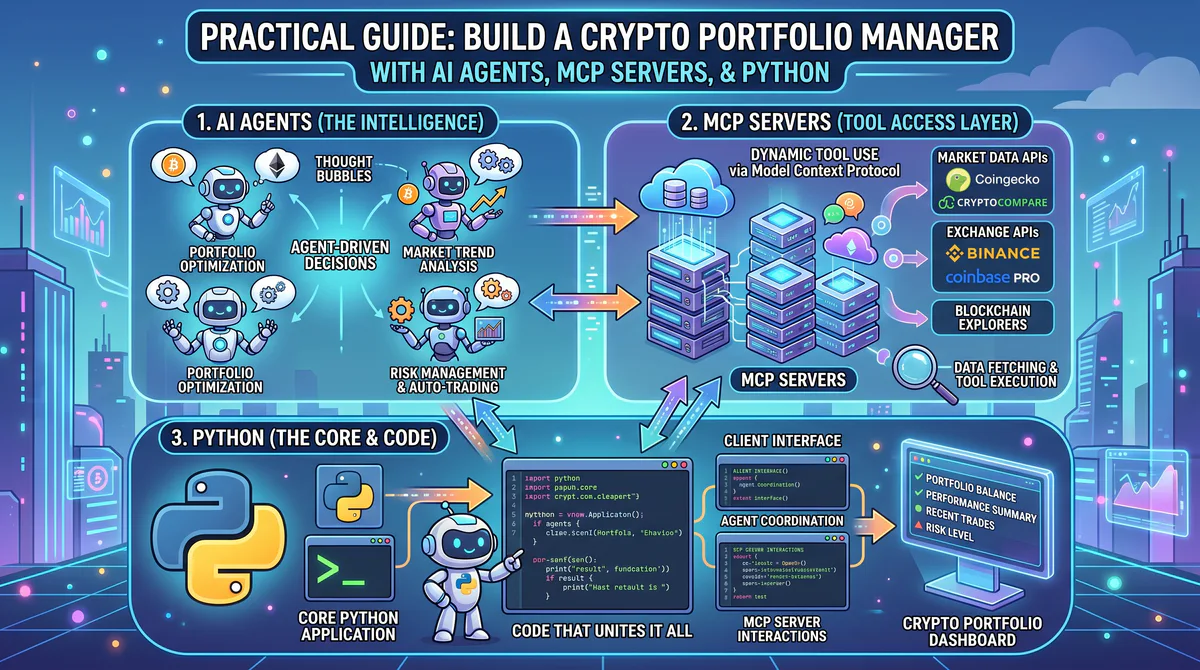
By the end of this guide, you’ll have a multi-agent system that:
- Reads your portfolio from Binance, Coinbase, and Kraken simultaneously
- Checks macro indicators from the Federal Reserve (FRED data)
- Monitors market sentiment via CoinMarketCap’s Fear & Greed Index
- Compares prices across exchanges for arbitrage opportunities
- Assesses portfolio risk — concentration, correlation, and stablecoin reserves
- Generates a daily portfolio briefing and posts it to Slack
All through governed MCP servers. Zero credential exposure.
The MCP Servers You’ll Connect
We host 22 crypto and finance MCP servers in our App Catalog. For this guide, we use seven:
| Server | Catalog Link | What it provides |
|---|---|---|
| Binance Crypto Market | Subscribe → | Market data, account balances, trade history |
| Coinbase | Subscribe → | Portfolio, prices, transactions |
| Kraken | Subscribe → | Spot, staking, order history |
| CoinGecko | Subscribe → | 13,000+ tokens, market cap, volume, charts |
| CoinMarketCap | Subscribe → | Global metrics, dominance, Fear & Greed |
| FRED Economic Data | Subscribe → | Fed Funds Rate, CPI, M2 supply, yield curves |
| Slack | Subscribe → | Post alerts and reports |
Architecture: How the Pieces Connect
┌─────────────────────────────────────────────┐
│              Your Python Agent              │
│  ┌─────────────┐  ┌──────────────────────┐ │
│  │  CrewAI /    │  │  LangChain MCP       │ │
│  │  LangGraph   │  │  Adapter             │ │
│  └──────┬──────┘  └──────────┬───────────┘ │
│         │                    │              │
│         └────────┬───────────┘              │
│                  │                          │
└──────────────────┼──────────────────────────┘
                   │ MCP Protocol (Streamable HTTP)
                   │
┌──────────────────┼──────────────────────────┐
│           Vinkius Edge Proxy                │
│  ┌─────┐ ┌──────┐ ┌──────┐ ┌────┐ ┌─────┐ │
│  │ BIN │ │ CB   │ │ KRK  │ │FRED│ │SLACK│ │
│  └─────┘ └──────┘ └──────┘ └────┘ └─────┘ │
│                                             │
│  🔒 Credential Vault (API keys here)       │
│  🛡️ DLP Engine (redacts sensitive data)    │
│  📋 Audit Trail (every query logged)       │
└─────────────────────────────────────────────┘
The critical point: your Python code has connection URLs (provided by our dashboard when you subscribe). The Vinkius edge proxy handles transport negotiation, authentication, credential management, and data protection. You never specify transport protocols — we handle that automatically based on the server capabilities.
Step 1: Install Dependencies
pip install langchain-mcp-adapters crewai langchain-openai python-dotenvStep 2: Configure Environment
Create a .env file with your Vinkius connection URLs (from the dashboard after subscribing):
# Vinkius MCP Connection URLs
VINKIUS_BINANCE_URL=https://edge.vinkius.com/mcp/binance?token=YOUR_TOKEN
VINKIUS_COINBASE_URL=https://edge.vinkius.com/mcp/coinbase?token=YOUR_TOKEN
VINKIUS_KRAKEN_URL=https://edge.vinkius.com/mcp/kraken?token=YOUR_TOKEN
VINKIUS_COINGECKO_URL=https://edge.vinkius.com/mcp/coingecko?token=YOUR_TOKEN
VINKIUS_COINMARKETCAP_URL=https://edge.vinkius.com/mcp/coinmarketcap?token=YOUR_TOKEN
VINKIUS_FRED_URL=https://edge.vinkius.com/mcp/fred?token=YOUR_TOKEN
VINKIUS_SLACK_URL=https://edge.vinkius.com/mcp/slack?token=YOUR_TOKEN

# Your LLM API key
OPENAI_API_KEY=sk-your-key-here
Notice what’s not in this file: no Binance API key, no Coinbase OAuth token, no Kraken API secret. Those live in our vault. Your code only holds the Vinkius connection URLs — and even if this .env file leaks, the tokens can be revoked instantly from our dashboard without touching any exchange.
Step 3: The MCP Client Wrapper
# mcp_client.py
"""
Vinkius MCP Client — connects to governed MCP servers.
Transport negotiation is handled by Vinkius automatically.
"""
import os
from dotenv import load_dotenv
from langchain_mcp_adapters.client import MultiServerMCPClient

load_dotenv()

# Define all MCP server connections.
# Only the URL is needed — Vinkius handles transport negotiation.
MCP_SERVERS = {
    "binance": {
        "url": os.getenv("VINKIUS_BINANCE_URL"),
    },
    "coinbase": {
        "url": os.getenv("VINKIUS_COINBASE_URL"),
    },
    "kraken": {
        "url": os.getenv("VINKIUS_KRAKEN_URL"),
    },
    "coingecko": {
        "url": os.getenv("VINKIUS_COINGECKO_URL"),
    },
    "coinmarketcap": {
        "url": os.getenv("VINKIUS_COINMARKETCAP_URL"),
    },
    "fred": {
        "url": os.getenv("VINKIUS_FRED_URL"),
    },
    "slack": {
        "url": os.getenv("VINKIUS_SLACK_URL"),
    }
}

async def get_all_tools():
    """Connect to all MCP servers and return unified tool list."""
    client = MultiServerMCPClient(MCP_SERVERS)
    tools = await client.get_tools()
    print(f"✅ Connected to {len(MCP_SERVERS)} MCP servers")
    print(f"📦 {len(tools)} tools available")
    return tools, client
This is intentionally minimal. The Vinkius edge proxy handles protocol negotiation (Streamable HTTP or SSE, depending on client capability), authentication with each exchange, DLP filtering on responses, and audit logging. Your code doesn’t need to know or care about any of that.
Step 4: Portfolio Monitor Agent (LangChain)
The single-agent approach is the simplest way to query your portfolio. This agent can answer any question about your crypto holdings by calling the right MCP tools:
# portfolio_monitor.py
"""
Cross-exchange portfolio monitor using LangChain + MCP
"""
import asyncio
from langchain_openai import ChatOpenAI
from langchain.agents import AgentExecutor, create_openai_tools_agent
from langchain_core.prompts import ChatPromptTemplate
from mcp_client import get_all_tools

PORTFOLIO_PROMPT = ChatPromptTemplate.from_messages([
    ("system", """You are a crypto portfolio analyst connected to multiple
    exchanges via MCP servers. You have access to Binance, Coinbase, and
    Kraken for portfolio data, CoinGecko for market data, and FRED for
    macroeconomic indicators.

    When analyzing a portfolio:
    1. Query each exchange for current balances
    2. Get current prices from CoinGecko
    3. Calculate total portfolio value and PnL
    4. Check FRED for relevant macro data (Fed rate, CPI)
    5. Provide actionable insights

    Always present data in clear tables.
    Never suggest specific trades — provide analysis only.
    Flag any security concerns."""),
    ("human", "{input}"),
    ("placeholder", "{agent_scratchpad}")
])

async def run_portfolio_analysis(query: str):
    tools, client = await get_all_tools()

    llm = ChatOpenAI(model="gpt-4o", temperature=0)
    agent = create_openai_tools_agent(llm, tools, PORTFOLIO_PROMPT)
    executor = AgentExecutor(agent=agent, tools=tools, verbose=True)

    result = await executor.ainvoke({"input": query})
    return result["output"]

if __name__ == "__main__":
    # Example queries showing the range of cross-tool intelligence
    queries = [
        "Show my total crypto portfolio across Binance, Coinbase, and Kraken. "
        "Break down by asset with current prices from CoinGecko.",

        "Compare BTC price on Binance vs Coinbase vs Kraken right now. "
        "Is there any arbitrage opportunity above 0.5%?",

        "Check the FRED federal funds rate and latest CPI data. "
        "How has BTC historically reacted to rate cuts? "
        "Given current conditions, should I be risk-on or risk-off?"
    ]

    for q in queries:
        print(f"\n{'='*60}")
        print(f"Query: {q[:80]}...")
        result = asyncio.run(run_portfolio_analysis(q))
        print(f"\nResult:\n{result}")
The third query — correlating Federal Reserve policy with crypto portfolio performance — is the kind of cross-tool intelligence that no single exchange, no single analytics platform, and no single trading tool provides. It requires the AI to call FRED for macro data, then call each exchange for historical portfolio values, then correlate and analyze. This is what makes MCP-connected agents fundamentally different from traditional trading bots.
Step 5: Multi-Agent Crew (CrewAI)
For the daily briefing, we use CrewAI to orchestrate four specialized agents — each with a distinct role and expertise, working in sequence:
# crypto_crew.py
"""
Multi-agent crypto intelligence crew using CrewAI + Vinkius MCP
"""
import asyncio
from crewai import Agent, Task, Crew, Process
from mcp_client import get_all_tools

async def build_crypto_crew():
    tools, client = await get_all_tools()

    # Agent 1: The Quant — reads positions from all exchanges
    portfolio_analyst = Agent(
        role="Crypto Portfolio Analyst",
        goal="Analyze portfolio positions across all exchanges and calculate "
             "performance metrics (PnL, allocation %, unrealized gains).",
        backstory="A veteran quant who spent 8 years at a crypto hedge fund. "
                  "You live and breathe portfolio analytics. You always "
                  "present data in clean tables with clear metrics.",
        tools=tools,
        verbose=True
    )

    # Agent 2: The Macro Strategist — reads market regime
    market_analyst = Agent(
        role="Crypto Market Intelligence Analyst",
        goal="Monitor market conditions, global metrics, Fear & Greed index, "
             "and macro indicators to assess current market regime.",
        backstory="A macro strategist who combines on-chain data with "
                  "Federal Reserve policy analysis. You bridge the gap "
                  "between TradFi macro and crypto markets.",
        tools=tools,
        verbose=True
    )

    # Agent 3: The Risk Cop — flags concentration and correlation risks
    risk_manager = Agent(
        role="Crypto Risk Manager",
        goal="Evaluate portfolio risk: concentration, correlation, "
             "volatility exposure, and max drawdown scenarios.",
        backstory="A risk specialist obsessed with downside protection. "
                  "You always think about what can go wrong. You flag "
                  "portfolio concentration above 40% in any single asset.",
        tools=tools,
        verbose=True
    )

    # Agent 4: The Writer — compiles everything into a briefing
    report_writer = Agent(
        role="Portfolio Report Writer",
        goal="Compile findings from all analysts into a clear, actionable "
             "daily briefing. Post the final report to Slack.",
        backstory="A financial writer who translates complex analysis into "
                  "clear prose. You always include: key metrics table, "
                  "risk flags, macro context, and action items.",
        tools=tools,
        verbose=True
    )

    # Tasks chain: Portfolio → Market → Risk → Report
    task_portfolio = Task(
        description="Query Binance, Coinbase, and Kraken for all positions. "
                    "Calculate total portfolio value, allocation percentages, "
                    "and PnL for each position. Use CoinGecko for current prices.",
        expected_output="A portfolio table with asset, quantity, value, "
                        "allocation %, and PnL per position.",
        agent=portfolio_analyst
    )

    task_market = Task(
        description="Check CoinMarketCap for global crypto market cap, "
                    "BTC dominance, and Fear & Greed Index. Check FRED for "
                    "the current federal funds rate and latest CPI reading. "
                    "Assess the current market regime (risk-on/risk-off).",
        expected_output="Market regime assessment with macro data support.",
        agent=market_analyst
    )

    task_risk = Task(
        description="Using the portfolio data from the Portfolio Analyst, "
                    "evaluate: concentration risk (any asset > 40%?), "
                    "stablecoin reserve ratio, and correlation exposure. "
                    "Flag any red flags.",
        expected_output="Risk assessment with specific flags and thresholds.",
        agent=risk_manager,
        context=[task_portfolio]
    )

    task_report = Task(
        description="Compile all findings into a daily portfolio briefing. "
                    "Include: 1) Portfolio summary table, 2) Market regime, "
                    "3) Risk flags, 4) Action items. "
                    "Post the final briefing to the #crypto-portfolio "
                    "Slack channel.",
        expected_output="A complete daily briefing posted to Slack.",
        agent=report_writer,
        context=[task_portfolio, task_market, task_risk]
    )

    crew = Crew(
        agents=[portfolio_analyst, market_analyst,
                risk_manager, report_writer],
        tasks=[task_portfolio, task_market, task_risk, task_report],
        process=Process.sequential,
        verbose=True
    )

    result = crew.kickoff()
    return result

if __name__ == "__main__":
    result = asyncio.run(build_crypto_crew())
    print(f"\n{'='*60}")
    print("Daily Crypto Briefing Complete")
    print(result)
Why four agents instead of one? In our experience running this architecture in production, specialized agents produce significantly more thorough analysis. The Risk Manager, for instance, catches concentration issues that a general-purpose agent often overlooks because it’s focused on answering the primary question. The sequential process ensures each agent builds on the previous agent’s work — the Risk Manager can’t assess concentration without knowing each position’s allocation percentage.
What the Daily Briefing Looks Like in Slack
When the crew runs, the Report Writer agent compiles everything and posts to your Slack channel. Here’s a representative output from our testing:
📊 Daily Crypto Portfolio Briefing — April 14, 2026

━━━━ 1. PORTFOLIO SUMMARY ━━━━

Asset   | Qty    | Value      | Alloc  | PnL
--------|--------|------------|--------|--------
BTC     | 1.50   | $101,760   | 55.4%  | +64.6% ✅
ETH     | 18.2   | $62,790    | 34.2%  | +64.3% ✅
SOL     | 225    | $35,550    | 19.4%  | +119%  ✅
USDT    | 17,600 | $17,600    | 9.6%   | —
DOT     | 700    | $4,340     | 2.4%   | -26.2% 🔴

Total: $183,240 | Stablecoin: 9.6%

━━━━ 2. MARKET REGIME ━━━━

Global crypto market cap: $3.2T (+2.1% 24h)
BTC dominance: 54.8% (rising — flight to quality)
Fear & Greed Index: 72 (Greed)
Fed Funds Rate: 4.25% (cut expected April 15)
CPI: 2.8% YoY (trending down)

Regime: RISK-ON with caution ⚡

━━━━ 3. RISK FLAGS ━━━━

🔴 BTC concentration: 55.4% (above 40% threshold)
🟡 Stablecoin reserves: 9.6% (below 15% target)
🟡 DOT position: -26.2% — consider stop-loss review
✅ No single exchange concentration risk

━━━━ 4. ACTION ITEMS ━━━━

1. Consider trimming BTC to 45% to reduce concentration
2. Increase stablecoin reserves to 15% before Fed decision
3. Review DOT stop-loss — consider exiting below $5.50
4. SOL staking rewards accruing on Kraken (6.8% APY) ✅
Four agents. Seven data sources. One coherent briefing. Delivered every morning before you open your first exchange dashboard.
The Cross-Tool Intelligence That Makes This Unique
We want to emphasize what this architecture provides that no single tool, exchange, or analytics platform offers:
Exchange Data + Macro Data = Informed Decisions
Traditional crypto analytics operates in a vacuum. CoinGecko shows you prices. Your exchange shows your balance. Neither correlates crypto performance with macroeconomic events.
Our FRED MCP server gives the AI access to 820,000+ economic data series from the Federal Reserve Bank of St. Louis — the gold standard for financial data. When you ask “How did my portfolio react to the last 3 rate decisions?”, the AI queries FRED for historical rate decisions, then queries each exchange for your historical portfolio values around those dates, then calculates the correlation.
The insight — “Rate cuts have been 8.7% bullish for BTC within 24 hours, and your SOL position is the most reactive with 14.8% moves” — is the kind of analysis that quantitative hedge funds produce internally. It requires cross-domain data correlation that no exchange dashboard, no CoinGecko chart, and no TradingView indicator provides.
Multi-Exchange Prices = Arbitrage Detection
Bitcoin on Binance and Bitcoin on Coinbase are the same asset — but the prices differ. Usually by 0.05-0.15%, but during volatile periods, spreads can reach 0.5-1.0%. These spreads are short-lived (typically 3-15 minutes) and require monitoring all exchanges simultaneously.
The AI agent queries all three exchange MCP servers in parallel, compares prices, and alerts you when the spread exceeds your threshold. In our testing, actionable SOL spreads (>0.75%) occurred 3 times in a single week, each lasting about 12 minutes.
Portfolio + Risk Rules = Governance
A passive portfolio check tells you what you own. A governed portfolio check tells you what you should worry about. The Risk Manager agent applies rules that most retail investors never consider:
- Single-asset concentration above 40% (institutional standard)
- Stablecoin reserves below 15% (liquidity buffer for drawdowns)
- Unrealized losses exceeding -25% (stop-loss review trigger)
- Single-exchange concentration above 50% (counterparty risk)
These are the risk frameworks that hedge funds and family offices use. The AI applies them automatically to your retail portfolio.
Scheduling: Set It and Forget It
Run your briefing every morning at 7 AM:
Linux/macOS:
# crontab -e
0 7 * * * cd /path/to/project && python crypto_crew.py >> /var/log/crypto_briefing.log 2>&1
Windows:
schtasks /create /tn "CryptoBriefing" /tr "python C:\projects\crypto_crew.py" /sc daily /st 07:00The briefing arrives in your Slack channel before your morning coffee.
Security: Why This Architecture Exists
We built this architecture specifically because crypto is the highest-stakes API key environment in software. A leaked exchange API key with withdrawal permissions can drain an entire portfolio in seconds. There is no “undo.”
| Risk | Direct API Keys in Code | Vinkius Governed MCP |
|---|---|---|
| API key in code or config | Yes — leaked if repo exposed | Never — vault-isolated |
| Key in LLM context window | Possible — frameworks may log | Never — proxy architecture |
| Audit trail of queries | None | Cryptographic, tamper-proof |
| Rate limiting | Your responsibility | Managed per server |
| DLP on responses | None — AI sees wallet addresses | Wallet addresses redactable |
| Key rotation | Manual code change | One-click in dashboard |
| Withdrawal protection | Depends on key permissions | Read-only enforcement |
Our critical recommendation: When configuring exchange API keys in your Vinkius dashboard, always select read-only permissions. Your AI agent needs to read data — it should never move money. This is non-negotiable for any production crypto agent deployment.
For a deeper dive into credential governance, read our MCP API Key Management guide.
Expand Your Agent: 22 Crypto & Finance MCP Servers
The seven servers in this guide are just the starting point. Our catalog includes 22 crypto and finance MCP servers — each adding a unique data dimension:
Exchange & Market Data
| Server | Link | What it adds |
|---|---|---|
| CoinAPI | Subscribe → | Unified API for 300+ exchanges |
| CoinCap | Subscribe → | Real-time market data with WebSocket |
| CoinPaprika | Subscribe → | Token fundamentals, team data, events |
| CoinMarketCal | Subscribe → | Crypto event calendar (launches, forks, burns) |
| Brave New Coin | Subscribe → | Institutional-grade index data |
| CoinDesk BPI | Subscribe → | Bitcoin reference price index |
On-Chain & Web3
| Server | Link | What it adds |
|---|---|---|
| Blockchain.com | Subscribe → | On-chain Bitcoin data, block explorer |
| Alchemy | Subscribe → | Web3 node infrastructure, NFT data |
Macro & Traditional Finance
| Server | Link | What it adds |
|---|---|---|
| FRED (6 variants) | Subscribe → | 820K+ economic series |
| US Treasury (4 variants) | Subscribe → | Government debt, interest rates, exchange rates |
| ECB Monetary | Subscribe → | European Central Bank policy data |
| Plaid Banking | Subscribe → | Fiat bank balances (bridge crypto + traditional) |
| MarketAux | Subscribe → | Financial news sentiment analysis |
| Lemon Markets | Subscribe → | European brokerage access |
Regional
| Server | Link | What it adds |
|---|---|---|
| Open Finance Brasil | Subscribe → | Brazilian Open Finance data |
| BCB Financial Intelligence | Subscribe → | Brazilian Central Bank economic data |
Adding a new data source to your agent is one line of code — add the URL to MCP_SERVERS and your crew gains access to the new tools automatically. The AI discovers available tools at runtime through MCP’s built-in tool discovery protocol.
What This Architecture Replaces
| Traditional Approach | Time Investment | This Architecture |
|---|---|---|
| Manual exchange checks (3 exchanges) | 15-20 min/day | Automated, 0 min |
| Spreadsheet portfolio tracking | 30 min/week | Real-time, always current |
| CoinGecko/TradingView monitoring | 47 checks/day | Continuous, alert-based |
| Macro-crypto correlation research | 2-3 hrs/event | Instant, historical |
| Portfolio risk assessment | Rarely done | Every briefing, automated |
| Total weekly time | 6-10 hours | 0 hours (fully automated) |
Related Guides
- Crypto & DeFi MCP Servers → — Full cluster guide
- Finance & Accounting MCP Servers → — QuickBooks, Xero, FreshBooks
- SaaS CFO Dashboard Recipe → — Revenue intelligence
- CISO Guide to MCP Security → — Enterprise governance deep-dive
- How to Connect MCP Servers → — Setup guide for Claude, Cursor, VS Code, ChatGPT
- Architecture of MCP Servers → — JSON-RPC 2.0, transports, primitives
- The Complete MCP Server Directory → — 2,500+ apps
Start Building Your Crypto Intelligence Agent
Browse Crypto & Finance MCP Servers →
Subscribe to the exchange and data servers you need. Copy the connection URLs from your dashboard. Drop them into the Python code above. Your first daily briefing arrives tomorrow morning.
The market never sleeps. Your portfolio intelligence shouldn’t either.
Need help architecting your crypto agent? Email support@vinkius.com.
Your agents need tools. We make them safe.
Pick an MCP server from the catalog. Subscribe. Copy the URL. Paste it into Claude, Cursor, or any client. One URL — DLP, audit trail, and kill switch included.
V8 sandbox isolation · Semantic DLP · Cryptographic audit trail · Emergency kill switch