There are thousands of MCP servers. Most are demos. Some are broken. A handful are genuinely transformative — the kind that make you wonder how you worked without them.
This guide is the handful. We curate, test, and host 2,500+ MCP servers on our platform. We see which ones get actual usage, which ones users subscribe to and keep, and which ones generate the most cross-tool workflows. This list reflects that data — not random GitHub stars or marketing hype.
Every server listed here is available in our App Catalog with governed security, DLP, and audit trails.
How We Selected
Our criteria:
- Active maintenance — the server is actively updated, not abandoned
- Real usage — actual daily active users on our platform, not just downloads
- Tool quality — well-designed tools with clear descriptions that AI agents use correctly
- Practical value — solves a real problem, not a tech demo
- Security — no credential leakage, proper error handling, safe for production
🔧 Developer & Engineering
1. GitHub
The most essential MCP server for any developer. Query PRs, create issues, search code, review commits — all from your AI conversation.
What makes it exceptional: Cross-repository code search. Ask “Find all files that import the deprecated auth module across all our repos” and get results in seconds.
Example prompt: “Show me all open PRs in our main repo. For each one with failing CI, check the Sentry errors from the last 24 hours and see if they’re related.”
2. Sentry
Error monitoring that your AI can query and correlate. Not just error counts — stack traces, affected users, first-seen/last-seen, and release correlation.
What makes it exceptional: Combined with GitHub, you can ask “What errors are in production, and which recent commit likely caused them?” — cross-tool causation analysis.
Example prompt: “Show me all P0 errors in production from the last 6 hours. For any with more than 100 occurrences, find the commit that introduced them.”
3. Linear
Issue tracking designed for AI. Linear’s clean API translates into exceptionally well-structured MCP tools — creating, updating, and querying issues feels natural.
Example prompt: “Create a bug ticket for the checkout error from Sentry. Assign to the team that owns the payments module. Priority: urgent.”
4. Supabase
Database access with AI governance. Query your Postgres database through natural language, with DLP rules preventing the AI from seeing PII columns.
What makes it exceptional: The Presenter allowlist means you can let the AI query your database without risking exposure of sensitive columns. It sees user.name and user.plan but not user.ssn or user.credit_card.
Example prompt: “How many users signed up this month? Break down by plan tier and country.”
5. Datadog
Infrastructure monitoring and APM data accessible to AI. CPU, memory, error rates, latency percentiles, and custom metrics.
Example prompt: “Are any services running above 80% CPU right now? Show me the latency trend for the payments API over the last 4 hours.”
💼 Business & Revenue
6. Stripe
The gold standard for revenue data. MRR, subscriptions, invoices, payment failures, customer LTV — everything your finance team needs.
What makes it exceptional: Combined with HubSpot, you get the Revenue Intelligence recipe — pipeline-to-revenue correlation that no single tool provides.
Example prompt: “What’s our current MRR? Show me the revenue waterfall: new business, expansion, contraction, and churn for this month.”
7. HubSpot
CRM intelligence. Deals, contacts, pipeline stages, email engagement, and forecast data.
Example prompt: “Show me all deals closing this month. Which ones haven’t had contact in more than 7 days?”
8. Salesforce
Enterprise CRM for larger organizations. Opportunities, accounts, reports, and custom objects.
Example prompt: “Pull the Q2 pipeline report. What’s our weighted forecast vs. target?”
9. QuickBooks
Accounting data: P&L, balance sheet, invoices, expenses, and cash flow.
Example prompt: “What’s our burn rate this month? How does it compare to last month?”
10. Shopify
E-commerce operations: orders, products, inventory, customer data, and analytics.
What makes it exceptional: Combined with Klaviyo and Gorgias, you get the E-Commerce Command Center recipe — abandoned cart correlation with email campaigns and support tickets.
Example prompt: “What were yesterday’s sales? Show top products by revenue and flag any products running low on inventory.”
📊 Data & Analytics
11. Google Sheets
The universal data layer. Read, write, and update spreadsheets that serve as shared data stores, reports, and dashboards.
What makes it exceptional: Google Sheets is the “glue” of most multi-tool recipes. Our SaaS CFO Dashboard writes board metrics here. The Agency Reporting recipe updates client dashboards automatically.
Example prompt: “Write this week’s KPI summary to the ‘Weekly Metrics’ tab in our tracking sheet.”
12. Amplitude
User behavior analytics. Cohorts, retention curves, funnel analysis, and feature adoption.
Example prompt: “What’s the D7 retention for users who signed up this week? Compare with last week’s cohort.”
13. PostHog
Product analytics with feature flags and A/B testing. The AI can check experiment results and feature adoption.
Example prompt: “Is the pricing page experiment statistically significant yet? What’s the conversion lift?”
14. Google Analytics
Web traffic analytics — sessions, pageviews, conversion rates, traffic sources.
Example prompt: “Show me traffic sources for the last 30 days. Which channel has the best conversion rate?”
Subscribe → Google Analytics MCP
💬 Communication
15. Slack
The most-subscribed MCP server on our platform. Send messages, read channels, search history, and manage threads.
What makes it exceptional: Slack is the output layer for every multi-tool recipe. Every briefing, every alert, every report ends with “Post to Slack.”
Example prompt: “Post the daily stand-up summary to #engineering. Include open PRs, unresolved Sentry errors, and deployment status.”
16. Gmail / Google Workspace
Email intelligence — read, compose, search, and manage your inbox.
Example prompt: “Find all emails from investors in the last 2 weeks. Summarize each thread.”
17. WhatsApp
Business messaging — send templates, manage contacts, track delivery.
Example prompt: “Send the appointment confirmation to all clients scheduled for tomorrow.”
Subscribe → WhatsApp Business MCP
📋 Productivity & Project Management
18. Notion
Knowledge base and project management. Read and write pages, databases, and wikis.
Example prompt: “Create a new page in our Engineering Wiki documenting the API changes we shipped today.”
19. Jira
Enterprise project management. Issues, sprints, boards, and time tracking.
Example prompt: “Show me all tickets in the current sprint that are blocked. Who is the blocking assignee?”
20. Google Calendar
Schedule intelligence — events, availability, and meeting management.
Example prompt: “What’s on my calendar tomorrow? Do I have any conflicts between 2-4 PM?”
Subscribe → Google Calendar MCP
💰 Finance & Crypto
21. Binance
Crypto exchange data — prices, portfolio, trade history.
What makes it exceptional: Combined with FRED macro data, you get our Crypto Portfolio Manager — cross-exchange portfolio analysis with macroeconomic correlation.
Example prompt: “Show my Binance portfolio. Compare BTC price here vs. Coinbase. Any arbitrage opportunity?”
22. FRED Economic Data
820,000+ economic data series from the Federal Reserve. Interest rates, CPI, GDP, unemployment, M2 supply.
Example prompt: “What’s the current federal funds rate? How has CPI trended over the last 6 months?”
📢 Marketing & Social
23. Google Ads
PPC campaign management — keywords, ad groups, performance metrics, ROAS.
What makes it exceptional: Combined with Facebook Ads, you get the Agency Client Reporting recipe — cross-channel attribution that retains agency clients.
Example prompt: “Show all campaigns with ROAS below 2x. Which keywords are burning budget?”
24. Instagram Business
Social media analytics — reach, engagement, follower demographics, post performance.
Example prompt: “How did my last 5 posts perform? Which content type gets the best engagement?”
25. YouTube
Video analytics — views, watch time, subscriber growth, revenue.
Example prompt: “Show my channel analytics for the last 30 days. Which video has the best audience retention?”
The 10 Multi-Tool Recipes That Use These Servers
Individual servers are useful. Combinations are transformative. Each recipe below connects 4-5 servers from this list into a workflow that no single tool provides — cross-tool correlation, multi-source analysis, and automated reporting that previously required a data analyst or a custom BI dashboard.
These are our most-read guides, and the reason users subscribe to multiple servers:
| Recipe | Servers Used | What It Does | Guide |
|---|---|---|---|
| DevOps War Room | Sentry + Datadog + GitHub + Slack | Cross-correlates errors with infrastructure metrics and recent commits to find root causes in minutes | Read → |
| Revenue Intelligence | Stripe + HubSpot + Google Sheets + Slack | Connects revenue data with pipeline health for a unified CFO view | Read → |
| E-Commerce Command | Shopify + Klaviyo + Gorgias | Correlates abandoned carts with email campaigns and support tickets | Read → |
| SaaS CFO Dashboard | Stripe + HubSpot + QuickBooks + Sheets | Board-ready SaaS metrics (ARR, NDR, Rule of 40) in one prompt | Read → |
| Crypto Portfolio | Binance + Coinbase + FRED + CoinGecko | Cross-exchange portfolio analysis with macro correlation | Read → |
| Recruiter Intelligence | LinkedIn + Greenhouse + BambooHR + Calendly + Slack | Pipeline health, comp risk analysis, scheduling bottleneck detection | Read → |
| Content Creator | YouTube + Twitch + Spotify + Instagram + Sheets | Cross-platform audience growth and content optimization | Read → |
| Agency Reporting | HubSpot + Google Ads + Facebook Ads + Sheets + Slack | Multi-client, cross-channel campaign intelligence | Read → |
| Product Analytics | Amplitude + Mixpanel + PostHog + Sentry + Slack | Feature launch health checks with error correlation | Read → |
| Fleet Intelligence | Tesla + Google Maps + Slack + Weather | Real-time fleet tracking with weather and route optimization | Read → |
How to Get Started
Connecting your first MCP server takes about 3 minutes:
- Browse the catalog — go to our App Catalog and find the servers you need
- Subscribe — one-click subscription per server
- Copy the connection URL — each server gets a unique URL from your dashboard
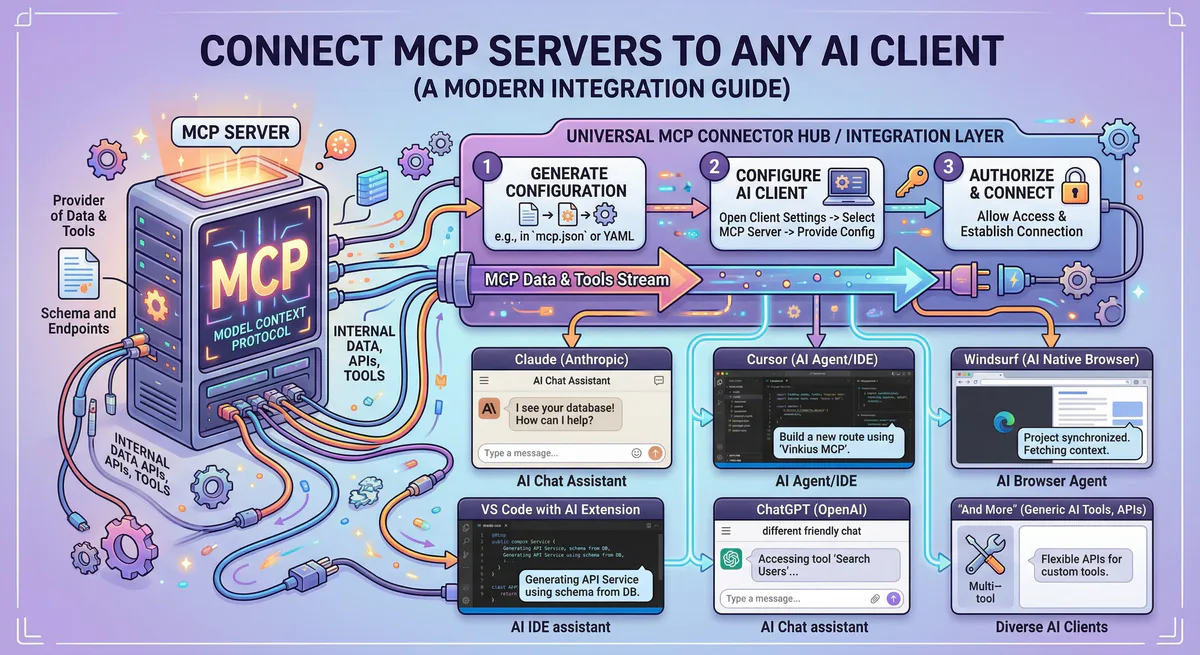
- Paste into your AI client — Claude, Cursor, ChatGPT, or VS Code (see our setup guide for step-by-step instructions per client)
- Ask a question — the AI automatically discovers all available tools
For developers who want to integrate MCP servers into Python code using CrewAI or LangChain, see our Crypto Portfolio Manager tutorial — it shows the complete code pattern for connecting multiple servers programmatically.
Security: Why Governed Servers Matter
Not all MCP servers are created equal. A community-built MCP server running locally on your machine has full access to your credentials and data with no governance layer.
The servers in this guide are hosted on our governed infrastructure with:
- Credential isolation — your API keys are stored in an encrypted vault and never exposed to the AI agent’s context window. The AI sees data, not credentials.
- DLP (Data Loss Prevention) — configurable rules that redact sensitive fields (SSNs, credit cards, wallet addresses) from AI responses.
- Audit trail — every tool call is cryptographically logged. Essential for SOC 2, HIPAA, and GDPR compliance.
- Rate limiting — managed rate limits prevent abuse and protect your API quotas.
- Key rotation — rotate credentials from the dashboard without changing any code.
For an in-depth analysis of the security architecture, read our CISO Guide to MCP Security Governance. For the technical details of credential management, see MCP API Key Management: From Plaintext to Zero-Trust.
Understanding why governed MCP is different from direct API keys — and why the distinction matters for production deployments — is covered in our MCP vs. API comparison guide.
Beyond 25: The Full Catalog
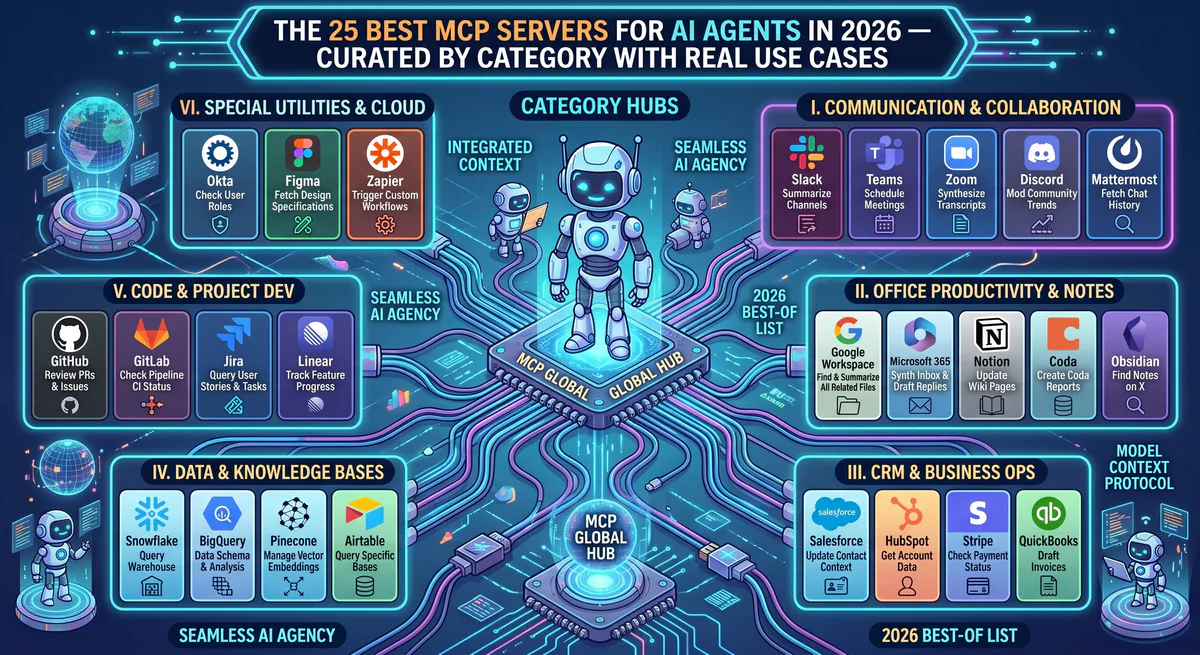
These 25 servers are the highest-impact starting point. Our catalog has 2,500+ more — covering every vertical:
| Category | Servers | Cluster Guide |
|---|---|---|
| CRM & Sales | Salesforce, HubSpot, Pipedrive, Close | Read → |
| Database & Backend | Supabase, PostgreSQL, MongoDB, Airtable | Read → |
| Project Management | Notion, Jira, Linear, Asana | Read → |
| Social Media | Instagram, TikTok, LinkedIn, Facebook | Read → |
| HR & People | BambooHR, Workday, Gusto, Deel | Read → |
| Crypto & DeFi | Binance, Coinbase, Kraken, CoinGecko | Read → |
| E-Commerce | Shopify, WooCommerce, BigCommerce | Read → |
| Finance | QuickBooks, Xero, FreshBooks | Read → |
| Customer Support | Zendesk, Freshdesk, Intercom | Read → |
| Marketing | SurferSEO, Jasper, Semrush | Read → |
Start Connecting
These 25 are the starting point. Our catalog has 2,500+ more — every business tool, every platform, every data source your AI agent needs.
Related Guides
- How to Connect MCP Servers → — Setup for Claude, Cursor, VS Code, ChatGPT
- MCP vs. API → — Why MCP replaces custom integrations
- Build Your Own MCP Server → — FastMCP Python + TypeScript tutorial
- Architecture of MCP → — JSON-RPC 2.0, transports, primitives
- Vinkius vs. Composio vs. Zapier → — Platform comparison
- CISO Guide to MCP Security → — Enterprise governance
- Crypto Portfolio Manager → — Working code tutorial
- The Complete MCP Server Directory → — 2,500+ apps
Your agents need tools. We make them safe.
Pick an MCP server from the catalog. Subscribe. Copy the URL. Paste it into Claude, Cursor, or any client. One URL — DLP, audit trail, and kill switch included.
V8 sandbox isolation · Semantic DLP · Cryptographic audit trail · Emergency kill switch