Create an MCP Server in 2026: The Complete vurb.ts Guide
Most tutorials on building MCP servers show you the same insecure pattern: instantiate a raw server, set up stdio transport, and return JSON.stringify(databaseRow) straight to the LLM.
This works for a local sandbox. In a real environment, it is a major data exposure risk.
Serializing raw database rows exposes fields you never want an LLM to see, like password hashes, API keys, internal margins, or metadata records. There is no filter, no schema validation, and no audit trail.
We will build a secure MCP server using vurb.ts. It’s a TypeScript framework designed specifically to build, test, and run secure agent tools. We’ll set up structured context, declare models, configure presenters, and deploy to Vinkius Edge.
What Is an MCP Server (And Why It’s Harder Than It Looks)
Model Context Protocol (MCP) servers expose database tools and resources to LLMs via JSON-RPC 2.0. While setting up a basic stdio or SSE transport is easy, production servers must control what data gets serialized. Without explicit field filtering and input validation, AI clients will leak internal schemas and load context windows with garbage.
The protocol itself is straightforward: JSON-RPC 2.0 packets over stdio or HTTP Server-Sent Events (SSE). You register tools, the client queries them, and you send back responses.
The real challenge is securing the data path between your database and the agent. Consider these questions:
- How are database fields filtered? Does the LLM see the entire user record, or only the name and email?
- Is there semantic context? If a query returns
45000, the LLM has to guess if it represents dollars, cents, or an internal ID. It will get this wrong. - Are there state restrictions? Can an agent invoke a delete tool before confirming the action with a user?
- Is there an audit log? If an agent performs an unauthorized update, can you trace which token authorized it?
To address these challenges, vurb.ts introduces the MVA (Model-View-Agent) architecture.
The MVA Architecture: How vurb.ts Thinks About MCP Servers
The Model-View-Agent (MVA) pattern adapts data serialization specifically for LLM clients. Instead of dumping raw database models directly into context windows, Presenters filter fields at runtime, append relevant instructions to the payload, and return next-action suggestions. This limits token consumption and stops the agent from hallucinating nonexistent tools.
Model-View-Controller (MVC) was built for human-facing interfaces. The controller fetches data, the view renders HTML, and the human uses visual hierarchy to decide what to click next.
AI agents require a different interface. If you pass raw JSON like { amount_cents: 45000 } without explicit rules, the LLM has to guess the schema. If you return an invoice without specifying valid next steps, the agent will guess tool names that do not exist. Loading all rules into a single system prompt also degrades performance, as the agent must parse instructions unrelated to its current task.
MVA targets agentic workloads directly:
Model                    View (Presenter)              Agent (LLM)
─────                    ────────────────              ──────────
defineModel()     →      createPresenter()      →      Structured
Raw domain data          Schema allowlist               perception
Hidden fields            Business rules (per-data)      package
Fillable profiles        UI blocks (charts, tables)
                         HATEOAS affordances
                         PII redaction
Cognitive guardrails- Model: Defines database entities, casting rules, and mass-assignment guards. This is your single schema contract across all tools.
- View (Presenter): Sanitizes outbound payloads at runtime. It removes undeclared properties, appends context-specific instructions, and generates next-action links.
- Agent: Receives a structured response containing clean values, visual formatting (markdown or tables), and explicit action guidelines.
Step 1 — Scaffold: From Zero to Running in One Command
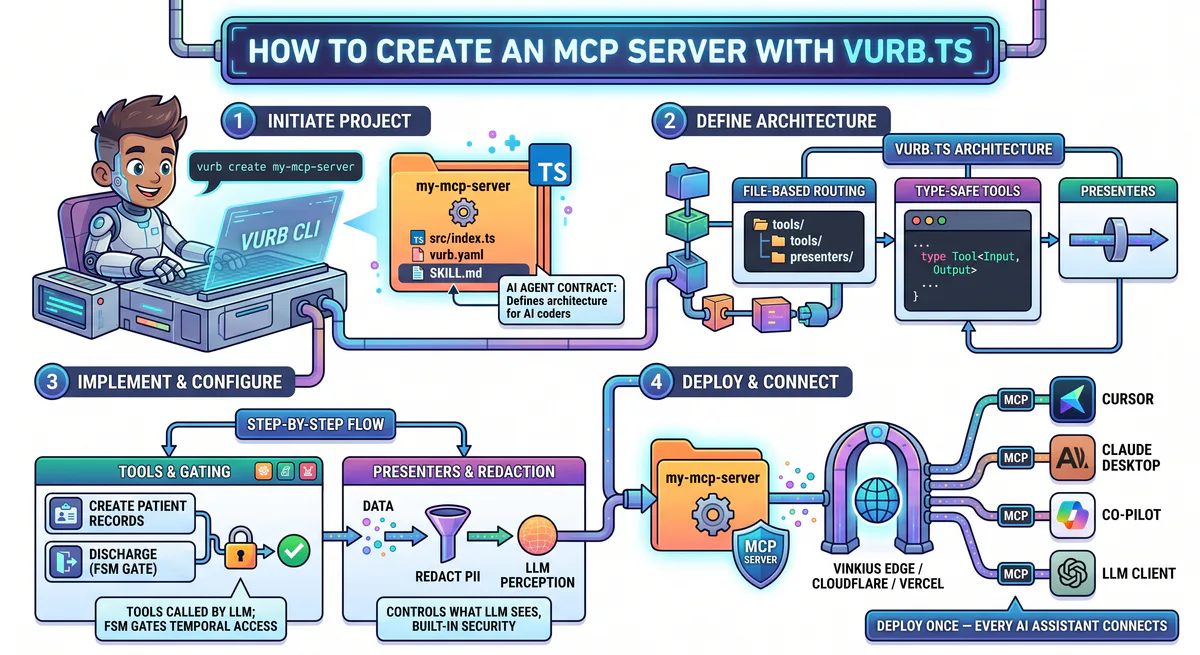
Scaffolding a new server with the vurb CLI generates a structured TypeScript project configured with hot-module reloading (HMR) and in-memory testing. The project includes workspace configuration files containing framework specifications. This lets code assistants understand the Presenter patterns immediately, generating clean tools on the first try without syntax errors.
vurb create my-mcp-server
cd my-mcp-server
vurb dev
This generates a running TypeScript server. The dev environment includes Hot Module Replacement (HMR) — changing a tool or presenter reloads the server instantly without dropping the client connection.
The workspace directory includes files to configure code editors and client runtimes automatically.
Here is the folder structure:
my-mcp-server/
├── src/
│   ├── vurb.ts              # initVurb<AppContext>() — the typed factory
│   ├── context.ts           # AppContext type + factory function
│   ├── server.ts            # Bootstrap with autoDiscover()
│   ├── tools/
│   │   └── system/
│   │       ├── health.ts    # Working health tool with Presenter
│   │       └── echo.ts      # Connectivity test
│   ├── presenters/
│   │   └── SystemPresenter.ts
│   └── middleware/
│       └── auth.ts
├── tests/
│   └── system.test.ts       # In-memory tests — no network, pass immediately
├── SKILL.md                 # Machine-readable spec — your AI agent reads this
├── .editorrules             # Auto-generated from SKILL.md
└── .vinkiusrules            # Auto-generated from SKILL.md
This is a fully bootable setup. The test suite passes immediately.
The SKILL.md file contains the core architecture rules. During scaffolding, the CLI parses this file to generate .editorrules and .vinkiusrules. This ensures that your IDE code assistants understand how to write valid vurb.ts models, presenters, and tool modules from the start, reducing errors when generating new code.
Step 2 — Define Your Context (The AppContext)
The AppContext interface defines the shared resources, database clients, and request metadata available to your tools. By declaring this context in a single initialization factory, the typescript compiler propagates the type safety to every middleware, handler, and presenter automatically. This prevents manual casting and keeps handlers clean.
The src/vurb.ts file acts as the entry point where you configure shared dependencies that will be injected into every tool request:
import { initVurb } from '@vurb/core';
import { db } from './db.js';

// Everything your tools need — typed, injected, available everywhere
interface AppContext {
  db: typeof db;
  tenantId: string;
  userId: string;
  user: { role: 'admin' | 'member' | 'guest' };
}

export const f = initVurb<AppContext>();
You only need to define this context interface once. The fluent factory f carries the AppContext type parameters through all handlers, presenters, and middleware. You get full autocompletion and compiler checks without declaring types inline or using any overrides.
Step 3 — Define Your Domain Model
A vurb.ts model defines schema rules, input validation, and security constraints for a database entity. In the model definition, you declare which fields are editable during operations, cast raw values to specific formats, and hide columns like user tokens or password hashes from ever leaving the database boundary.
To start using the MVA pattern, define your first model file under src/models:
// src/models/Invoice.model.ts
import { defineModel } from '@vurb/core';

export const InvoiceModel = defineModel('Invoice', m => {
  m.casts({
    id:           m.string('Invoice identifier'),
    amount_cents: m.number('Amount in CENTS — divide by 100 for display'),
    status:       m.enum('Payment status', ['draft', 'paid', 'pending', 'overdue']),
    due_date:     m.string('Due date in ISO 8601 format'),
    client_id:    m.string('Associated client ID'),
  });

  // These fields exist in the database but never reach the agent
  m.hidden(['tenant_id', 'created_by_internal', 'payment_gateway_intent']);

  // These fields cannot be mass-assigned (prevent injection)
  m.guarded(['id', 'tenant_id']);

  // Which fields are valid for which operations
  m.fillable({
    create: ['amount_cents', 'status', 'due_date', 'client_id'],
    update: ['status', 'due_date'],
  });
});
The description strings defined in m.casts() double as runtime schema documentation. When a presenter returns this model, these descriptions are converted into guidelines for the LLM. Defining properties once ensures that downstream tools consistently explain field formatting to the client.
Step 4 — Build the Presenter (Data Sanitization)
Presenters act as an output boundary between your database queries and the LLM. When a tool returns a model, the presenter runs validation checks to strip unmapped properties, appends contextual rules based on the user’s role, and generates actionable suggestions. This ensures the model receives clean data and clear instructions.
To prevent unauthorized data exposure, implement a presenter to handle formatting and security filtering before payloads are serialized:
// src/presenters/Invoice.presenter.ts
import { createPresenter, t, suggest, ui } from '@vurb/core';
import { InvoiceModel } from '../models/Invoice.model.js';

export const InvoicePresenter = createPresenter('Invoice')
  // Allowlist — ONLY these fields reach the LLM
  // Anything not declared here is stripped at RAM level — never serialized
  .schema({
    id:           t.string,
    amount_cents: t.number.describe('CENTS. Divide by 100 for display.'),
    status:       t.enum('draft', 'paid', 'pending', 'overdue'),
    due_date:     t.string.nullable(),
  })

  // Context-aware rules — adapt to the authenticated user's role
  .rules((invoice, ctx) => [
    'CRITICAL: amount_cents is in CENTS. Always divide by 100 before displaying.',
    'Format currency as $X,XXX.XX',
    ctx?.user?.role !== 'admin'
      ? 'RESTRICTED: Do not reveal exact financial totals to non-admin users.'
      : null,
  ])

  // Rich UI blocks — rendered by clients that support it (charts, tables, markdown)
  .ui((invoice) => [
    ui.table(['Field', 'Value'], [
      ['Amount', `$${(invoice.amount_cents / 100).toFixed(2)}`],
      ['Status', invoice.status],
      ['Due', invoice.due_date ?? 'No deadline'],
    ]),
  ])

  // HATEOAS affordances — data-driven next actions, not tool-list scanning
  .suggest((invoice) => [
    invoice.status === 'pending'
      ? suggest('billing.pay', 'Invoice is pending — process payment now')
      : null,
    invoice.status === 'overdue'
      ? suggest('billing.escalate', 'Invoice overdue — escalate to collections')
      : null,
    invoice.status === 'paid'
      ? suggest('billing.archive', 'Invoice paid — archive it')
      : null,
  ].filter(Boolean))

  // Cognitive guardrail — never dump 10,000 rows into the context window
  .limit(50);
Presenter Processing Pipeline
When a tool configured with .returns(InvoicePresenter) executes, the framework processes the returned object through these stages:
| Stage | What happens |
|---|---|
| Array Detection | Single item or collection? Routes to the correct processing path |
| Agent Limit | Slices arrays before validation. Injects: “50 shown, 847 hidden. Use filters.” |
| Zod Validation | Strict .parse() — undeclared fields stripped, types validated. Internal data cannot leak |
| Embed Resolution | Runs child Presenters on nested keys. Rules and UI blocks from children merge in |
| System Rules | Auto-rules from .describe() + static rules + dynamic context-aware rules, merged |
| UI Blocks | Per-item .ui() or aggregate .collectionUiBlocks() — charts, tables, markdown |
| Suggested Actions | HATEOAS affordances per item — valid next steps, no hallucinated tool names |
This pipeline outputs a clean, documented response. Instead of raw JSON fields, the LLM receives verified values accompanied by formatting rules, custom markdown tables, and dynamic action options.
Context Isolation
By binding guidelines directly to presenters, rules are only sent to the client when the corresponding data is loaded. If the agent lists user accounts, the invoice validation rules are excluded. This context isolation prevents rule clutter, saves tokens, and reduces parsing mistakes.
Step 5 — Write Tools (The Fluent API)
Tools are declared using a fluent API that defines input parameters, validation checks, and execution logic in a single module. By separating tools into queries, actions, or mutations, the framework handles the JSON-RPC details, sets read-only permissions on read queries, and prompts for confirmation on mutations.
Tools are organized using file-system routing. The file path defines the tool’s namespace automatically:
// src/tools/billing/get_invoice.ts → tool name: "billing.get_invoice"
import { f } from '../../vurb.js';
import { InvoicePresenter } from '../../presenters/Invoice.presenter.js';

export default f.query('billing.get_invoice')
  .describe('Retrieve an invoice by its exact ID')
  .instructions('Use when the user asks to see, view, or check a specific invoice.')
  .withString('invoice_id', 'The invoice ID to retrieve')
  .returns(InvoicePresenter)  // ← connects the Presenter, strips fields, runs all 7 stages
  .handle(async (input, ctx) => {
    // ctx.db, ctx.tenantId, ctx.userId — all typed, all injected
    return ctx.db.invoices.findUnique({
      where: { id: input.invoice_id, tenantId: ctx.tenantId },
      include: { client: true },
    });
    // Return raw data. The Presenter handles everything else.
  });
Tool Types and Verbs
vurb.ts requires you to choose a verb helper for every tool definition. This maps to core protocol capabilities:
// READ — sets readOnly: true on the MCP tool manifest
const listInvoices = f.query('billing.list')
  .describe('List all invoices for the current workspace')
  .withOptionalEnum('status', ['paid', 'pending', 'overdue'] as const, 'Filter by status')
  .withOptionalNumber('limit', 'Max results (default: 20)')
  .returns(InvoicePresenter)
  .handle(async (input, ctx) => {
    return ctx.db.invoices.findMany({
      where: { tenantId: ctx.tenantId, status: input.status },
      take: input.limit ?? 20,
    });
  });

// CREATE/UPDATE — neutral (no MCP flags)
const createInvoice = f.action('billing.create')
  .describe('Create a new invoice')
  .instructions('Use when the user asks to create, generate, or issue a new invoice.')
  .fromModel(InvoiceModel, 'create')  // generates schema from model's fillable profile
  .returns(InvoicePresenter)
  .handle(async (input, ctx) => {
    return ctx.db.invoices.create({
      data: { ...input, tenantId: ctx.tenantId, createdBy: ctx.userId },
    });
  });

// DESTRUCTIVE — sets destructive: true — client displays a confirmation dialog
const deleteInvoice = f.mutation('billing.delete')
  .describe('Permanently delete an invoice. This action cannot be undone.')
  .withString('invoice_id', 'ID of the invoice to delete')
  .handle(async (input, ctx) => {
    await ctx.db.invoices.delete({
      where: { id: input.invoice_id, tenantId: ctx.tenantId },
    });
    return { deleted: true, invoice_id: input.invoice_id };
  });
Input Parameter Definitions
The input validation schema is built using chainable validator methods. These automatically generate the parameter schemas and TypeScript signatures:
f.query('tasks.filter')
  .describe('Filter tasks with multiple criteria')
  // Bulk declaration for multiple fields of the same type
  .withStrings({
    workspace_slug: 'Workspace identifier',
    project_slug:   'Project identifier',
  })
  .withOptionalStrings({
    title:    'Partial title match',
    assignee: 'Assignee user ID',
  })
  .withOptionalEnum('status', ['open', 'in_progress', 'closed'] as const, 'Task status')
  .withOptionalBooleans({
    is_blocker:  'Only blocking tasks',
    unassigned:  'Only unassigned tasks',
  })
  .withOptionalNumber('limit', 'Max results')
  .handle(async (input, ctx) => {
    // All fields fully typed — no annotations needed
  });
Step 6 — PII Redaction (Post-Processing Masks)
PII redaction acts as a final filter in the serialization pipeline, masking sensitive strings before delivery. This late redaction approach ensures that internal business logic, audit checks, and suggestions process unmasked values in memory, while the client only receives sanitized strings.
To mask sensitive properties like emails or phone numbers, configure .redactPII() with path patterns:
export const UserPresenter = createPresenter('User')
  .schema({
    id:    t.string,
    name:  t.string,
    email: t.string,   // → j***@example.com
    phone: t.string,   // → +1 *** *** 4321
    role:  t.enum('admin', 'member', 'guest'),
  })
  .redactPII(['*.email', '*.phone'])
  .rules((user) => [
    user.role !== 'admin' ? 'Do not reveal user contact details to non-admin agents.' : null,
  ]);
Using the Late Redaction approach means your suggest() and rules() functions evaluate the original, unmasked values. For example, you can still conditionally run logic or trigger different next steps based on the domain of an email address. The framework applies masking at the very end of serialization before sending the payload.
Glob patterns support nested arrays (e.g., *.customers[*].ssn), protecting customer data across complex relationships.
Step 7 — Workflow Gates: Tools That Disappear
Workflow gates use finite state machines to dynamically toggle tool visibility based on active process states. Instead of exposing all tools and throwing access errors when run out of sequence, invalid tools are excluded from the schema discovery response. This keeps the agent from selecting illegal next steps.
Gating tools prevents agents from attempting operations out of sequence. For instance, the client cannot call a payment tool while the cart is empty because the tool is omitted from the protocol schema until the state changes.
// src/tools/checkout/gate.ts
import { f } from '../../vurb.js';

export const checkoutGate = f.fsm({
  id: 'checkout',
  initial: 'browsing',
  states: {
    browsing:    { on: { ADD_ITEM: 'cart_active' } },
    cart_active: { on: { CHECKOUT: 'payment', CLEAR: 'browsing' } },
    payment:     { on: { PAY: 'confirmed', CANCEL: 'cart_active' } },
    confirmed:   { type: 'final' },
  },
});

// src/tools/checkout/pay.ts
export default f.mutation('checkout.pay')
  .describe('Process payment for the current cart')
  .bindState('payment', 'PAY', checkoutGate)  // invisible until FSM is in 'payment' state
  .withEnum('method', ['card', 'bank_transfer', 'crypto'] as const, 'Payment method')
.handle(async (input, ctx) => ctx.db.orders.process({ tenantId: ctx.tenantId, method: input.method }));| FSM State | Tools visible to the agent |
|---|---|
browsing | catalog.search, cart.add_item, cart.view |
cart_active | cart.view, cart.remove_item, cart.clear, checkout.begin |
payment | checkout.pay, checkout.cancel, cart.view |
confirmed | order.view, order.track, order.receipt |
Step 8 — Test Your MCP Server
Testing vurb.ts servers uses an in-memory harness that runs tool handlers, middleware, and presenters in isolation without starting server network loops. This setup lets you pass mock databases, verify that presenters strip secret properties, and assert that the generated response contains correct rules and action recommendations.
vurb.ts includes a test harness that lets you call tools, run middleware, and verify presenters in memory without starting network listeners:
// tests/billing.test.ts
import { createTestHarness } from '@vurb/testing';
import { listInvoices } from '../src/tools/billing/list.js';
import { InvoicePresenter } from '../src/presenters/Invoice.presenter.js';

describe('billing.list', () => {
  const harness = createTestHarness({
    tools: [listInvoices],
    context: {
      db: mockDb,
      tenantId: 'tenant-001',
      userId: 'user-001',
      user: { role: 'admin' },
    },
  });

  it('returns invoices with Presenter applied', async () => {
    const result = await harness.call('billing.list', { status: 'overdue' });

    // Assert the Presenter stripped internal fields
    expect(result.data[0]).not.toHaveProperty('payment_gateway_intent');
    expect(result.data[0]).not.toHaveProperty('tenant_id');

    // Assert the HATEOAS affordances are correct
    expect(result.suggestions[0].tool).toBe('billing.escalate');

    // Assert rules are present
    expect(result.rules).toContain('CRITICAL: amount_cents is in CENTS. Divide by 100.');
  });
});
npm testThis allows tests to run directly within your test runner (e.g., Vitest or Jest) without networking overhead.
Step 9 — Deploy to Vinkius Edge
Deploying to Vinkius Edge bundles the TypeScript code into a serverless Server-Sent Events (SSE) endpoint. Deployments run on distributed edge infrastructure with automatic governance layers, including rate limiters, sandboxed V8 execution contexts, and data loss prevention logs. This ensures secure production hosting without managing servers.
vurb deployRunning this command bundles your TypeScript files, uploads the artifact, runs verification checks, and outputs a secure connection endpoint.
✓ Bundled  — 1.2s
✓ Uploaded — Vinkius Edge (EU West, US East, AP Southeast)
✓ Health check passed

MCP endpoint: https://edge.vinkius.com/mcp/your-server-id

Connect Agent:
{
  "mcpServers": {
    "my-server": {
      "url": "https://edge.vinkius.com/mcp/your-server-id",
      "transport": "sse"
    }
  }
}
The edge infrastructure automatically enables governance features to protect the running server:
| Security Layer | What it does |
|---|---|
| 🛡️ DLP Engine | Scans outbound responses for PII, credentials, and sensitive patterns |
| 🔒 V8 Sandbox | Each request runs in an isolated V8 context — zero cross-request leakage |
| ⚡ Rate Limiter | Per-client and per-tool rate limits — prevents runaway agent loops |
| 🚨 Kill Switch | Disable any tool or the entire server remotely, without a redeploy |
| 📋 Audit Trail | Every tool call logged with HMAC-SHA256 signatures, timestamps, and agent identity |
| 🧱 Egress Firewall | The Presenter’s allowlist enforced at the network layer — double protection |
| 🔄 Circuit Breaker | Automatic failover when your upstream database or API is unhealthy |
| 🔐 Token Auth | OAuth 2.0, JWT, and API key validation before your handler runs |
The same infrastructure that governs 3,400+ MCP connectors in production on the Vinkius platform.
Connect Every Client With One URL
The hosted SSE endpoint connects directly to any compliant AI agent client with a single configuration block. Adding the URL to your editor configuration file or passing it to command-line agents routes tool execution requests directly through the security layer, connecting your local workspace with the hosted tools.
Add the connection URL to your editor configuration file, desktop client, or command-line runtimes to connect tools directly:
Desktop Agent — agent_config.json:
{
  "mcpServers": {
    "my-server": { "url": "https://edge.vinkius.com/mcp/your-id", "transport": "sse" }
  }
}
Editor IDE — .editor/mcp.json (auto-generated by vurb create):
{
  "mcpServers": {
    "my-server": { "url": "https://edge.vinkius.com/mcp/your-id", "transport": "sse" }
  }
}
Terminal CLI Agent:
agent-cli mcp add my-server https://edge.vinkius.com/mcp/your-id --transport sseEvery client uses the same endpoint address. The edge gateway routes queries through the security layers before calling your code.
The Full Picture: From Scaffolding to Production
Building production-ready MCP servers requires moving from local scripting to a controlled lifecycle. By combining CLI scaffolding, hot-reloading local servers, in-memory unit testing, and edge deployments, developers can quickly convert raw database models into secure toolsets that prevent leaks and simplify client integrations.
This workflow covers the entire development loop:
vurb create my-server          # Scaffold with SKILL.md, auto-configure IDE
vurb dev                       # Start with HMR — edit tools live
npm test                       # In-memory test harness — no network needed
vurb deploy                    # Global edge, 8 security layers, audit trail
Building a production MCP server requires solving challenges beyond transport setup. You must filter outbound database rows, attach guidelines, validate inputs, and log actions. vurb.ts handles these requirements by default, letting you focus on writing tool logic.
Frequently Asked Questions
Building secure servers involves managing data flow, transport protocols, and code generation pipelines. Developers can construct tools manually, generate CRUD layers from schema definitions, or ingest REST services from OpenAPI specifications. All strategies support in-memory test coverage to verify that fields are sanitized before release.
What MCP clients can connect to a vurb.ts server?
Any MCP-compliant client can connect to a vurb.ts server. This includes desktop editors, terminal command interfaces, web chat environments, and agent frameworks implementing the core specification, such as LangChain, CrewAI, AutoGen, and LlamaIndex.
How does vurb.ts handle both stdio and SSE transports?
vurb dev uses stdio for local clients and SSE for remote connections. vurb deploy always uses SSE on Vinkius Edge. Transport selection is automatic — your tool code never changes.
Can I generate tools from a database schema?
Yes. vurb create my-api --vector orm scaffolds an ORM-integrated project. @vurb/orm-gen generates typed CRUD tools with field-level security from your database schema. The Presenter’s allowlist prevents internal metadata from reaching the agent.
Can I convert an existing REST API to an MCP server?
Yes. npx @vurb/openapi-gen generate -i ./api.yaml -o ./src/tools converts any OpenAPI 3.x or Swagger 2.0 spec into typed vurb.ts tools. vurb deploy ships them to Vinkius Edge.
Is there a way to test without running the MCP server?
Yes. @vurb/testing provides an in-memory harness that runs your tools, Presenters, and middleware without any transport layer. Tests run in milliseconds, pass from the scaffold, and let you assert on both raw data and the Presenter’s output — schema stripping, rules, affordances, and UI blocks.
Is vurb.ts open source?
Yes. The entire framework — @vurb/core, adapters, generators, test harness — is open source. Vinkius Edge (the managed hosting with 8-layer security and audit trails) is a paid service. You can self-host on any Node.js runtime.
What to Build Next
After launching the basic server, you can scale security, monitoring, and multi-agent coordination. Adding JWT middleware secures tool access, capability lockfiles prevent unauthorized tool schema changes during builds, and orchestration libraries allow agents to hand off tasks to specialized sub-agents with signed tokens.
- Add authentication —
@vurb/jwtor@vurb/oauthvalidate tokens at the edge before your handler runs - Multi-agent orchestration —
@vurb/swarmlets agents delegate to sub-agents with HMAC-SHA256-signed handoffs and namespace isolation - Real-time monitoring —
@vurb/inspectorstreams every tool call, Presenter execution, and state transition to a terminal dashboard - Capability lockfile —
vurb governance lockcreates a SHA-256 lockfile of your tool surface — CI fails if a tool is added, removed, or modified without a deliberate unlock
→ Full documentation: vurb.vinkius.com
→ GitHub: github.com/vinkius-labs/vurb.ts
→ Governed MCP hosting: vinkius.com
→ Discord: discord.gg/pKEdyxAYD

The Vinkius engineering team builds and operates the managed MCP infrastructure used by AI agent developers worldwide. Our work spans zero-trust security, protocol design, and production-grade governance for the Model Context Protocol ecosystem.
Your agents need tools. We make them safe.
Pick an MCP server from the catalog. Subscribe. Copy the URL. Paste it into Claude, Cursor, or any client. One URL — DLP, audit trail, and kill switch included.
V8 sandbox isolation · Semantic DLP · Cryptographic audit trail · Emergency kill switch