The transition from basic generative chatbots to Enterprise AI agent workflow automation is the defining engineering challenge of 2026. Businesses no longer want AI that “chats”; they require production-ready AI agents that can autonomously research markets, execute marketing campaigns, and close sales via direct messaging.
Historically, building an autonomous pipeline required months of coding bespoke API wrappers for every service. But with the standardization of the Model Context Protocol (MCP)—widely regarded as the “USB-C for AI”—the paradigm has shifted.
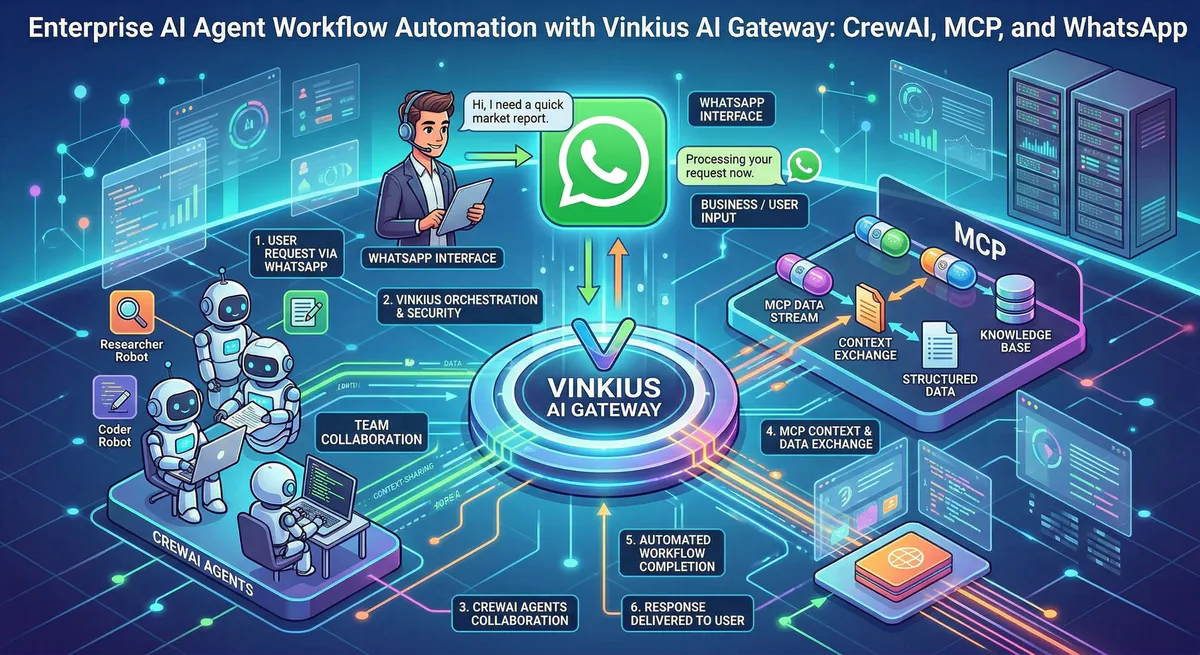
In this technical guide, we will demonstrate a highly advanced, yet remarkably simple agentic workflow integration. We will use CrewAI to orchestrate the intelligence, and use our AI Gateway to instantly plug in three powerful MCP servers:
- Tavily MCP: For real-time, deep-web market research.
- Mailchimp MCP: For dispatching segmented email campaigns.
- WhatsApp Business MCP: For executing personalized VIP client SMS outreach.
1. The Challenge of Production-Ready AI Agents
If you build a CrewAI workflow using standard Python SDKs (mailchimp-marketing, whatsapp-business-api), you immediately encounter three enterprise roadblocks:
- Dependency Hell: Your AI container becomes bloated with conflicting package versions.
- Credential Sprawl: You are forced to expose highly sensitive corporate API keys (
MAILCHIMP_KEY,WHATSAPP_TOKEN) directly into the agent’s environment variables. If an agent suffers from Prompt Injection, those keys are compromised. - Brittle Schemas: When an API updates, your custom LangChain tool wrappers instantly break.
Our MCP Edge Solution
By executing this workflow through the Model Context Protocol (MCP) via our Edge network, you abstract the execution layer entirely. You do not write, host, or maintain MCP servers. You simply pass our highly secure, unique Connection Token to CrewAI.
We host the Mailchimp and WhatsApp execution logic inside secure V8 Isolates. The tokens act as your precise server identity. It is zero-config, mathematically secure, and instantly production-ready.
2. The Business Objective: Deploying Digital Coworkers
The era of using automation merely to “monitor the web 24/7” ended in 2020. In 2026, the enterprise objective is Human Augmentation—transitioning human employees from being bottleneck “doers” to strategic “supervisors” (Human-on-the-Loop).
The Necessity: Your sales team should not spend hours manually researching competitor pricing drops, writing segmented emails, or copying WhatsApp numbers from a CRM. That is execution-heavy labor. We need to deploy an autonomous Digital Coworker—an agentic system that operates cross-functionally. When an anomaly occurs in the market, this digital coworker must autonomously draft a counter-strategy, retrieve the relevant VIP clients via Mailchimp, and execute personalized WhatsApp outreach.
This frees your human workforce to focus on what AI cannot do: closing the deal and building the relationship.
Here is how we build this Digital Coworker Pipeline with two specialized AI Agents.
Step 1: Connecting the MCP Tools via Connection Tokens
Thanks to our gateway architecture, configuring CrewAI to understand complex enterprise APIs takes exactly three lines of remote connection code.
import os
from crewai import Agent, Task, Crew, Process
from langchain_community.tools.mcp import MCPRemoteToolkit

# "USB-C for AI": Instantly connect Enterprise APIs without writing standard REST wrappers.
# Vinkius injects the Connection Token directly into the routing path for frictionless connection.
tavily_toolkit = MCPRemoteToolkit(
    endpoint=f"https://edge.vinkius.com/{os.getenv('VINKIUS_TAVILY_TOKEN')}/mcp"
)
mailchimp_toolkit = MCPRemoteToolkit(
    endpoint=f"https://edge.vinkius.com/{os.getenv('VINKIUS_MAILCHIMP_TOKEN')}/mcp"
)
whatsapp_toolkit = MCPRemoteToolkit(
    endpoint=f"https://edge.vinkius.com/{os.getenv('VINKIUS_WHATSAPP_TOKEN')}/mcp"
)

# Extract standardized tools for CrewAI
research_tools = tavily_toolkit.get_tools()
outreach_tools = mailchimp_toolkit.get_tools() + whatsapp_toolkit.get_tools()
Step 2: Defining the Autonomous AI Agents
With our tools loaded, we define our CrewAI agents. Notice how clean the Python code remains. The agents are focused purely on cognitive reasoning, while Vinkius Edge handles the underlying REST API complexities.
# Agent 1: The Market Analyst
market_researcher = Agent(
    role='Senior Market Analyst',
    goal='Uncover competitor pricing changes or vulnerabilities in real-time.',
    backstory='You are an elite corporate researcher using Tavily to analyze web footprints.',
    tools=research_tools,
    verbose=True
)

# Agent 2: The Enterprise Outreach Director
outreach_director = Agent(
    role='VP of Client Engagement',
    goal='Execute high-conversion email and direct WhatsApp messages.',
    backstory='You orchestrate multi-channel outreach campaigns securely.',
    tools=outreach_tools,
    verbose=True
)
Step 3: Structuring the Automation Tasks
We link the agents together using sequential CrewAI Tasks. The output of the Tavily research naturally flows into the communication APIs.
analyze_market_task = Task(
    description=(
        'Use Tavily to research the competitor "SaaS-Corp". '
        'Identify any recent price hikes or platform outages reported in the last 48 hours.'
    ),
    expected_output='A strategic summary of SaaS-Corp vulnerabilities.',
    agent=market_researcher
)

execute_outreach_task = Task(
    description=(
        'Based on the Analyst summary:\n'
        '1. Use Mailchimp tools to send an email campaign to the "SaaS-Corp Churn Risk" audience segment.\n'
        '2. Use WhatsApp Business tools to send a highly personalized, 2-sentence SMS instantly '
        'to the phone numbers of VIP accounts associated with that segment.'
    ),
    expected_output='Log of successful WhatsApp message dispatched events.',
    agent=outreach_director,
    context=[analyze_market_task] # Ingests research automatically
)
Step 4: The MCP Execution Trace (Under the Hood)
Before we activate the Crew, it is critical to understand how the execution actually happens. When the outreach_director decides to send a WhatsApp message, what does CrewAI do with the Vinkius Connection Token?
It does not make a REST call to api.whatsapp.com. Instead, the MCPRemoteToolkit dispatches a standardized JSON-RPC 2.0 payload across the mcp/sse tunnel directly to our AI Gateway.
1. The Request (From CrewAI to Vinkius Edge):
{
  "jsonrpc": "2.0",
  "method": "tools/call",
  "params": {
    "name": "send_whatsapp_template",
    "arguments": {
      "to_phone": "+1234567890",
      "template_name": "competitor_counter_offer"
    }
  },
  "id": "req_88x2ab"
}
2. The Gateway Verification: We intercept this payload at the edge. Because the tunnel was opened using your unique Connection Token, our Gateway instantly identifies the target as the whatsapp-business V8 Isolate, validates the arguments against the strict MCP schema, and executes the action securely without exposing your API keys to the orchestration logic.
3. The Response (From Vinkius Edge to CrewAI):
{
  "jsonrpc": "2.0",
  "result": {
    "content": [
      {
        "type": "text",
        "text": "Message securely dispatched. WABA_ID: wamid.HBgL..."
      }
    ]
  },
  "id": "req_88x2ab"
}
The AI orchestrated the logic; our Edge network safely orchestrated the internet.
Step 5: Activating the Digital Coworker Fleet
# Assemble the Production-Ready Crew
automation_crew = Crew(
    agents=[market_researcher, outreach_director],
    tasks=[analyze_market_task, execute_outreach_task],
    process=Process.sequential,
    verbose=True
)

# Ignite the autonomous AI workflow
automation_crew.kickoff()
3. The Execution Results: Capitalizing on Market Signals
When automation_crew.kickoff() is executed, the digital coworker pipeline operates invisibly and returns deterministic outcomes. This is not a hypothetical setup. According to the Gartner and Salesforce 2026 State of Sales Reports, agentic workflows are driving the largest capability gap in B2B history:
- Revenue Growth Probability: Organizations leveraging hybrid AI agents for signal-based prospecting are 1.3x more likely to report revenue growth, with 83% of AI-adopter teams hitting their targets versus only 66% of standard teams (Source: Salesforce 2026).
- Engagement Superiority (WhatsApp over Email): The WhatsApp Business API continues to deliver an astronomical 98% open rate, vastly outperforming legacy B2B email sequences, making zero-latency SMS outreach the decisive engagement channel (Source: McKinsey Digital).
- The ‘10x’ Competitor: Gartner forecasts that by 2028, AI agents will outnumber human sellers by 10x. Developing your digital coworker infrastructure today using Vinkius Edge is the only way to scale pipeline without scaling human overhead.
This is the power of zero-latency execution. You intercept the buyer’s frustration at the exact moment it peaks. The AI handles the research, data correlation, and API handshakes; your human sales team simply opens WhatsApp and negotiates with deeply engaged inbound leads.
4. The Economics of Unlimited Digital Coworkers
The traditional model of enterprise scaling is linear: to do more work, you hire more humans or buy more specialized, rigid SaaS software. Agentic workflows break this equation permanently.
Astronomical Cost Savings
Deploying this architecture via our Edge network eradicates IT overhead. You are not paying engineering teams to maintain shifting OAuth patterns for Mailchimp and WhatsApp. By centralizing tool execution within our AI Gateway, your operational cost for maintaining API integrations drops to near zero. The digital coworker executes the campaign for the cost of inference tokens—a savings of 98% compared to human operational hours.
Fleet Scaling: Unlimited Agents
Because the Model Context Protocol standardizes communication, you are not limited to marketing. The Vinkius App Directory contains a vast catalog of production-ready servers.
From a single architecture, you can instantly spawn unlimited agents:
- A DevOps Agent connected to the GitHub MCP to auto-revert failed PRs.
- An HR Agent connected to the BambooHR MCP to orchestrate employee onboarding.
- A Finance Agent connected to the Stripe MCP to audit uncollected invoices.
The days of fragile, monolithic IT integrations are over. By combining the cognitive orchestration of CrewAI with the standardized execution, zero-trust sandboxing, and sheer scale of our Edge network, you can weaponize an unlimited workforce of digital coworkers.
You retain full observability. Every database fetched and every message dispatched is cryptographically verified by our execution node, ensuring your automated workflows are compliant, secure, and infinitely scalable.
Ready to deploy your first Digital Coworker? Explore the Vinkius App Directory to connect Tavily, Mailchimp, WhatsApp Business, and thousands of other enterprise MCP servers instantly.
Your agents need tools. We make them safe.
Pick an MCP server from the catalog. Subscribe. Copy the URL. Paste it into Claude, Cursor, or any client. One URL — DLP, audit trail, and kill switch included.
V8 sandbox isolation · Semantic DLP · Cryptographic audit trail · Emergency kill switch