You missed the morning standup. Three Slack channels have unread threads. There’s a Zoom recording from a client meeting you need to catch up on. Gmail shows 47 new messages. Teams has notifications you haven’t checked. Discord has 12 pings in the developer community channel.
Catching up takes an hour. What if it took 30 seconds?
“Summarize everything important from #engineering, #sales, and #product in Slack today. Check if I have any urgent emails. Then tell me the key decisions from the Zoom meeting I missed.”
That’s one prompt. Three tools. Complete context recovery.
According to a 2024 study by RescueTime, the average knowledge worker checks communication tools 77 times per day and spends 28% of their workweek managing email. Microsoft’s Work Trend Index found that employees spend 57% of their time communicating and only 43% creating. MCP servers don’t eliminate communication — but they eliminate the time spent navigating communication tools to extract the information you actually need.
In this guide, we cover every communication and collaboration MCP server in our catalog — messaging platforms, video conferencing, email, meeting notes, and community tools — what each one gives your AI, and the workflows that transform how you stay informed.
Team Messaging
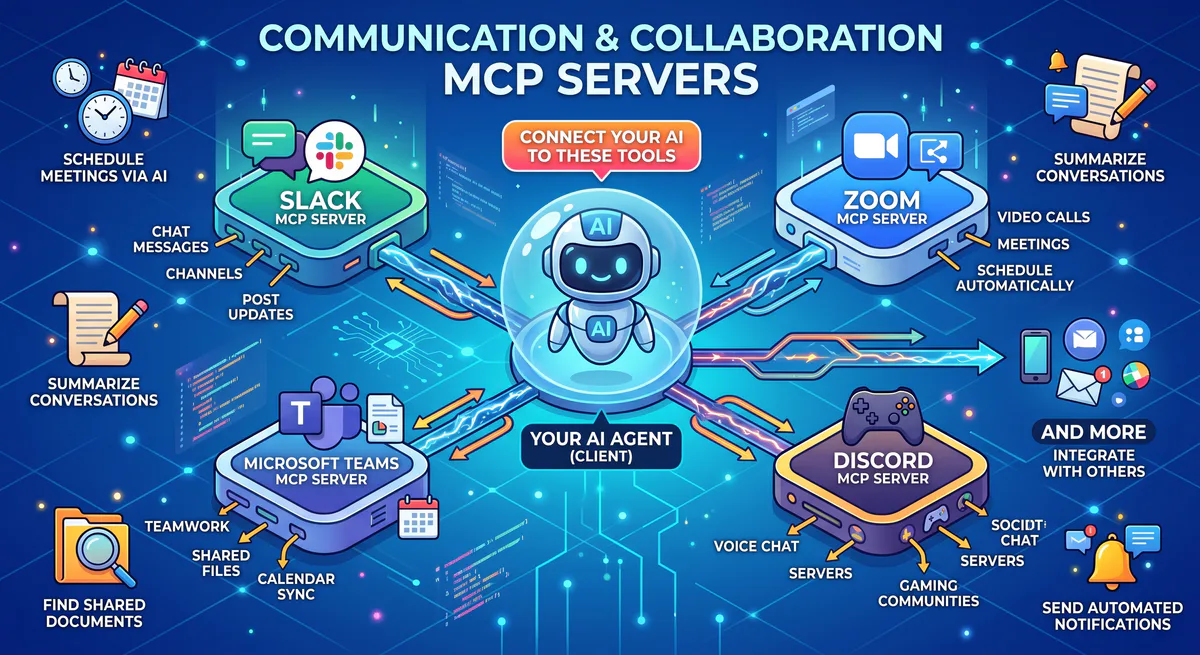
Slack MCP
Slack is the workplace communication hub used by over 750,000 organizations worldwide, including 65 of the Fortune 100. With an average of 200 million messages sent daily, it’s the pulse of modern work — but it’s also the biggest source of information overload.
What your AI can do once connected:
- Channel summarization — read and distill entire channels into key points, action items, and decisions
- Message search — find specific conversations by keyword, sender, date, or channel across your entire workspace
- Thread analysis — summarize long threads, extract decisions, and identify follow-ups
- Mentions review — see everything that mentioned you, your team, or specific topics
- Message posting — send updates to channels on your behalf
Real-world workflows this unlocks:
Morning catch-up in 30 seconds. You ask: “What did the #engineering team discuss today? Highlight any decisions made or blockers raised.” The AI reads the channel and responds: “Key discussions: 1) Decided to use Redis instead of Memcached for session storage (decision by CTO, thread at 10:14 AM). 2) Deploy blocked: staging environment down since 9 AM, DevOps investigating. 3) New hire onboarding: frontend dev starts Monday, buddy assigned: Sarah. No action items tagged to you.”
Cross-channel intelligence. Before a leadership meeting, you ask: “Across #sales, #product, and #engineering — did anyone mention the pricing update this week?” The AI searches all three channels: “Mentioned in 4 places: #sales (Tuesday, rep asked about enterprise pricing — no answer yet). #product (Wednesday, PM noted pricing page redesign delayed to next sprint). #engineering (Thursday, API discount codes deployed successfully). #sales (Thursday, same rep asking again — still no answer). You may want to follow up on the unanswered question.”
Action item extraction. After a busy day of discussions, your team lead asks: “What action items were assigned to our team in #product today?” The AI scans messages for assignments, commitments, and follow-ups: “3 action items for your team: 1) Update API docs for v3 endpoints (assigned to James, due Friday). 2) Fix mobile checkout bug from QA report (assigned to Priya, critical). 3) Review design mockups for new onboarding flow (assigned to you, link shared at 2:47 PM).”
Example prompts:
- “What did the #engineering team discuss today?”
- “Summarize the top 3 threads in #sales from this week”
- “Post to #marketing: ‘Q1 report is ready for review’”
- “Did anyone mention the pricing update in any channel today?”
- “What action items were assigned to me this week?”
Connect: Slack MCP in our App Catalog →
Discord MCP
Discord has evolved from a gaming platform to a communications hub used by developer communities, DAOs, open-source projects, and increasingly by companies for external community management. Over 200 million monthly active users engage across 19 million active servers.
What your AI can do once connected:
- Server channel monitoring — read messages across multiple channels in any server your bot has access to
- Community sentiment — analyze conversation tone, trending topics, and engagement patterns
- Message search — find specific discussions by keyword, user, or date
- Update posting — send announcements and updates through bot channels
Real-world workflow: Your developer relations team asks: “What are the top 3 questions in our community Discord this week? Are there any trending complaints?” The AI analyzes: “Top questions: 1) ‘How to authenticate with v3 API?’ (asked 14 times — FAQ gap). 2) ‘Is there a Python SDK?’ (8 times — potential product opportunity). 3) ‘Rate limit increase for production’ (6 times). Trending complaint: ‘Webhook delivery delays’ mentioned by 5 different users since Tuesday.”
Connect: Discord MCP in our App Catalog →
Other Messaging Platforms
- Telegram Bot MCP — Send/receive messages, manage group chats, automate notifications. Connect →
- Mattermost MCP — Self-hosted team messaging with full channel and message access. Connect →
- Microsoft Teams — Team chats, channels, and meeting data. Contact us for enterprise setup
Video Conferencing
Zoom MCP
Zoom has 300 million daily meeting participants. Most of those meetings generate discussions, decisions, and action items that are immediately forgotten unless someone takes notes. When your AI can access Zoom recordings and transcripts, every meeting becomes searchable, summarizable, and actionable.
What your AI can do once connected:
- Meeting transcripts — access AI-generated transcripts of recorded meetings
- Meeting summaries — key points, decisions, and action items extracted from recordings
- Calendar integration — upcoming meetings, scheduled participants, and agendas
- Participation data — who attended, who didn’t, meeting duration, and engagement metrics
Real-world workflow: You missed a 45-minute client meeting. Instead of watching the recording, you ask: “Summarize the key decisions and action items from today’s meeting with Acme Corp.” The AI reads the Zoom transcript: “Key decisions: 1) Contract extended 12 months at current rates. 2) New API integration starts next quarter. 3) bi-weekly check-ins replace monthly (starting May). Action items: 1) Send revised SOW by Friday (you). 2) Set up sandbox environment (their CTO). 3) Schedule kickoff for API project (PM). Tone: positive, client expressed satisfaction with current service.”
Example prompts:
- “Summarize the key decisions from today’s client meeting”
- “What meetings do I have scheduled for tomorrow?”
- “Extract action items from the last team standup recording”
- “Who attended the product review meeting on Tuesday?”
Gmail MCP
Gmail has over 1.8 billion active accounts. Its ubiquity makes it the most common communication tool — and the most common source of information overload. When your AI can access Gmail, email triage becomes conversational.
What your AI can do once connected:
- Smart search — find emails by sender, subject, date, attachment type, or content
- Thread summarization — distill long email threads into key points and decisions
- Draft responses — generate replies based on context and previous correspondence
- Urgency detection — identify time-sensitive emails that need immediate attention
- Email organization — categorize, label, and prioritize unread messages
Real-world workflow: You return from vacation with 200+ unread emails. You ask: “Summarize my inbox from the last 5 days. Highlight anything that needs my response before tomorrow.” The AI categorizes: “Total: 247 emails. Urgent (needs response today): 3 — 1) Client contract terms counter-proposal (Wednesday). 2) Budget approval request from your direct report (Thursday, deadline tomorrow). 3) HR: benefits enrollment closes Friday. Important but not urgent: 8 emails. FYI/Newsletters: 236 (can be batched).”
Connect: Gmail MCP in our App Catalog →
Meeting Notes & Async
- Fireflies.ai MCP — AI meeting transcripts, action items, and conversation analytics. Connect →
- Loom MCP — Video message transcripts and viewer engagement data. Connect →
- Fellow MCP — Meeting agendas, notes, action items, and feedback. Connect →
Communication Security
When your AI reads Slack messages, emails, and meeting transcripts, it may encounter:
- Internal pricing and strategy discussions that would be valuable to competitors
- Customer PII shared in support threads — names, emails, phone numbers
- Credentials shared in DMs — API keys, passwords, tokens (it happens more often than IT teams want to admit)
- Confidential HR discussions — performance feedback, compensation, personnel changes
- Legal communications that may be privileged
Our DLP engine scans every response and redacts sensitive patterns before the data reaches your AI model. Credentials are automatically redacted. PII follows configurable rules. Your conversations stay accessible — but your secrets stay protected.
The Multi-Tool Communication Workflow
| Question | Tool | What it pulls |
|---|---|---|
| ”What did I miss today?” | Slack MCP | Channel summaries + mentions |
| ”Summarize the client meeting” | Zoom MCP | Transcript → key points |
| ”Any urgent emails?” | Gmail MCP | Priority inbox triage |
| ”What’s the community saying?” | Discord MCP | Trending topics + sentiment |
| ”What are my follow-ups?” | Fellow MCP | Action items from meetings |
Internal Linking: Related Cluster Guides
- CRM & Sales MCP Servers — Salesforce, HubSpot
- Customer Support MCP Servers — Zendesk, Freshdesk, Intercom
- HR MCP Servers — HiBob, Workday
- Brand & Knowledge MCP Servers — Slab, Confluence
- The Complete MCP Server Directory — 2,500+ apps
How to Connect
Go to our App Catalog → Search → Subscribe → Copy URL → Paste into Claude, Cursor, or ChatGPT. Under 2 minutes.
Start Connecting
Browse all communication MCP servers →
Never miss a message again. Never watch a 45-minute recording to learn 3 decisions. Never spend an hour triaging email after vacation. Your AI processes it all — and gives you back hours every week.
Need a communication tool not in our catalog? Email support@vinkius.com.
Your agents need tools. We make them safe.
Pick an MCP server from the catalog. Subscribe. Copy the URL. Paste it into Claude, Cursor, or any client. One URL — DLP, audit trail, and kill switch included.
V8 sandbox isolation · Semantic DLP · Cryptographic audit trail · Emergency kill switch