Your security team uses an average of 76 different tools, according to a 2024 survey by Panaseer. That’s 76 dashboards, 76 alert streams, 76 sources of truth — and your CISO is supposed to synthesize all of them into a coherent risk posture.
The result is predictable: alert fatigue, blind spots, and the constant fear that a critical finding is buried in a dashboard nobody checked today.
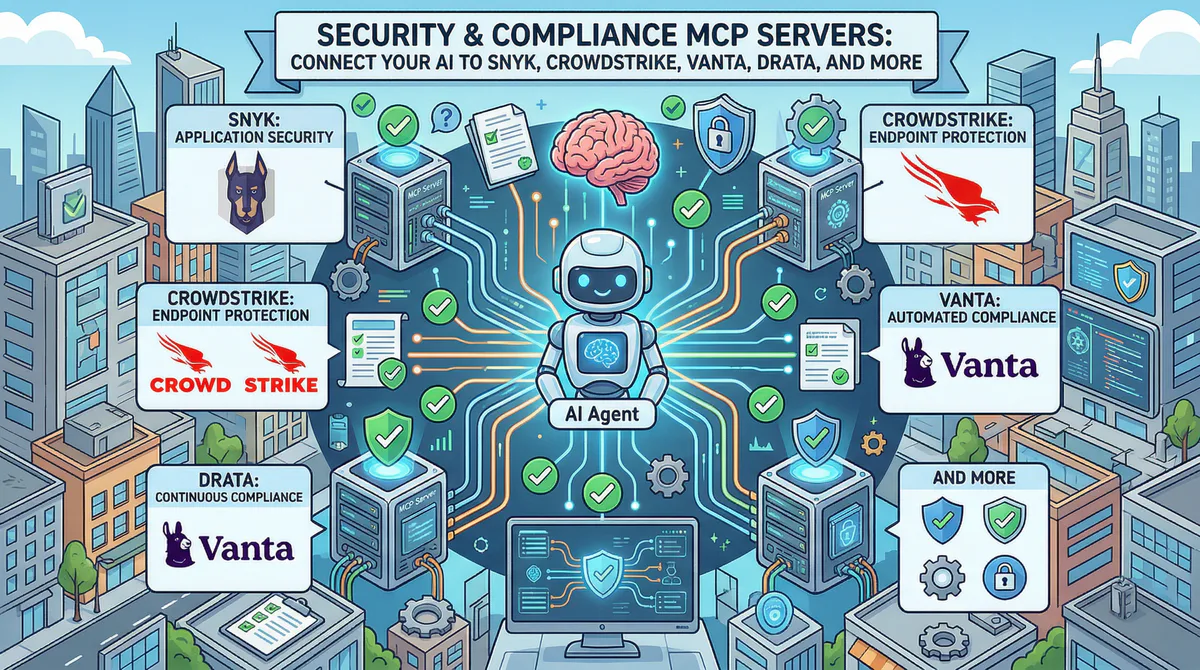
MCP servers solve this by letting your AI query every security tool through a single, secure channel. Each server creates a governed bridge between your AI assistant and a specific security platform. The AI agent can then correlate across tools — something no single dashboard can do:
“Are there any critical Snyk findings in production repos that overlap with endpoints that have active CrowdStrike alerts?”
That cross-platform correlation — which would take a security analyst an hour of manual investigation — becomes a 10-second prompt.
In this guide, we cover every security and compliance MCP server in our catalog, the real-world incident response and audit workflows each one unlocks, and why connecting security tools through our managed gateway is actually more secure than the alternatives.
Why Security Tools Need a Secure Gateway (The Paradox)
There’s an inherent paradox in connecting security tools to AI: the tools that protect your infrastructure contain the most sensitive information about your vulnerabilities. Scan results, CVSS scores, internal hostnames, IP addresses, firewall rules, and compliance gaps — all data that would be gold for an attacker.
This is why connecting security tools through our gateway includes protections you can’t get by running MCP servers yourself:
- Internal hostnames and IP addresses can be redacted per your DLP rules — the AI sees “Server A has a critical finding” instead of “prod-db-001.internal.company.com has a critical finding”
- CVE details can be summarized without exposing specific version numbers
- All security queries are cryptographically logged — you know exactly what was asked and what was returned
- Zero data retention — security data passes through the gateway and is never stored
- Per-token access — each team member gets their own connection, so access patterns are individually auditable
Application Security (AppSec)
Snyk MCP
Snyk is the developer-first security platform used by over 2,300 enterprise customers and millions of developers to find and fix vulnerabilities in code, open-source dependencies, containers, and infrastructure-as-code. It integrates directly into development workflows — git repositories, CI/CD pipelines, and IDE extensions.
What your AI can do once connected:
- Vulnerability scanning results — critical, high, medium, and low severity findings by project, language, or package
- Open-source dependency risks — which third-party packages have known exploits and what are the safe versions
- Fix recommendations — automated remediation suggestions including upgrade paths and patches
- License compliance — identify dependencies with risky or incompatible licenses
- Container security — findings from Docker image scans with base image upgrade recommendations
Real-world workflows this unlocks:
Pre-release security gate. Before every release, your security champion asks: “Are there any critical or high-severity vulnerabilities in our production repositories?” The AI queries Snyk: “2 critical findings. 1) CVE-2026-XXXX in express (v4.18.2 → upgrade to v4.19.0). 2) Hardcoded AWS key detected in config/staging.ts (detected today, committed by developer-3). 7 high-severity findings: all in test dependencies (non-production risk).”
Dependency risk assessment. Before adopting a new library, a developer asks: “What’s the security profile of the @auth/core package?” The AI checks Snyk’s vulnerability database: “3 known vulnerabilities (all patched in latest version). Last security issue: 4 months ago. Actively maintained (47 contributors, weekly releases). License: ISC (permissive, no issues).”
Technical debt visibility. Your CISO presents to the board: “What’s our vulnerability fix rate trend over the last 6 months?” The AI pulls Snyk metrics: “Mean time to remediate critical: 4.2 days (down from 7.1 days in October — 41% improvement). Fix rate: 89% of findings resolved within SLA. Backlog: 12 medium-severity findings older than 30 days.”
Example prompts:
- “Are there any critical vulnerabilities in our production projects?”
- “Which open-source dependencies have known exploits with available patches?”
- “Show me our vulnerability fix rate trend for the last 6 months”
- “What’s the container security status for our latest Docker images?”
Connect: Snyk MCP in our App Catalog →
Semgrep MCP / SonarQube MCP / Veracode MCP / Checkmarx MCP
Static analysis and code security scanning:
- Semgrep — Custom rules, SAST results, and security pattern violations. Connect →
- SonarQube/SonarCloud — Code quality gates, security hotspots, tech debt tracking, and coverage. Connect →
- Veracode — Enterprise SAST/DAST results, policy compliance, and flaw tracking. Connect →
- Checkmarx — SAST/DAST/SCA scan results and compliance reporting. Connect →
Endpoint & Cloud Security
CrowdStrike Falcon MCP
CrowdStrike Falcon is the leading endpoint detection and response (EDR) platform, protecting over 30,000 organizations worldwide. It provides real-time threat detection, incident response, and threat intelligence across all endpoints — laptops, servers, cloud workloads, and mobile devices.
What your AI can do once connected:
- Active threat detections — severity, affected hosts, detection type, and MITRE ATT&CK tactics
- Incident timelines — step-by-step reconstruction of what happened on a compromised endpoint
- Endpoint health — sensor status, offline devices, and last check-in times
- Threat intelligence — context about the threat actors and techniques behind detections
- Containment status — whether affected endpoints have been isolated
Real-world workflows this unlocks:
Morning security briefing. Your SOC analyst starts every day by checking CrowdStrike. Now they ask: “Any new high-severity detections since yesterday? If so, are the affected endpoints contained?” The AI responds: “3 new detections since yesterday. 1 high-severity: PowerShell execution pattern on LAPTOP-MK82 (user: dev-engineer-4), matched MITRE T1059.001. Endpoint auto-contained at 3:14 AM. 2 medium: both false-positive candidates (legitimate admin scripts on build servers).”
Incident investigation acceleration. During an active investigation, your IR analyst asks: “Show me the full timeline for the detection on LAPTOP-MK82 — every process execution, network connection, and file modification in the 30 minutes before and after.” The AI reconstructs the timeline from CrowdStrike data: “2:58 AM — Outlook spawned PowerShell (abnormal). 3:01 AM — PowerShell downloaded base64-encoded script from pastebin[.]com. 3:04 AM — Script attempted credential harvest. 3:14 AM — Falcon blocked execution and contained endpoint.”
Example prompts:
- “Are there any high-severity detections in the last 24 hours?”
- “Which endpoints have offline sensors?”
- “Show me the incident timeline for the detection on server-prod-03”
- “How many new detections this week vs. last week?”
Connect: CrowdStrike Falcon MCP in our App Catalog →
Prisma Cloud MCP / Trend Micro MCP
Cloud security posture management:
- Prisma Cloud — Cloud misconfiguration detection across AWS/Azure/GCP, compliance violations, and workload protection. Connect →
- Trend Micro — Threat detection, workload security, and email security. Connect →
Network & Attack Surface
Shodan MCP
Shodan is the search engine for internet-connected devices — used by security teams to monitor their external attack surface. It indexes open ports, services, banners, and known vulnerabilities across the entire internet.
What your AI can do once connected:
- Attack surface monitoring — exposed services, open ports, and unexpected public-facing infrastructure
- Vulnerability correlation — which of your public IPs have services with known CVEs
- Change detection — new services that appeared on your IP range since the last scan
- Competitive intelligence — (carefully) assess competitor technology stacks
Real-world workflow: Your penetration tester asks before a quarterly review: “Scan our public IP range for any unexpected open ports or services that shouldn’t be exposed.” The AI queries Shodan: “Found 14 services across your range. Expected: 10 (web servers, mail, DNS). Unexpected: 4. 1) Port 3306 (MySQL) on 203.0.113.47 — database directly internet-facing. 2) Port 9200 (Elasticsearch) on 203.0.113.52 — no authentication detected. 3-4) Two debug services on non-standard ports.” That MySQL finding alone could have prevented a breach.
Connect: Shodan MCP · Tenable MCP · Rapid7 InsightVM MCP
Compliance & Audit
Vanta MCP
Vanta automates compliance evidence collection for SOC 2, ISO 27001, HIPAA, GDPR, and PCI-DSS. Used by over 7,000 companies, it continuously monitors security controls and flags gaps before auditors do.
What your AI can do once connected:
- Compliance dashboard — passing/failing tests across all active frameworks
- Evidence collection — status of automated and manual evidence items
- Vendor risk — third-party risk assessment scores and review status
- Employee compliance — security training completion, device encryption status, MFA enrollment
Real-world workflow: Two weeks before your SOC 2 audit, your compliance manager asks: “What’s our current status? Any failing tests or overdue evidence?” The AI checks Vanta: “142 of 148 tests passing. 6 failing: 1) 3 laptops without disk encryption (employees: Alex M., Sarah K., James L.). 2) Background check evidence missing for 2 new hires. 3) Vendor risk assessment for CloudFlare overdue by 12 days.”
Connect: Vanta MCP · Drata MCP · OneTrust MCP
The Multi-Tool Security Workflow
| Question | Tool | What it pulls |
|---|---|---|
| ”Any critical vulns in our code?” | Snyk MCP | Code + dependency findings |
| ”Any threats on our endpoints?” | CrowdStrike MCP | Active detections |
| ”Is anything exposed externally?” | Shodan MCP | Attack surface scan |
| ”Are we audit-ready?” | Vanta/Drata MCP | Compliance test status |
| ”Any cloud misconfigurations?” | Prisma Cloud MCP | Cloud security posture |
Internal Linking: Related Cluster Guides
- Developer & Data MCP Servers — Codacy, Sentry, Datadog
- HR MCP Servers — Employee compliance data
- Finance MCP Servers — SOX compliance
- The Complete MCP Server Directory — 2,500+ apps
How to Connect
Go to our App Catalog → Search → Subscribe → Copy URL → Paste into Claude, Cursor, or VS Code. Under 2 minutes per tool.
Start Building
Browse all security MCP servers →
Your security posture should be a question away, not an investigation away. These connections make that possible — with security infrastructure protecting your security tools.
Need a security tool not in our catalog? Email support@vinkius.com.
Your agents need tools. We make them safe.
Pick an MCP server from the catalog. Subscribe. Copy the URL. Paste it into Claude, Cursor, or any client. One URL — DLP, audit trail, and kill switch included.
V8 sandbox isolation · Semantic DLP · Cryptographic audit trail · Emergency kill switch