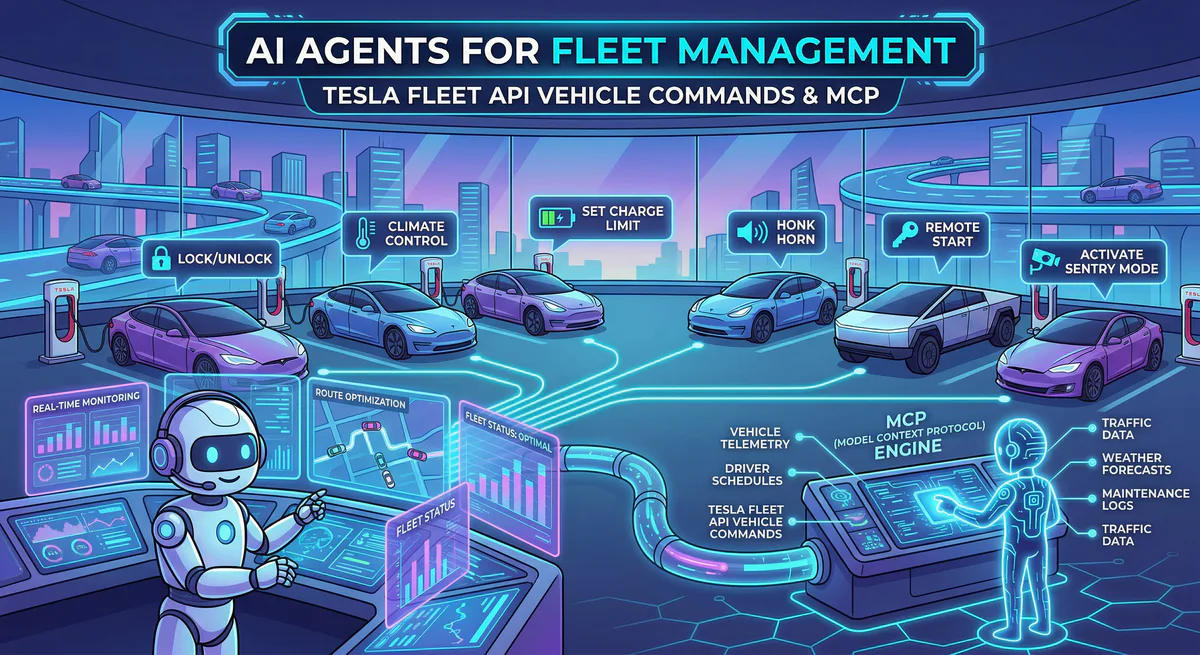
The transition of Artificial Intelligence from digital text generation to real-world, physical manipulation is the final frontier of automation. Emitting a generated email is one thing; unlocking the doors of a 2-ton vehicle moving across the country is entirely another.
To safely cross this gap, enterprise engineering teams must construct what we define as Physical Actuator Proxy Mapping—the ability to explicitly map native, cognitive LLM decisions into highly secure, code-signed commands evaluating live telemetry.
In this engineering breakdown, we demonstrate how to orchestrate physical reality. Using CrewAI and the Tesla Fleet API MCP hosted on our AI Gateway, we will build an autonomous Fleet Management agent capable of tracking active Tesla vehicles, reasoning about their environment, and sending physical actuator commands cleanly and securely.
1. The Challenge of Hardware Orchestration
Writing a Python script to lock a Tesla is easy. Allowing an autonomous AI Agent to decide when to lock a Tesla is a terrifying architectural risk.
If you provide a standard AI agent with bare API keys for a rental car fleet, a hallucination could trigger a charge_stop command on 500 vehicles simultaneously, leaving them stranded.
To solve this, we rely on the Model Context Protocol (MCP) via our Edge. Our AI Gateway acts as the strict governance proxy between the LLM’s reasoning engine and the Tesla’s physical hardware. You do not write or host MCP servers; you simply pass a Connection Token to CrewAI, ensuring the AI only has access to isolated, structurally framed endpoints.
2. Infrastructure: Telemetry vs. Actuation
The 2026 Tesla Fleet API architecture is cleanly bifurcated into two streams, both handled natively by the Vinkius MCP Server:
- Fleet Telemetry (Input): A read-only, high-efficiency data stream. The AI agent uses this to securely evaluate location (
vehicle_location), battery constraints, and climate conditions without polling the legacy endpoints. - Vehicle Commands (Output): The physical actuators. Modern Tesla commands must be signed by a cryptographic Virtual Key. The Vinkius Gateway intercepts the “textual” command from the AI, cryptographically signs the REST payload, and tunnels it to the vehicle.
3. Deploying the CrewAI Fleet Manager
Let us build a specialized CrewAI “Fleet Safety Director”. This AI will monitor a VIP client’s vehicle. If the telemetry detects that the car is parked in a high-temperature zone and the client is approaching, the agent will autonomously actuate the climate control to precondition the cabin.
Step 1: Secure Sensor Connection
The setup requires no REST wrappers. We inject the Connection Token directly into the routing path.
import os
from crewai import Agent, Task, Crew, Process
from langchain_community.tools.mcp import MCPRemoteToolkit

# "Physical Actuator Proxy Mapping"
# Vinkius injects the Connection Token, securely bridging the AI to the physical Tesla.
tesla_toolkit = MCPRemoteToolkit(
    endpoint=f"https://edge.vinkius.com/{os.getenv('VINKIUS_TESLA_TOKEN')}/mcp"
)

physical_tools = tesla_toolkit.get_tools()
Step 2: Defining the Hardware Agent
We define an agent focused entirely on spatial reasoning and hardware health.
# Agent: The Fleet Safety Director
fleet_director = Agent(
    role='Autonomous Fleet Safety Director',
    goal='Ensure VIP vehicles are secure and perfectly climate-controlled based on location telemetry.',
    backstory='You are a cyber-physical AI. You do not write text; you actuate hardware.',
    tools=physical_tools,
    verbose=True
)
Step 3: Triggering the Physical Task
The Task instructs the LLM to ingest the telemetry and execute an actuator command if necessary.
actuate_vehicle_task = Task(
    description=(
        '1. Fetch the Fleet Telemetry for Vehicle ID 99281X.\n'
        '2. If the internal cabin temperature is above 85°F and the VIP is scheduled for pickup,\n'
        '3. Execute the `auto_conditioning_start` physical command to cool the vehicle.'
    ),
    expected_output='Log of vehicle status and confirmation of physical actuator commands.',
    agent=fleet_director
)

automation_crew = Crew(
    agents=[fleet_director],
    tasks=[actuate_vehicle_task],
    process=Process.sequential
)

automation_crew.kickoff()
4. The Execution Trace: Text to Physical Reality
What happens when an LLM decides to turn on the air conditioning of a car parked 2,000 miles away?
The magic lies in the JSON-RPC 2.0 execution trace handled by Vinkius Edge. CrewAI does not touch the Tesla Virtual Key. It simply dispatches the intent over the MCP Server-Sent Events (SSE) tunnel:
1. The Abstract Request (CrewAI → Vinkius Edge)
{
  "jsonrpc": "2.0",
  "method": "tools/call",
  "params": {
    "name": "auto_conditioning_start",
    "arguments": {
      "vehicle_id": "99281X",
      "target_temp": "70"
    }
  },
  "id": "trk_hvac_9A"
}
2. The Proxy Mapping (Vinkius Gateway): The Vinkius Edge intercepts the payload. It confirms the VINKIUS_TESLA_TOKEN has authorization to actuate Vehicle 99281X. It retrieves the sandboxed Virtual Key, signs the binary payload, and fires the command to fleet-api.prd.na.vn.cloud.tesla.com.
3. The Reality Shift: A physical relay clicks inside the Tesla. The HVAC system boots up.
4. The Telemetry Confirmation (Vinkius Edge → CrewAI)
{
  "jsonrpc": "2.0",
  "result": {
    "content": [
      {
        "type": "text",
        "text": "SUCCESS: Actuator engaged. Climate control active at 70F."
      }
    ]
  },
  "id": "trk_hvac_9A"
}
5. The Incredible Benefits of AI Fleet Management
Deploying this architecture yields massive competitive advantages that completely revolutionize fleet economics:
- Proactive Predictive Maintenance: Instead of waiting for a vehicle to break down or scheduling arbitrary maintenance windows, the AI agent continuously analyzes telemetry data (e.g., HVAC sensor anomalies, powertrain efficiency drops). It can autonomously route a failing vehicle to a service center before a catastrophic failure occurs, saving thousands in towing and downtime costs.
- Dynamic Resource Optimization: For logistics and rental fleets, AI can evaluate real-time battery levels across the grid. An agent can autonomously trigger the
add_charge_schedulecommand during off-peak energy hours, drastically reducing a fleet’s grid electricity costs without human intervention. - Hyper-Personalized Client Experiences: VIP transport services no longer require manual operators. The AI tracks flight delays, location telemetry, and passenger preferences, adjusting the physical cabin temperature and media exactly 3 minutes before the client opens the door.
6. The Vinkius Vision: Zero-Trust Hardware Governance
By 2028, we anticipate that autonomous AI agents will not just orchestrate emails—they will manage multi-million-dollar corporate fleets, agricultural drones, and industrial IoT systems.
When AI touches the physical world, security is not merely a feature; it is the entire product. Giving an LLM raw API access to physical moving machinery is an unacceptable risk.
Vinkius Edge is being built to serve as the secure nervous system connecting the cognitive brain of AI to the physical actuators of the real world. By utilizing the Vinkius App Directory, enterprises can deploy a massive array of digital coworkers that can manipulate physical environments safely. The AI decides what needs to happen, but Vinkius ensures how it happens—enforcing cryptographic signing, sandboxed isolation, and absolute Zero-Trust governance.
Ready to give your AI agents a physical footprint? Deploy the Tesla Fleet API MCP via our Edge today.
Your agents need tools. We make them safe.
Pick an MCP server from the catalog. Subscribe. Copy the URL. Paste it into Claude, Cursor, or any client. One URL — DLP, audit trail, and kill switch included.
V8 sandbox isolation · Semantic DLP · Cryptographic audit trail · Emergency kill switch