Your team doesn’t need another chatbot. They need an agent that opens the CRM, qualifies the lead, drafts the follow-up email, and logs the activity — without anyone touching a keyboard.
That’s what AI agents do. Not the marketing version. The real version. And the infrastructure that makes it possible is the Model Context Protocol (MCP).
This guide explains how to go from “we should use AI” to “our agent processed 200 support tickets last night.”
What an AI agent actually is
An AI agent is software that perceives, decides, and acts. It doesn’t wait for a prompt. You give it a goal — “resolve level-1 support tickets” or “keep our CRM updated” — and it figures out the steps on its own.
The difference between an agent and a chatbot is the difference between an assistant who answers questions and an employee who does the job. The assistant tells you the weather. The agent cancels your outdoor meeting, moves it indoors, and emails the attendees.
What makes this possible in 2026 is the ability to connect agents directly to the tools your team already uses. Not through screen scraping or brittle API wrappers. Through structured, authenticated, auditable connections.
That’s where MCP comes in.
Why MCP is the missing piece
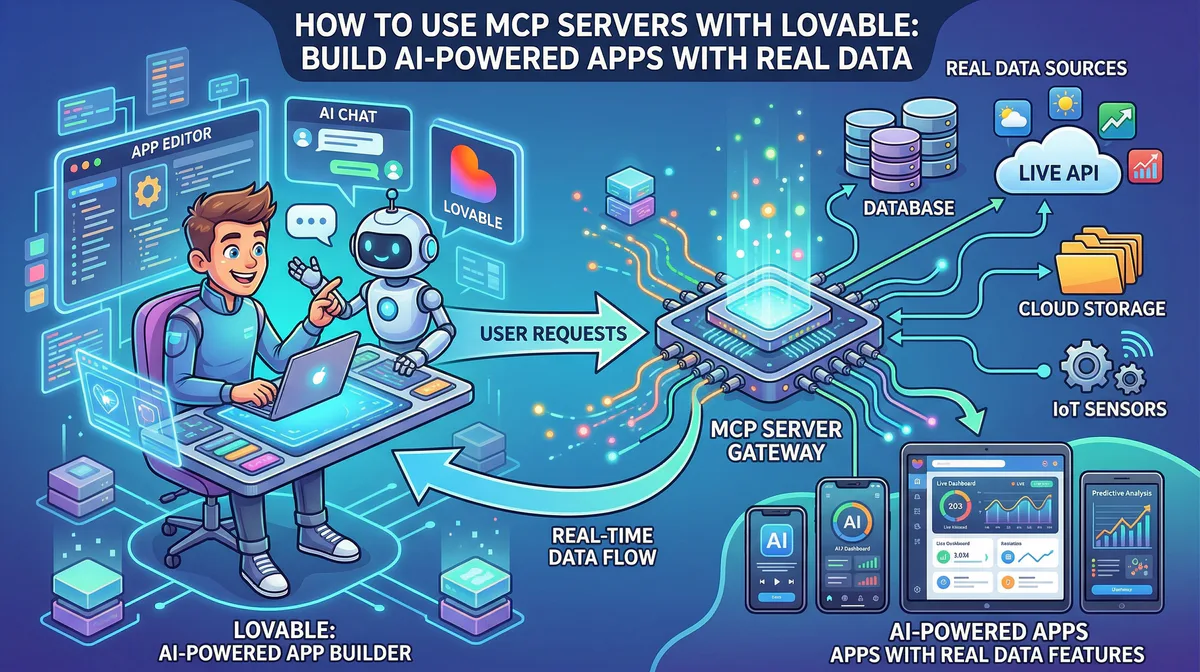
The Model Context Protocol (MCP) is an open standard that lets AI agents interact with external tools — your CRM, your database, your payment processor, your project management board — through a universal interface.
Before MCP, connecting an AI agent to Stripe required writing a custom integration. Connecting it to Salesforce required another one. GitHub, another. Jira, another. Every new tool multiplied the engineering cost by the number of AI systems you wanted to use it with.
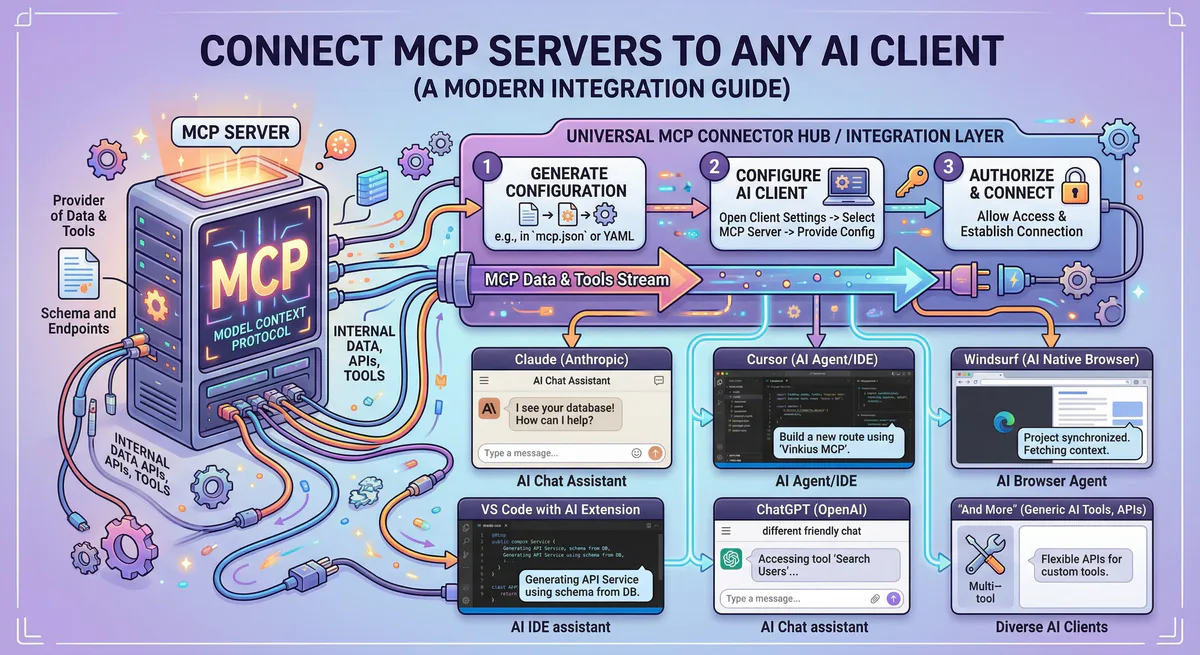
MCP collapsed that problem. You connect to an MCP server once, and every AI client that supports the protocol — Claude, Cursor, custom agents, local LLMs — can use it immediately.
The servers handle the API authentication, the JSON schema translation, and the error handling. Your agent just says “create a Jira ticket” and the MCP server figures out the rest.
Five automations you can deploy this week
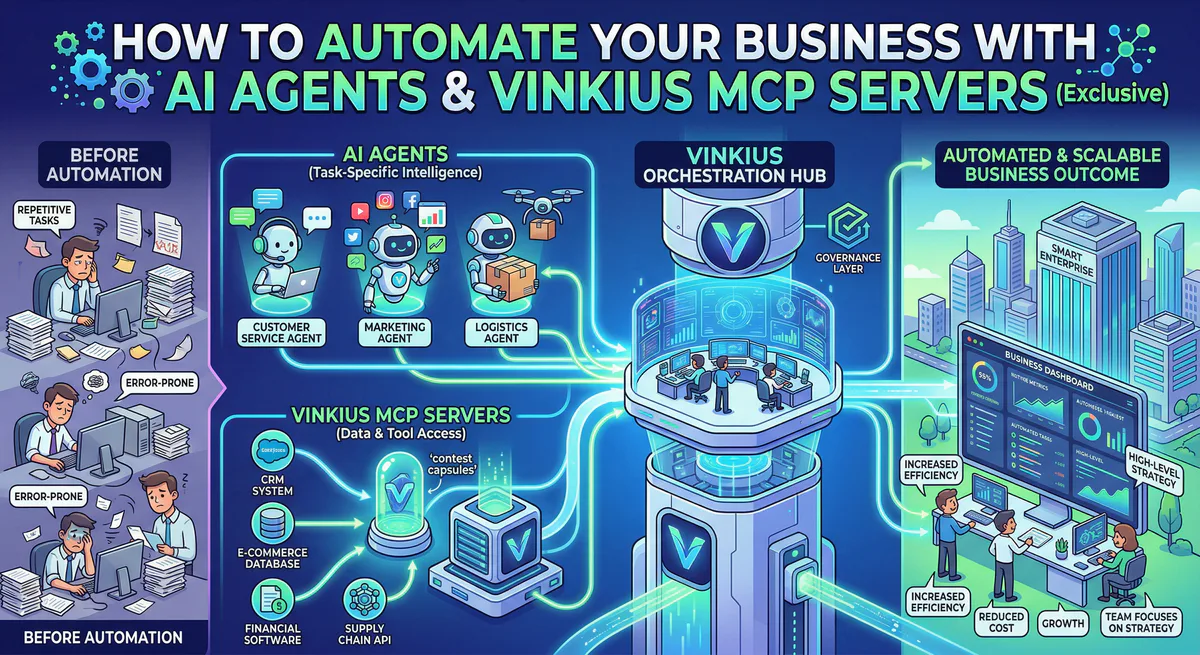
These aren’t hypothetical. These are the workflows our customers are running right now through our managed MCP gateway.
Customer support triage
Your agent monitors incoming support channels. When a ticket arrives, it uses the Jira MCP Server to check if there’s an existing issue. It queries the customer’s account status through the Salesforce MCP Server. If the issue is a known bug, the agent links the ticket to the existing Jira issue, updates the customer via Slack, and closes the loop.
What used to take a support engineer fifteen minutes happens in seconds. And every action is logged in our audit trail with a cryptographic hash chain.
CRM enrichment and lead qualification
A new lead hits your CRM. Your agent immediately uses the Firecrawl MCP Server to scrape the company’s website, extract key data points — size, industry, tech stack — and uses Perplexity AI to pull recent news and funding information. It enriches the contact record in HubSpot, scores the lead based on your qualification criteria, and routes high-value prospects to your sales team immediately.
Your sales reps stop spending two hours per day on manual research. The agent does it in real-time, for every lead, without human intervention.
Invoice processing and financial reconciliation
Your accounting team processes dozens of invoices per week. Your agent reads incoming invoices from Google Drive, extracts line items, cross-references them against purchase orders in your ERP, and flags discrepancies for review. If everything matches, it creates the payment record in Stripe and logs the transaction.
Because financial operations are high-risk, our gateway enforces semantic intent classification — every write operation goes through explicit approval before execution. The agent cannot autonomously process a payment that exceeds your configured thresholds.
Developer workflow automation
Your engineering team runs on GitHub. When a pull request is created, your agent reviews the changes, runs the test suite via Vercel, checks for security vulnerabilities through Snyk, and posts a summary in the PR thread. If the build is green and the review passes, it auto-merges.
If Sentry detects an error spike after deployment, the agent correlates the spike with the most recent merge, generates a regression report, and creates a rollback PR — all before your on-call engineer opens their laptop.
Meeting preparation and follow-up
Before a meeting, your agent queries Google Calendar for the attendee list, pulls relevant context from Notion — previous meeting notes, project status, open action items — and generates a briefing document. After the meeting, it updates the action items in Asana or Jira and sends a summary to the team on Slack.
What used to take thirty minutes of context-gathering becomes a two-sentence text to your AI assistant.
The security question you need to answer first
Before you automate anything, you need to answer one question: what happens when the agent makes a mistake?
An AI agent with unmediated access to your Stripe account, your production database, and your CRM can cause catastrophic damage through a single hallucination or prompt injection attack.
This is not a theoretical risk. Security researchers have documented thousands of compromised MCP servers in public registries. Malicious skills disguised as legitimate tools. Prompt injection vectors that trick agents into exfiltrating API keys.
Running AI agents in production without a governance layer is like giving an intern root access to your servers on their first day. The talent might be there. The guardrails are not.
A managed MCP gateway solves this by placing an execution firewall between the agent and every tool it wants to use:
- Credential isolation — Your API keys live in an encrypted vault. The agent never sees them.
- Semantic classification — Every tool call is categorized as
QUERY,MODIFY, orDESTRUCTIVEbefore execution. - DLP pipeline — Outbound payloads are scanned for PII, financial data, and credentials in real-time.
- Emergency kill switch — Revoke all access and terminate all connections with one click.
- Audit trail — Every action is hash-chained and cryptographically signed for compliance.
See how the security architecture works →
How to get started
The fastest path from “interested” to “in production”:
Week 1: Pick one workflow. Choose the most repetitive, time-consuming task your team does. Support triage, lead enrichment, invoice processing — whichever has the clearest ROI.
Week 1: Connect the servers. Create a free account. Browse the App Catalog and subscribe to the MCP servers your workflow needs. You’ll generate a connection token and add it to your AI client in under two minutes.
Week 2: Build the agent. Use Claude, Cursor, or your preferred AI client. Define the agent’s goal, connect it to your MCP servers, and test the workflow in a controlled environment. Our semantic classification will prevent any destructive actions during testing.
Week 2-3: Monitor and iterate. Use our audit logs to review what the agent is doing. Adjust the workflow based on actual execution traces. Expand the agent’s access gradually.
Week 4: Scale. Once the first workflow is validated, add more. Connect additional MCP servers. Build specialized agents for different teams — sales, engineering, operations. Each one governed by the same security infrastructure.
Building agents in code
Not every team uses Claude Desktop or Cursor. If you’re building custom agents in Python or TypeScript, here’s how to connect them to MCP servers through our gateway.
Notice something about every code example below: there are no transport fields, no headers, no Authorization tokens in request payloads. Just a URL.
That’s deliberate. The Vinkius AI Gateway embeds authentication directly in the URL path and auto-negotiates the transport protocol with every client. If your client supports Streamable HTTP, the gateway uses Streamable HTTP. If it only supports SSE, the gateway falls back to SSE. Your code doesn’t need to know or care. You point at the URL, the gateway handles the rest — protocol negotiation, credential injection, payload inspection, and audit logging. One URL. Zero configuration.
You don’t build anything. You don’t configure anything. You pick an MCP server from the Vinkius App Catalog, subscribe with one click, copy the URL, and paste it into your agent. That’s it. Every server is hardened and governed from day one — V8 sandbox isolation, DLP scanning, semantic classification, cryptographic audit trail, and an emergency kill switch. There is no “raw mode.” There is no way to bypass the governance layer. Every tool call, from every agent, through every server, passes through the firewall. You get enterprise-grade security without writing a single line of security code.
Direct MCP connection (Python)
The simplest path. Use the official MCP SDK to connect directly to a Vinkius-managed server:
from mcp import ClientSession
from mcp.client.streamable_http import streamablehttp_client

async def run_agent():
    # Connect to a Vinkius-managed MCP server
    # The token is generated in your Vinkius dashboard
    server_url = "https://edge.vinkius.com/YOUR_VINKIUS_TOKEN/jira-mcp"

    async with streamablehttp_client(server_url) as (r, w, _):
        async with ClientSession(r, w) as session:
            await session.initialize()

            # Discover available tools automatically
            tools = await session.list_tools()
            print(f"Available tools: {[t.name for t in tools.tools]}")

            # Call a tool — the gateway handles auth, DLP, and audit
            result = await session.call_tool(
                "search_issues",
                arguments={"query": "status = 'Open' AND priority = 'High'"}
            )
            print(result)
That’s it. The gateway handles the Jira API authentication, scans the response for PII through the DLP pipeline, and logs the execution in your audit trail. Your code never touches a Jira API key.
LangChain agent with MCP tools
If you’re building with LangChain, you can load MCP servers as native tools and let the agent reason over them:
from langchain_mcp_adapters.client import MultiServerMCPClient
from langgraph.prebuilt import create_react_agent
from langchain_anthropic import ChatAnthropic

# Define your Vinkius-managed MCP servers
# Token is embedded in the URL — no headers or transport config needed
# The Vinkius AI Gateway auto-negotiates the protocol
mcp_servers = {
    "jira": {
        "url": "https://edge.vinkius.com/YOUR_VINKIUS_TOKEN/jira-mcp"
    },
    "hubspot": {
        "url": "https://edge.vinkius.com/YOUR_VINKIUS_TOKEN/hubspot-mcp"
    },
    "slack": {
        "url": "https://edge.vinkius.com/YOUR_VINKIUS_TOKEN/slack-mcp"
    }
}

async def run_support_agent():
    model = ChatAnthropic(model="claude-sonnet-4-20250514")

    async with MultiServerMCPClient(mcp_servers) as client:
        tools = client.get_tools()

        agent = create_react_agent(
            model,
            tools,
            prompt="You are a support triage agent. When a ticket arrives, "
                   "check Jira for duplicates, look up the customer in HubSpot, "
                   "and post updates to Slack. Never delete anything."
        )

        result = await agent.ainvoke({
            "messages": [
                {"role": "user", "content": "New ticket from acme@example.com: "
                 "'Cannot access dashboard after password reset'. Triage this."}
            ]
        })
The agent discovers all tools from the three MCP servers, reasons about which ones to use, and chains them together autonomously. Every tool call routes through our gateway — credential isolation, semantic classification, and DLP are enforced on every execution.
CrewAI multi-agent team
CrewAI lets you build specialized agent teams where each crew member has a distinct role. Combined with MCP servers, you can create autonomous departments:
from crewai import Agent, Task, Crew
from crewai_tools import MCPServerAdapter

# Connect MCP servers through our gateway
# Token is embedded in the URL — no headers needed
mcp_adapter = MCPServerAdapter(
    servers={
        "firecrawl": "https://edge.vinkius.com/YOUR_VINKIUS_TOKEN/firecrawl-mcp",
        "hubspot": "https://edge.vinkius.com/YOUR_VINKIUS_TOKEN/hubspot-mcp",
        "perplexity": "https://edge.vinkius.com/YOUR_VINKIUS_TOKEN/perplexity-mcp",
    }
)

# Researcher — scrapes websites and pulls news
researcher = Agent(
    role="Lead Researcher",
    goal="Research incoming leads and extract company intelligence",
    tools=mcp_adapter.get_tools(["firecrawl", "perplexity"]),
    verbose=True
)

# CRM Manager — enriches and scores the lead
crm_manager = Agent(
    role="CRM Manager",
    goal="Enrich HubSpot contacts with research data and score leads",
    tools=mcp_adapter.get_tools(["hubspot"]),
    verbose=True
)

# Define the workflow
research_task = Task(
    description="Research {company_url}. Extract: industry, size, "
                "tech stack, recent funding, and key decision-makers.",
    agent=researcher,
    expected_output="Structured company profile with scoring data"
)

enrich_task = Task(
    description="Update the HubSpot contact for {email} with the research "
                "findings. Set lead score based on company fit criteria.",
    agent=crm_manager,
    expected_output="Confirmation that CRM record was updated"
)

# Run the crew
crew = Crew(
    agents=[researcher, crm_manager],
    tasks=[research_task, enrich_task],
    verbose=True
)

result = crew.kickoff(inputs={
    "company_url": "https://acmecorp.com",
    "email": "jane@acmecorp.com"
})
The Researcher agent scrapes the lead’s website and pulls recent news. The CRM Manager takes those findings and enriches the HubSpot contact. Two agents, three MCP servers, zero manual work — and every action governed by our gateway.
Claude Desktop / Cursor (zero code)
If your team doesn’t write code, you can connect MCP servers directly to Claude Desktop or Cursor with a single JSON config:
{
  "mcpServers": {
    "jira": {
      "url": "https://edge.vinkius.com/YOUR_VINKIUS_TOKEN/jira-mcp"
    },
    "hubspot": {
      "url": "https://edge.vinkius.com/YOUR_VINKIUS_TOKEN/hubspot-mcp"
    },
    "slack": {
      "url": "https://edge.vinkius.com/YOUR_VINKIUS_TOKEN/slack-mcp"
    }
  }
}
Paste this into your claude_desktop_config.json or .cursor/mcp.json. Replace the token with the one generated in your Vinkius dashboard. Claude or Cursor will discover all tools automatically and start using them in your conversations.
The companies that will lead in the next five years are the ones deploying AI agents now — not as experiments, but as production-grade teammates that execute real work, around the clock, under strict governance.
The infrastructure exists. The servers exist. The security exists.
The only question is whether you start this week or next quarter.
Start automating today. Browse the App Catalog to find the MCP servers your workflows need, or create a free account and connect your first agent in under two minutes.
Your agents need tools. We make them safe.
Pick an MCP server from the catalog. Subscribe. Copy the URL. Paste it into Claude, Cursor, or any client. One URL — DLP, audit trail, and kill switch included.
V8 sandbox isolation · Semantic DLP · Cryptographic audit trail · Emergency kill switch