Every HR team answers the same questions hundreds of times a year. “Who’s on PTO next week?” “How many open positions do we have?” “What’s our headcount by department?” “When does Maria’s probation end?” “What’s our attrition rate this quarter?”
The answers exist — in HiBob, Workday, BambooHR, or whatever HR platform your company uses. But getting them requires logging in, navigating to the right report, setting date filters, sometimes exporting to Excel, and formatting the data for whoever asked.
According to a 2024 survey by Sage, HR professionals spend an average of 14 hours per week on tasks that could be automated — with “answering employee questions about policies and records” ranking as the single largest time drain.
MCP servers eliminate this bottleneck. When your AI has direct, secure access to your HR platform, every people question becomes a 5-second conversation:
“Who in the engineering team is on PTO next week, and do we have coverage gaps for the on-call rotation?”
The AI checks PTO records in real time, cross-references with the team roster, and flags the gap. No dashboard navigation, no spreadsheet exports, no Slack thread asking “does anyone know if James is off next Tuesday?”
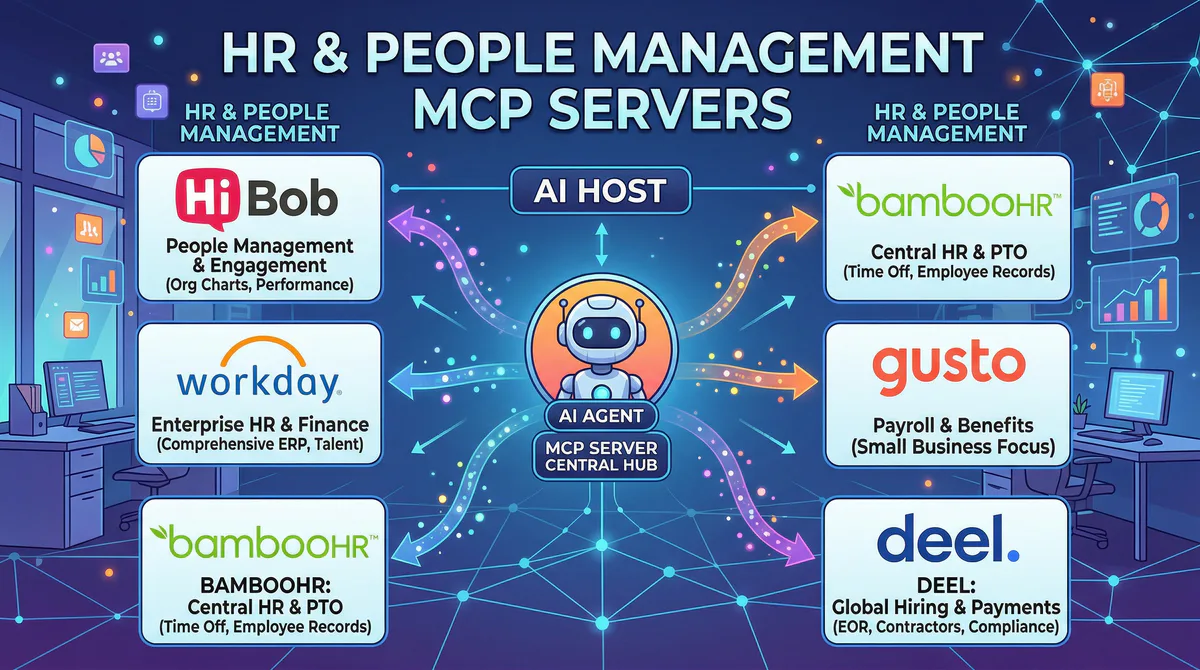
In this guide, we’ll cover every HR and people management MCP server in our catalog — what each one gives your AI access to, the real workflows it unlocks, and why connecting HR data through a managed, DLP-protected gateway is non-negotiable.
Why HR Data Requires the Strongest Security
Before diving into specific platforms, it’s critical to understand why HR MCP servers are different from every other category.
HR platforms contain the most sensitive personal data in any organization: full legal names, home addresses, Social Security numbers, bank account information, salary figures, medical leave records, performance ratings, disciplinary notes, and immigration status data.
In most jurisdictions — GDPR in Europe, CCPA in California, PIPEDA in Canada — unauthorized exposure of this data triggers mandatory breach notifications, regulatory fines, and potential lawsuits. This is “Your Money or Your Life” (YMYL) data in its purest form.
This is why we built our DLP engine with HR data as the primary use case. When your AI queries your HR platform through our gateway:
- SSNs and tax IDs are automatically redacted →
[REDACTED-SSN] - Bank account numbers are automatically redacted →
[REDACTED-BANK] - Home addresses are automatically redacted unless your DLP rules explicitly allow them
- Salary figures are handled per your configuration — some orgs allow aggregate data but redact individual salaries
- Medical and disability information is redacted by default with no override option
The AI gets the operational answers it needs (“3 people on PTO next week”) without ever seeing the sensitive personal details behind those answers.
Enterprise HR Platforms
HiBob MCP
HiBob (marketed as “Bob”) is the modern people management platform built for mid-size and scaling organizations — typically 100 to 5,000 employees. It’s designed around the principle that HR should be human-centric rather than process-centric, which means its data model is rich with people context: personal timelines, onboarding journeys, engagement signals, and team dynamics.
Companies like Monzo, VaynerMedia, Fiverr, and Happy Socks use HiBob as their HR system of record.
What your AI can do once connected:
- Employee directory search — find anyone by name, department, location, manager, hire date, or custom field
- PTO and leave management — check who’s on leave today, this week, or next month; verify PTO balances; identify coverage gaps
- Org chart navigation — understand reporting structures, find who reports to whom, check span of control
- Onboarding monitoring — see which new hires have incomplete onboarding tasks and what’s overdue
- People analytics — headcount by department, tenure distribution, growth rate, and demographic breakdowns
- Cycle data — access performance review data, calibration results, and goal progress
Real-world workflows this unlocks:
Management intelligence. A VP asks before a leadership meeting: “What’s the current headcount by department, and how has it changed since January?” The AI queries HiBob and returns: “Engineering: 47 (+5 since Jan), Product: 18 (+2), Sales: 31 (-3), Marketing: 12 (+1). Total: 108. Net growth: +5.”
Coverage planning. An engineering manager asks on Friday: “Who in my team is on PTO next week? Do we have coverage for the on-call rotation?” The AI checks HiBob PTO records: “James (Mon-Wed) and Priya (all week). On-call rotation shows Priya was scheduled for Wednesday — you’ll need to reassign.”
Onboarding accountability. Your HR Business Partner asks: “Which new hires from this month have incomplete onboarding tasks?” The AI scans onboarding checklists in HiBob: “3 of 7 new hires have incomplete tasks. Alex: missing emergency contact (due 3 days ago). Sonia: laptop setup not confirmed. Tom: compliance training not started.”
Data-driven decisions. Before a board meeting, the CHRO asks: “What’s our 12-month rolling attrition rate by department, and how does it compare to the same period last year?” The AI calculates from HiBob’s employee timeline data and presents a comparison table.
Example prompts:
- “Who in the marketing team is on PTO next week?”
- “Show me the org chart for the engineering department”
- “Which new hires from this month have incomplete onboarding tasks?”
- “What’s the average tenure by department?”
- “How has our headcount changed in Q1 vs. Q4 last year?”
- “List all employees whose probation ends in the next 30 days”
Connect: HiBob MCP in our App Catalog →
Workday MCP
Workday is the enterprise standard for Human Capital Management (HCM), used by over 10,000 organizations worldwide — including 60% of the Fortune 500. It handles everything from core HR and payroll to talent management, workforce planning, and financial management. If your organization has 1,000+ employees, there’s a good chance Workday is your HR system of record.
Connecting Workday to your AI is the difference between “submit a report request to HR analytics and wait 3 days” and “ask the question and get the answer now.”
What your AI can do once connected:
- Workforce data queries — headcount by department, cost center, region, job family, or any custom dimension
- Compensation analytics — salary band analysis, compensation ratio, and pay equity metrics (with DLP protection)
- Organizational intelligence — reporting lines, span of control, open positions, and successor planning data
- Workforce planning — headcount budgets vs. actuals, forecast vs. reality, time-to-fill metrics
- Compliance data — training completion, certification status, and regulatory compliance tracking
Real-world workflows this unlocks:
Board-ready people metrics. Your CHRO asks before the quarterly board meeting: “Give me current headcount by region, 12-month attrition rate, and open requisitions by department.” The AI pulls all three metrics from Workday in one query — a task that normally requires three separate Workday reports.
Compensation equity analysis. Your HR analytics team asks: “What’s the comp ratio distribution by gender across pay grades?” The AI queries Workday’s compensation data and surfaces any gaps — with salary figures redacted by default but statistical aggregates preserved.
Workforce planning. A VP of Engineering asks: “We budgeted for 12 new hires in Q1. How many have we actually filled, and what’s the average time-to-fill?” The AI pulls recruiting and workforce planning data: “8 of 12 filled. Average time-to-fill: 34 days. 4 remaining positions all in the ‘interview’ stage.”
Example prompts:
- “What’s our current headcount by region?”
- “Show me attrition rate trends for the last 4 quarters”
- “How many open requisitions do we have in the sales department?”
- “Compare average tenure in engineering vs. product”
- “Which cost centers have exceeded their headcount budget?”
Connect: Workday MCP in our App Catalog →
Mid-Market HR Platforms
BambooHR MCP
BambooHR is the popular HR platform for small and mid-size businesses — typically 50 to 1,000 employees. It covers the core HR lifecycle: hiring, onboarding, employee records, time-off tracking, performance management, and basic reporting. Over 35,000 companies worldwide use BambooHR.
What your AI can do once connected:
- Employee directory — search profiles, access employment details, check reporting relationships
- Time-off management — pending requests, approval status, PTO balances, and usage patterns
- Performance data — review scores, goal progress, and 360 feedback summaries
- Hiring pipeline — applicant tracking data, stage progression, and time-to-hire metrics
- Custom reports — generate reports from any employee data field combination
Real-world workflows this unlocks:
Proactive manager support. A people ops manager asks: “Which employees have upcoming work anniversaries this month?” The AI checks tenure data and responds: “4 employees: Jane (3 years, April 12), Carlos (5 years, April 18), Lisa (1 year, April 22), Ahmed (2 years, April 29).” The manager can prepare recognition in advance instead of being surprised.
Recruiting velocity tracking. Your head of talent asks: “What’s our current hiring pipeline for the marketing team? How many candidates are in each stage?” The AI pulls ATS data from BambooHR: “12 applicants → 5 phone screens → 3 on-site → 1 offer stage.”
Example prompts:
- “How many PTO requests are pending approval this week?”
- “Show me all employees hired in the last 90 days”
- “What’s the distribution of performance ratings across the company?”
- “Which employees have upcoming work anniversaries this month?”
Connect: BambooHR MCP in our App Catalog →
Gusto MCP
Gusto handles payroll, benefits, and HR compliance for over 300,000 small businesses in the US. It’s the payroll system of choice for startups and SMBs because it simplifies the most complex part of employing people: making sure everyone gets paid correctly and on time, while staying compliant with tax regulations.
What your AI can do once connected:
- Payroll data — run history, total amounts, deductions, and tax withholdings (DLP-protected)
- Benefits enrollment — eligibility status, enrollment progress, and coverage details
- Compensation details — individual and aggregate salary data (configurable DLP rules)
- Tax compliance — filing status, deadlines, and outstanding obligations
Real-world workflows this unlocks:
Payroll intelligence. Your finance manager asks before close: “When was the last payroll run, what was the total, and are there any outstanding tax filings?” The AI queries Gusto: “Last run: April 10, total: $127,450. All federal filings current. State: California Q1 filing due April 30.”
Benefits gap detection. Your HR coordinator asks: “Which employees haven’t enrolled in benefits yet? Who’s past the enrollment deadline?” The AI identifies: “3 employees haven’t enrolled. 1 is past the 30-day enrollment window — flagging for manual review.”
Why payroll data needs DLP: Gusto data contains the triad of sensitive financial data — salaries, SSNs, and bank accounts. Our DLP engine ensures:
- SSNs →
[REDACTED] - Bank accounts →
[REDACTED] - Individual salaries → visible only if your DLP rules explicitly allow it
- Aggregate payroll data (department totals, company-wide averages) → always visible
Example prompts:
- “When was the last payroll run and what was the total amount?”
- “Which employees haven’t enrolled in benefits yet?”
- “Show me the total payroll cost for the engineering team this quarter”
- “Are there any outstanding tax filings?”
Connect: Gusto MCP in our App Catalog →
Deel MCP
Deel manages international contractors, employees, and global payroll across 150+ countries. For remote-first companies hiring globally — and there are more of them every quarter — Deel is the platform that handles contracts, compliance, payments, and work permits across jurisdictions.
What your AI can do once connected:
- Contractor payment status — upcoming payments, completed payouts, and payment history
- Compliance monitoring — contractor vs. employee classification, country-specific requirements, and regulatory risks
- Contract management — active contracts, renewal dates, and amendment history
- Global workforce intelligence — headcount by country, currency exposure, and total contractor spend
Real-world workflows this unlocks:
Global workforce overview. Your CFO asks: “What’s our headcount breakdown by country, and what’s the total contractor spend this quarter?” The AI queries Deel and responds: “US: 45, UK: 12, Germany: 8, Brazil: 6, Philippines: 15. Total contractor spend Q1: $234,500.”
Contract renewal alerting. You ask: “Which contracts expire in the next 30 days?” The AI flags: “7 contracts expiring. 3 in LATAM (renewal requires 30-day notice — action needed this week), 4 in EU (auto-renew unless cancelled).”
Example prompts:
- “Which contractor payments are due this week?”
- “Show me compliance status for our team in Germany”
- “List all contracts expiring in the next 30 days”
- “What’s our headcount breakdown by country?”
Connect: Deel MCP in our App Catalog →
The Multi-Tool HR Workflow
When you connect multiple HR tools, your AI becomes a unified people intelligence layer:
| Question | Tool used | What it pulls |
|---|---|---|
| ”Who’s on PTO next week?” | HiBob/BambooHR MCP | PTO calendar data |
| ”Do we have engineering coverage?” | HiBob MCP | Org chart + team assignments |
| ”What’s the cost impact of the open positions?” | Workday MCP | Headcount budget vs. actual |
| ”Are we paying contractors on time?” | Deel MCP | Payment status + due dates |
| ”What’s our total people cost this quarter?” | Gusto MCP | Payroll totals by department |
One conversation. Complete people intelligence. Zero dashboard navigation.
The HR Security Stack (Included with Every Connection)
| Protection | How it works |
|---|---|
| DLP Redaction | SSNs, bank accounts, addresses, and medical data automatically removed from all responses |
| Encrypted Vault | HR platform API keys stored with AES-256 encryption — never on your device |
| Cryptographic Audit | Every people data access logged with tamper-proof signatures |
| Kill Switch | Instantly revoke any connection — critical when an HR team member leaves |
| Per-Token Isolation | Each user gets their own connection — no shared credentials across the team |
| Zero Retention | People data passes through our gateway and is discarded — we never store employee records |
Internal Linking: Related Cluster Guides
- CRM & Sales MCP Servers — Salesforce, HubSpot, Pipedrive
- Finance & Accounting MCP Servers — QuickBooks, Xero, FreshBooks
- Customer Support MCP Servers — Zendesk, Freshdesk, Intercom
- Communication MCP Servers — Slack, Zoom, Teams
- The Complete MCP Server Directory — 2,500+ apps across every category
How to Connect Any HR Platform
- Go to our App Catalog
- Search for your platform (HiBob, Workday, BambooHR, Gusto, or Deel)
- Click “Subscribe”
- Copy the connection URL
- Paste into your AI tool (Claude, Cursor, ChatGPT, VS Code, or Lovable)
Time: under 2 minutes. Every additional HR tool takes 30 seconds.
Start Connecting
Every people question in your company deserves a 5-second answer. These connections make that possible — with the strongest security stack in the market, because your people data deserves nothing less.
Need an HR platform that’s not in the catalog? Email us at support@vinkius.com — we add new servers every week.
Your agents need tools. We make them safe.
Pick an MCP server from the catalog. Subscribe. Copy the URL. Paste it into Claude, Cursor, or any client. One URL — DLP, audit trail, and kill switch included.
V8 sandbox isolation · Semantic DLP · Cryptographic audit trail · Emergency kill switch