If you’ve been following the AI space, you’ve seen “MCP” mentioned everywhere. At developer conferences, in GitHub repos, in product announcements from Anthropic, Google, and NVIDIA.
But most explanations either drown you in jargon or oversimplify it to the point of being useless.
This is the guide we wish existed when we started building our infrastructure. It’s written for developers, architects, and technical leaders who need to understand what the Model Context Protocol actually is, why it matters, and how to start using it today.
The Problem MCP Solves
An AI model — Claude, GPT, Gemini, or a local Ollama rig — is essentially a brain in a jar. It can reason, generate text, and write code. But it cannot inherently access your database. It cannot read your Slack messages. It cannot query your CRM.
Before MCP, if you wanted your AI assistant to interact with an external tool, you had to write custom integration code. Every combination of AI model and tool required its own bespoke wrapper. If you had 10 AI tools and 10 external services, you needed up to 100 integrations.
This created what the industry calls the N×M problem. It didn’t scale. It was fragile. When a third-party API changed, your integration broke silently, and the AI started hallucinating instead of executing.
The Model Context Protocol (MCP) eliminates this problem entirely.
What MCP Actually Is
MCP is an open-source protocol — originally introduced by Anthropic in late 2024 — that standardizes how AI applications connect to external tools, data sources, and services.
The analogy that stuck: MCP is the USB-C port for AI.
Before USB-C, you needed a different cable for every device. After USB-C, one port handles everything — power, data, video. MCP does the same thing for AI. You build a connector once, and it works with every AI application that supports the protocol.
You don’t need to rewrite your Stripe integration when you switch from Claude to GPT. You don’t need to maintain separate codebases for Cursor and Windsurf. The MCP server handles the tool, and the MCP client inside your AI host handles the connection.
How MCP Works
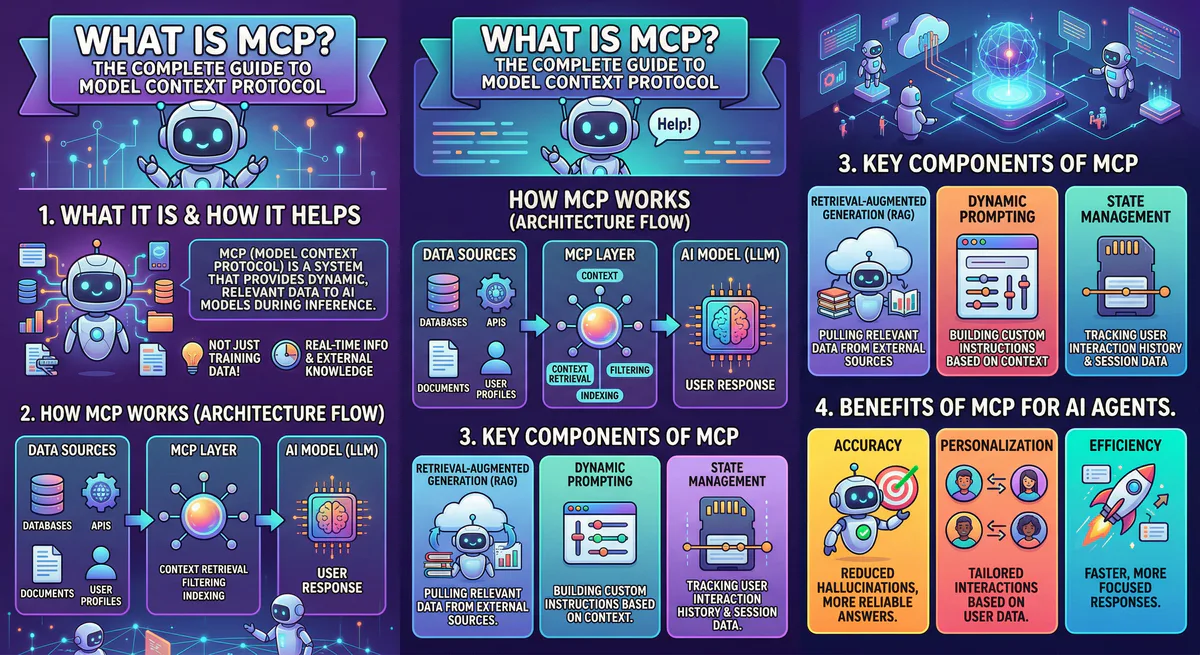
The architecture is straightforward. Three components:
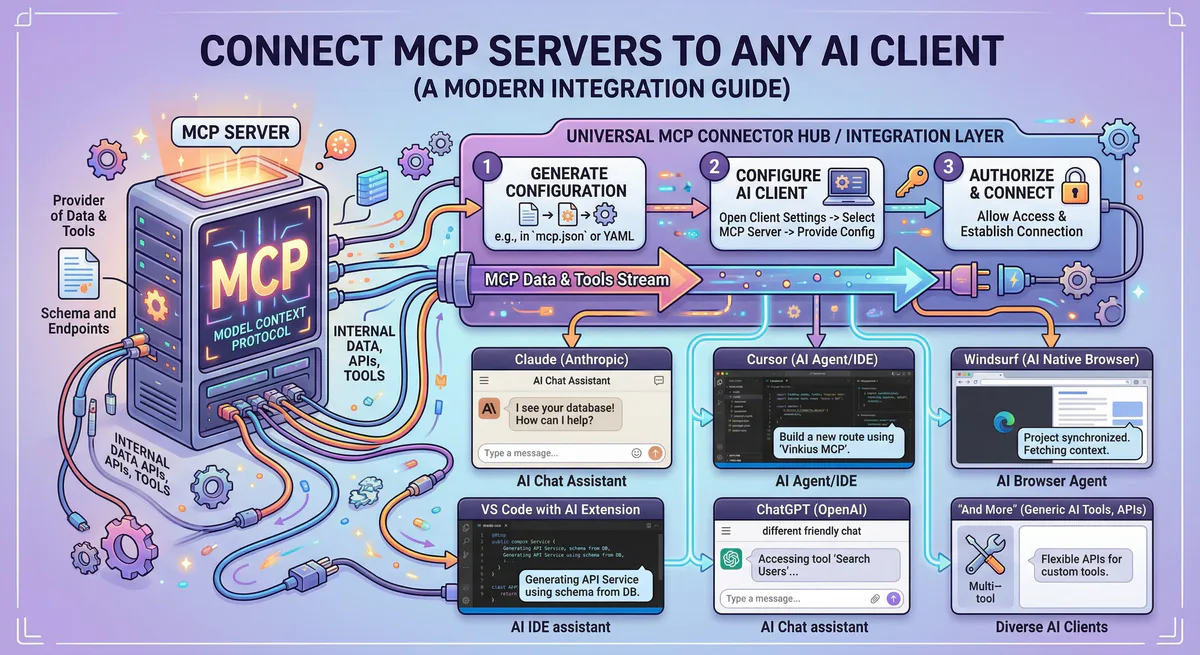
MCP Host. The AI application you’re using — Claude Desktop, Cursor, Windsurf, OpenClaw, or a custom agent built with LangChain or the Claude Agent SDK. This is where the intelligence lives.
MCP Client. A lightweight layer inside the host that manages connections to one or more MCP servers. It handles discovery, authentication, and message routing.
MCP Server. A small program that wraps a specific tool or data source and exposes it to the AI through a standardized interface. An MCP server for GitHub exposes tools like “create issue,” “list pull requests,” “merge branch.” An MCP server for PostgreSQL exposes “run query” and “list tables.”
The protocol runs on JSON-RPC 2.0 and supports two transport mechanisms:
- stdio — for local servers running on your machine (the AI host starts the server process directly)
- HTTP + SSE (Server-Sent Events) — for remote, cloud-hosted servers
When your AI agent needs to perform an action, the flow is: the host sends a request through the MCP client → the client routes it to the correct MCP server → the server executes the action (query a database, call an API, read a file) → and returns the result back to the AI in a structured JSON response.
The Three Primitives
Every MCP server can expose three types of capabilities:
Tools. Functions the AI can call to perform actions. “Send an email.” “Create a Jira ticket.” “Update a CRM record.” Tools are the action layer — they let the AI do things, not just read things.
Resources. Data the AI can read. File contents, database schemas, API documentation. Resources give the AI context without requiring it to call a function. Think of them as the information layer.
Prompts. Pre-defined instruction templates that guide the AI’s behavior for specific tasks. A “code review” prompt template tells the AI exactly how to analyze a pull request using data from the GitHub MCP server. They reduce hallucination by constraining the AI’s behavior to proven patterns.
MCP vs REST APIs
This is the question we hear constantly. “Why can’t I just use my existing REST API?”
You can. And you should. MCP doesn’t replace your APIs — it wraps them in an AI-native interface.
The difference is in who is consuming the interface:
- A REST API is designed for software developers to call from code, with fixed endpoints, typed parameters, and human-readable documentation.
- An MCP server is designed for AI models to call autonomously, with dynamic tool discovery, built-in context management, and structured intent-to-action translation.
When you connect an AI agent to a raw REST API, the agent needs to be told exactly which endpoint to hit, what parameters to pass, and how to interpret the response. You hardcode all of that into a custom integration.
When you connect the same agent to an MCP server wrapping that API, the agent discovers the available tools on its own. It reads the tool descriptions, understands the parameters, and calls the right function based on the user’s natural language intent. No hardcoded endpoints. No brittle glue code.
MCP is the orchestration layer. REST is the plumbing underneath.
MCP vs RAG
Another common confusion. RAG (Retrieval-Augmented Generation) and MCP solve different problems:
- RAG is a pattern — a technique for feeding relevant documents into an AI model’s context window to improve answer accuracy. It is primarily read-only.
- MCP is a protocol — a standardized communication layer that enables both reading data and performing actions. You can build a RAG pipeline on top of MCP, but MCP can do far more than retrieval.
If RAG is the library card catalog, MCP is the entire library infrastructure — the catalog, the checkout system, the inter-library loan network, and the security system.
Why MCP Matters Now
Three converging forces made MCP essential in 2026:
The agentic shift. AI moved from answering questions to executing autonomous, multi-step workflows. An agent that can only generate text is useless in production. An agent that can query a database, analyze the results, update a ticket in Jira, and notify the team on Slack — that’s valuable. MCP is the protocol that makes this chain of actions possible.
NVIDIA’s endorsement. At GTC 2026, Jensen Huang called OpenClaw — which uses MCP natively — “the operating system for personal AI.” NVIDIA subsequently launched the NemoClaw stack for enterprise deployments. When the company that powers the vast majority of AI hardware endorses a protocol, the ecosystem follows.
Security requirements. Raw tool access is dangerous. An autonomous AI agent with unmediated access to your production database can cause irreversible damage through a single prompt injection. The industry realized that MCP needs a governance layer — a managed gateway that authenticates, classifies, and audits every tool call before it executes. This is exactly what we built →
How to Connect an MCP Server to Claude Desktop
The fastest way to experience MCP:
Open Claude Desktop. Go to Settings → Developer → Edit Config. This opens the claude_desktop_config.json file. Add a server:
{
  "mcpServers": {
    "your-server-name": {
      "url": "https://your-mcp-server-url/mcp"
    }
  }
}
Save the file. Restart Claude Desktop.
That’s it. Claude will discover the tools exposed by the server and start using them in your conversations.
For Cursor, the process is similar — open Settings, search for “MCP,” and add your server to the .cursor/mcp.json file.
For remote, cloud-hosted MCP servers — like the ones available in our App Catalog — you get a pre-configured connection URL with a scoped authentication token. Copy it, paste it, and your AI is live.
The Security Problem Nobody Talks About
Here is the uncomfortable truth about MCP in 2026.
The protocol itself is elegant. But the default security posture of most deployments is dangerously permissive.
When you run an MCP server locally, API keys sit on your machine in plain text. If the AI agent is compromised through an indirect prompt injection — a malicious instruction hidden inside a document the agent reads — the attacker inherits every credential the agent has access to.
Community-built MCP servers on public registries are completely unvetted. Security researchers have documented cases of malicious servers designed to exfiltrate data.
And most MCP hosts provide zero audit trail. If an agent executes a destructive action at 3 AM, there is no forensic log to determine what happened.
This is why a managed MCP gateway is not optional for production deployments. It is essential infrastructure.
A managed gateway provides:
- Centralized credential storage — secrets never touch the agent’s local environment
- Semantic intent classification — destructive actions are blocked before they execute
- Cryptographic audit trail — every tool call is hash-chained and immutable
- Data Loss Prevention — PII and sensitive data are scrubbed in real-time before leaving the perimeter
- Emergency kill switch — revoke all tokens and terminate all connections with a single click
See how our managed MCP gateway works →
Getting Started
If you’re evaluating MCP for your team or organization, here is the practical path:
For prototyping: Install Claude Desktop or Cursor. Add a local MCP server (the official GitHub server or the filesystem server are great starting points). Experiment with natural language tool invocation.
For production: Don’t run raw MCP servers on developer laptops. Use a managed MCP gateway that handles authentication, governance, audit logging, and DLP. Subscribe to pre-built, version-managed servers instead of writing fragile integration scripts.
For building custom servers: Use the official Python SDK (pip install mcp) or the TypeScript SDK (npm install @modelcontextprotocol/sdk). Start with the FastMCP framework for rapid prototyping. Test your server using the MCP Inspector before deploying.
Ready to connect your AI agents to real tools? Browse our App Catalog — thousands of production-ready MCP servers, secured behind a managed gateway with built-in DLP, audit logging, and financial governance. Create a free account →
Your agents need tools. We make them safe.
Pick an MCP server from the catalog. Subscribe. Copy the URL. Paste it into Claude, Cursor, or any client. One URL — DLP, audit trail, and kill switch included.
V8 sandbox isolation · Semantic DLP · Cryptographic audit trail · Emergency kill switch