The legal industry has the highest cost-per-click in digital advertising — and for good reason. Legal services command premium pricing, client lifetime values are measured in tens of thousands of dollars, and the research workload is enormous. According to Clio’s 2025 Legal Trends Report, lawyers spend only 2.5 hours per 8-hour workday on billable work. The other 5.5 hours go to administrative tasks, legal research, document preparation, and correspondence.
AI agents connected to legal tools via MCP can recover a significant portion of those lost hours. Not by replacing legal judgment — but by accelerating the research, document preparation, and compliance monitoring that consume the majority of a lawyer’s day:
“Search Bloomberg Law for all recent precedents on data privacy class actions in California. Summarize the key rulings. Cross-reference with our open cases in Cloudlex. Draft a research memo.”
One prompt. Multiple legal databases. The kind of cross-platform legal research that would take a junior associate 4-6 hours — delivered in minutes.
We host production-grade, governed MCP servers for legal platforms in our App Catalog.
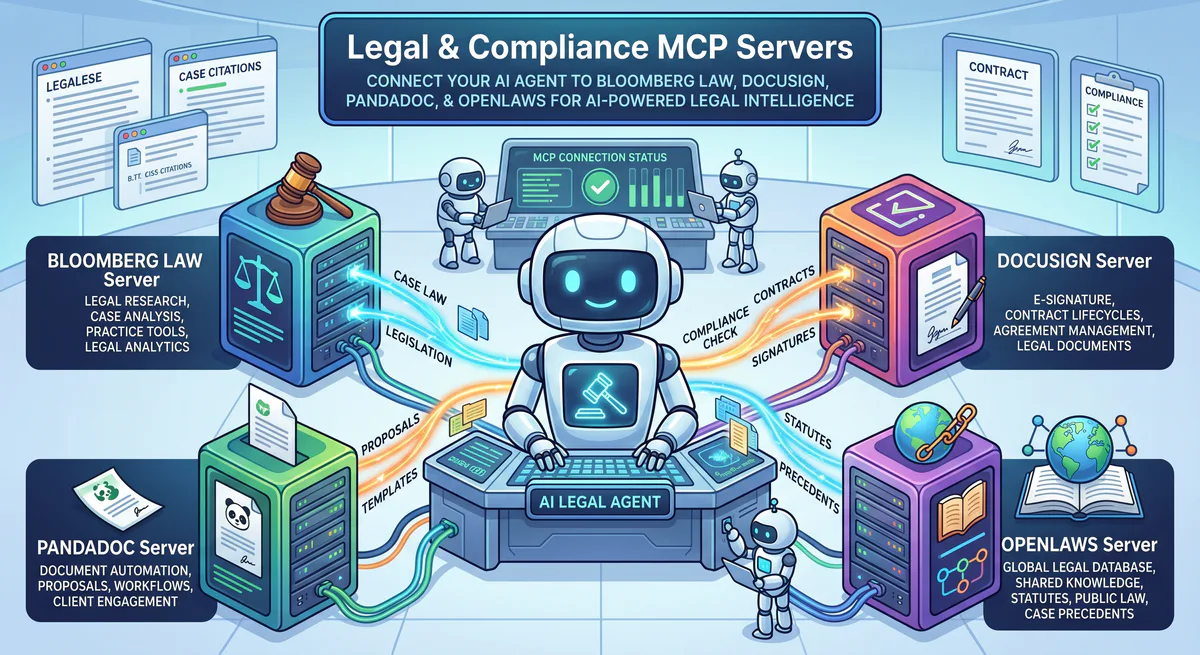
The Legal MCP Landscape
| Platform | MCP Server | Primary Use Case |
|---|---|---|
| Bloomberg Law | Bloomberg Law MCP | Legal research, case law, regulatory analysis, litigation analytics |
| Cloudlex | Cloudlex Legal MCP | Case management, intake, calendaring, document management |
| DocuSign | DocuSign MCP | E-signatures, contract lifecycle, envelope management |
| PandaDoc | PandaDoc MCP | Proposals, contracts, e-signatures, templates |
| Spellbook Legal AI | Spellbook Legal AI MCP | AI-powered contract drafting and review |
| LEAP Legal | LEAP Legal MCP | Practice management, billing, trust accounting |
| MyCase | MyCase Legal MCP | Client portal, case management, time tracking |
| Justia | Justia Legal Intelligence MCP | Free case law, regulations, legal reference |
| OpenLaws | OpenLaws MCP | Open-source legal data, EU legislation |
| BC Laws | BC Laws API MCP | British Columbia legislation |
Deep-Dive: Legal Research with Bloomberg Law MCP
Bloomberg Law is the gold standard for legal research — case law, statutory analysis, regulatory tracking, and litigation analytics. The Bloomberg Law MCP connects your AI to this vast legal database.
Real-World Workflow: Precedent Research
“Find all federal court decisions from the last 2 years involving data privacy class actions under CCPA. Identify which rulings established new precedent on ‘statutory damages’ thresholds. Summarize the key arguments that succeeded.”
AI response: “CCPA Class Action Precedent Research — Federal Courts (2024-2026):
12 relevant decisions found. 4 established new precedent on statutory damages:
-
Martinez v. DataBroker Inc. (9th Cir., 2025):
- Held: Statutory damages of $100-$750 per consumer per incident apply cumulatively, not per-class
- Impact: Exponentially increases potential exposure for large-scale data breaches
- Key argument: Plaintiff successfully argued that each individual data element constitutes a separate ‘incident’
- Citation: 2025 WL 3847291
-
Johnson v. RetailCorp (C.D. Cal., 2025):
- Held: Plaintiffs must demonstrate ‘actual harm’ beyond mere statutory violation for damages above $100
- Impact: Limits speculative damage claims; requires concrete evidence of identity theft or financial harm
- Key argument: Defense successfully cited Spokeo v. Robins for standing requirements
-
Chen v. SocialMedia Labs (N.D. Cal., 2026):
- Held: ‘Dark patterns’ in consent flows constitute violations regardless of user agreement
- Impact: Invalidates consent obtained through manipulative UI design
- Key argument: Expert testimony on UX psychology was decisive
-
Williams v. HealthApp Inc. (S.D. Cal., 2026):
- Held: Health-adjacent data (fitness tracking, sleep patterns) qualifies as ‘sensitive personal information’ under CCPA §1798.140(ae)
- Impact: Expands CCPA scope to wellness/fitness data
- Key argument: Legislative history cited to establish broad interpretation of ‘sensitive’
Cross-reference: Checking Cloudlex for open CCPA cases in our firm… Found 3 active CCPA matters. Williams ruling is directly applicable to Case #2024-1847 (HealthTrack v. Our Client) — the expanded scope of ‘sensitive personal information’ may strengthen our defense position.
Draft a research memo incorporating these findings?”
Deep-Dive: Contract Lifecycle with DocuSign + PandaDoc
Contract management is one of the highest-volume legal workflows. The DocuSign MCP handles e-signatures and envelope tracking, while PandaDoc MCP manages proposals and contract creation.
Real-World Workflow: Contract Status Dashboard
“Show me all contracts pending signature in DocuSign. Which are overdue (sent more than 5 days ago)? For overdue contracts, check PandaDoc for the original proposal status and deal value.”
AI response: “Contract pipeline — April 14, 2026:
DocuSign pending signatures: 14 envelopes
| Contract | Sent | Days | Status | Signers | PandaDoc Deal Value |
|---|---|---|---|---|---|
| Acme Corp MSA | Apr 6 | 8 | ⚠️ Overdue | 0/2 signed | $240,000 ARR |
| DataFlow NDA | Apr 11 | 3 | ✅ On time | 1/2 signed | — |
| TechStart SaaS Agreement | Apr 2 | 12 | 🔴 Overdue | 0/3 signed | $89,000 ARR |
| CloudFirst SOW | Apr 9 | 5 | ⚠️ Overdue | 0/1 signed | $45,000 project |
| … (10 more on time) |
⚠️ 3 contracts overdue — total deal value at risk: $374,000
Priority actions:
- TechStart SaaS Agreement (12 days, $89K) — No signers have opened the document. PandaDoc shows the proposal was ‘Content Approved’ 3 weeks ago. This is a signing/logistics issue, not a deal issue. Send a reminder email.
- Acme Corp MSA (8 days, $240K) — Signer 1 (Legal VP) viewed but didn’t sign on April 9. Possible: reviewing with internal counsel. Follow up with a call.
- CloudFirst SOW (5 days, $45K) — Just hit the overdue threshold. The signer hasn’t opened the envelope. Automatic reminder triggered.”
Multi-Tool Legal Workflow Table
| Workflow | Tools Combined | What You Ask |
|---|---|---|
| Precedent research + case correlation | Bloomberg Law + Cloudlex | ”Find relevant precedents and link to our open cases” |
| Contract status dashboard | DocuSign + PandaDoc | ”Which contracts are overdue? What’s the deal value at risk?” |
| Regulatory compliance monitoring | Bloomberg Law + OpenLaws | ”Any new regulations affecting our clients’ industry?” |
| Client intake + contract generation | Cloudlex + PandaDoc + DocuSign | ”Create a retainer agreement from intake data and send for signature” |
| Time-to-close analysis | DocuSign + PandaDoc + Google Sheets | ”Average time from proposal to signed contract, by deal size” |
| Legal research memo | Bloomberg Law + Notion + Slack | ”Research this topic and post the memo to #legal-research” |
Security: YMYL and Attorney-Client Privilege
Legal data is among the most sensitive in any organization. Attorney-client privilege, work product doctrine, and regulatory confidentiality requirements make security non-negotiable.
How We Protect Legal Connections
| Protection | What it does |
|---|---|
| Credential Isolation | Bloomberg Law, DocuSign, and all legal platform credentials in encrypted vault |
| DLP Engine | Client names, case numbers, and privileged communications can be redacted per configuration |
| YMYL Compliance | Legal content triggers enhanced governance — every query logged with full audit trail |
| No data retention | We do not store or cache legal research results, contract contents, or case data |
| Tenant Isolation | Multi-tenant firms can configure per-client access restrictions |
| Kill Switch | Disable any connection instantly — critical for client off-boarding |
How to Set It Up
- Go to our App Catalog
- Subscribe to your legal tools:
- Copy URLs → paste into Claude, Cursor, or ChatGPT
- Start researching
Internal Linking: Related Guides
- Security & Compliance MCP Servers → — Snyk, CrowdStrike, Vanta
- Finance & Accounting MCP Servers → — QuickBooks, Xero
- MCP API Key Management → — From plaintext to zero-trust
- Context Bleeding → — Why data leakage prevention matters
- The Complete MCP Server Directory → — 2,500+ apps
Start Building Your Legal Intelligence Agent
Your billable hours are worth too much to spend on data aggregation. Let your AI handle the research while you focus on strategy and client relationships.
Need a custom legal setup? Email support@vinkius.com.
Your agents need tools. We make them safe.
Pick an MCP server from the catalog. Subscribe. Copy the URL. Paste it into Claude, Cursor, or any client. One URL — DLP, audit trail, and kill switch included.
V8 sandbox isolation · Semantic DLP · Cryptographic audit trail · Emergency kill switch