The average P1 incident takes 47 minutes to resolve, according to FireHydrant’s 2024 Incident Management Report. But only 12 of those minutes are spent on the actual fix. The other 35 minutes are consumed by context gathering: checking Sentry for errors, switching to Datadog for metrics, scanning GitHub for recent deploys, pasting updates to Slack, and coordinating with whoever is on-call in PagerDuty.
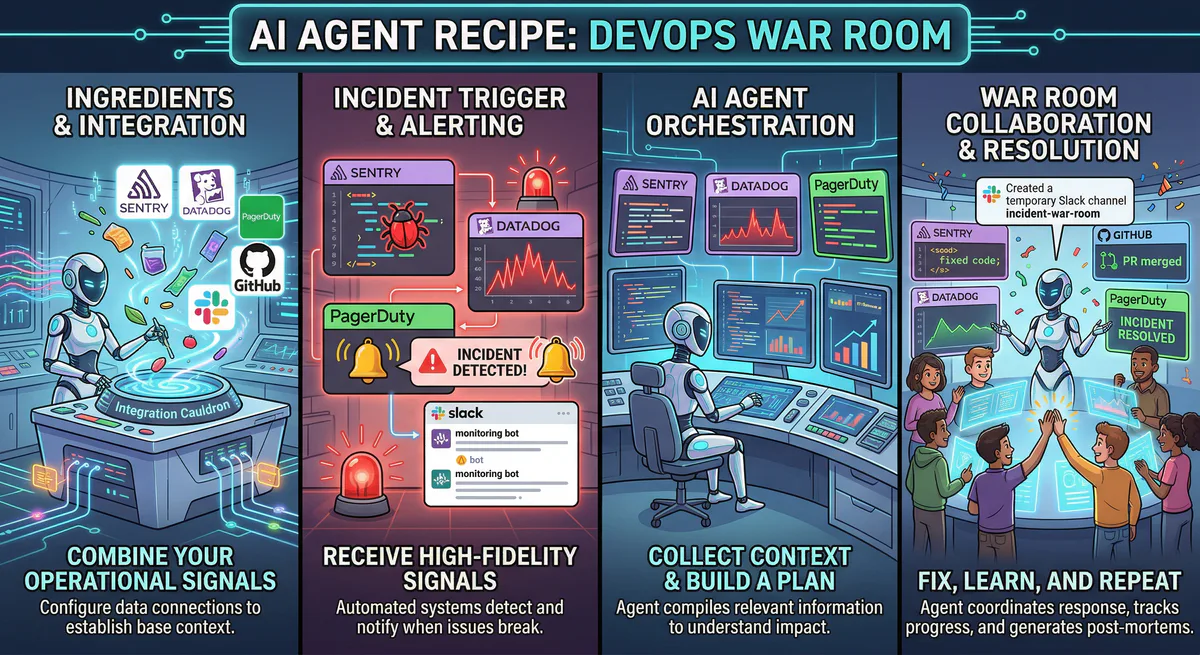
This recipe eliminates the 35-minute context-gathering phase. Five MCP servers connected to a single AI conversation that correlates across your entire observability stack:
“PagerDuty just fired. What’s happening? Show me the Sentry errors, the Datadog metrics, and the last GitHub deploy. Post a summary to #incidents.”
One prompt. Five tools. Complete incident context in 10 seconds. That’s the DevOps War Room.
No monitoring tool on the market does this. Datadog doesn’t read your GitHub commits. PagerDuty doesn’t check your Sentry stack traces. Sentry doesn’t know your infrastructure metrics. Each tool has 20% of the picture. This recipe gives you 100%.
The Recipe
| Ingredient | MCP Server | What it provides |
|---|---|---|
| 🐛 Error Tracking | Sentry MCP | Exceptions with stack traces, affected users, error frequency, release health, regression detection |
| 📈 Infrastructure | Datadog MCP | CPU, memory, disk, network, APM traces, logs, active alerts, custom metrics |
| 🚨 Incidents | PagerDuty MCP | Active alerts, on-call schedules, escalation policies, MTTA, MTTR, incident history |
| 🔧 Code Context | GitHub MCP | Recent commits, PRs, deployments, code search, file history, blame |
| 💬 Communication | Slack MCP | Post incident updates, notify on-call team, create war room channels |
Total setup time: 10 minutes. Subscribe to each → copy URL → paste into Claude, Cursor, or VS Code.
Why These Five Tools Together Create Something New
The observability industry generates $45 billion in annual revenue (Gartner, 2024) precisely because organizations need many specialized tools. But the value isn’t in any single tool — it’s in the correlation between them.
Sentry alone tells you an error occurred and shows you the stack trace. But it doesn’t know whether the error is causing infrastructure stress. It doesn’t know which deploy introduced the error. It doesn’t know who’s on-call.
Datadog alone shows you that CPU is at 92%. But it doesn’t know which error is causing the CPU spike. It doesn’t connect the spike to a specific code change.
PagerDuty alone tells you an alert fired. But it doesn’t tell you what caused it — just that a threshold was breached.
GitHub alone shows you the latest deploy. But it doesn’t know whether that deploy broke anything.
Slack alone is where your team coordinates. Without live data from the other four tools, your #incidents channel is full of “Is anything broken?” instead of “Here’s what broke, why, and how to fix it.”
The AI agent creates cross-tool causation chains that no single product can produce:
- PagerDuty alert → Datadog metrics → Sentry errors = Impact assessment (what fired, how bad is it, who’s affected)
- Sentry error + GitHub deploys = Root cause identification (this error appeared after this specific commit)
- Datadog logs + Sentry stack traces = Deep diagnosis (the error is caused by database connection pool exhaustion visible in Datadog, throwing a specific exception in Sentry)
- Everything → Slack = Coordinated response (the complete picture, shared with the team in seconds)
Real-World Workflows This Recipe Unlocks
1. Instant Incident Context (The 3 AM Scenario)
PagerDuty fires at 3:14 AM. Instead of opening five dashboards half-asleep, you ask your AI one question:
“There’s a PagerDuty alert firing. What’s happening? Cross-reference everything.”
What the AI does behind the scenes:
- PagerDuty: Identifies the alert — service, severity, assigned responder, escalation status
- Sentry: Searches for new errors in the affected service — stack traces, affected users, frequency
- Datadog: Pulls infrastructure metrics for the affected service — CPU, memory, latency, error rate
- GitHub: Finds the most recent deployment to the affected service — commit, author, timestamp
- Slack: Posts the correlated summary to #incidents
AI response: ”🚨 Active P1 Incident — Payment Service Degraded
PagerDuty: Alert triggered at 3:14 AM. Assigned to: Sarah (primary on-call). Status: not yet acknowledged. Escalation to VP Engineering in 12 minutes if unacknowledged.
Sentry (last 30 minutes):
- 147 new
TimeoutErrorexceptions inpayment-service - Affected endpoint:
POST /api/v2/checkout - Error rate: 34% of requests (normal baseline: <0.1%)
- 89 unique users affected
- First occurrence: 3:10 AM (4 minutes before PagerDuty triggered)
Datadog infrastructure:
- Payment service CPU: 94% (normal: 35%)
- Memory: 82% (normal: 60%)
- p99 latency: 4,200ms (normal: 180ms)
- Database connection pool: 48/50 active connections (saturated)
- Error log volume: 412 entries since 3:10 AM (normal: ~5 per hour)
GitHub (last deploy):
- Service:
payment-service - Deploy time: 2:58 AM (16 minutes before the alert)
- Commit:
Refactor checkout validation logicby @dev-james - PR #1247, merged 3 hours earlier, deployed via CI/CD
- Files changed:
checkout-validator.ts,payment-processor.ts(2 files, +47 lines, -12 lines)
Root cause hypothesis: PR #1247 introduced a new database query in the checkout validation path. Under load, this query is saturating the connection pool (48/50 connections). The timeout cascade causes 34% of checkout requests to fail.
Suggested fix: Revert PR #1247 or add connection pooling with a query timeout.
Alert posted to #incidents. @sarah-oncall notified.”
Five data sources. Complete incident context. The on-call engineer knows what broke, when it broke, why it likely broke, who deployed the change, and what to do about it — all before they’ve finished reading the alert.
2. Post-Deploy Health Check
After every deployment, your SRE team should verify that nothing regressed. With this recipe:
“We just deployed v2.14.0 to production 30 minutes ago. Run a post-deploy health check: any new Sentry errors? Any Datadog metric anomalies? Any PagerDuty alerts triggered?”
AI response: “Post-deploy health check — v2.14.0 (deployed 2:30 PM):
Sentry: 2 new error types since deploy:
TypeError: Cannot read property 'address' of nullinUserCheckout.tsx— 12 occurrences, 8 users affected. ⚠️ New regression — did not exist in v2.13.x.404 Not Foundon/api/v2/legacy-webhook— 34 occurrences. Endpoint removed in PR #1289. External integrations still hitting it.
Datadog: All core metrics nominal.
- API cluster CPU: 34% (stable). Memory: 58% (stable).
- p99 latency: 185ms (unchanged from pre-deploy).
- No new log patterns detected.
- ✅ Canary deployment: 10% of traffic on v2.14.0 — no anomalies.
PagerDuty: No new alerts triggered. All services green.
Assessment:
- Error #1 (
addressnull check) is a regression. Likely from PR #1291 which changeduser.billingAddresstouser.address.billing. Guest checkout users don’t haveuser.address, causing the null reference. Needs hotfix. - Error #2 is expected (deprecated endpoint), but the high volume (34 occurrences) suggests we should add a 301 redirect and notify affected partners.
Create a Sentry issue assignment for error #1? Post to #deployments?“
3. Code-Level Root Cause Correlation
The most powerful query — connecting error signals to specific code changes:
“The Sentry error ‘TypeError: Cannot read property address of null’ appeared 2 hours ago in UserCheckout.tsx line 147. Search GitHub for recent changes to that file and any files that reference ‘address’ in the checkout flow. Which PRs could have caused this?”
AI response:
“Root cause investigation — TypeError: Cannot read property 'address' of null
Sentry context:
- Error location:
UserCheckout.tsx:147 - First seen: 2:34 PM today
- Occurrences: 47 (and increasing — 8 per hour)
- Affected users: 31 (7% of checkout users)
GitHub search — recent changes to UserCheckout.tsx and related files:
| PR | File | Changed | Merged | Author | Confidence |
|---|---|---|---|---|---|
| #1291 | UserCheckout.tsx:142-155 | Changed user.billingAddress → user.address.billing | 3 hours ago | @dev-maria | 🔴 HIGH |
| #1287 | AddressForm.tsx | UI layout changes only | Yesterday | @dev-carlos | 🟢 LOW |
| #1283 | checkout-types.ts | Added Address type definition | 2 days ago | @dev-james | 🟡 MEDIUM |
Analysis of PR #1291:
- Line 147 now reads:
const billing = user.address.billing - If
user.addressis null (guest checkout users have no saved address), this throws. - Pre-PR code:
const billing = user.billingAddress— which was a direct, nullable field. - This is the regression.
Fix recommendation:
// Line 147 — add null coalescing
const billing = user.address?.billing ?? user.billingAddress;
Create a hotfix PR? Assign to @dev-maria?”
Sentry found the error. GitHub found the code. The AI correlated them and produced a specific fix recommendation with the exact line number. A human senior engineer would reach the same conclusion — but it would take 15-30 minutes of investigation instead of 10 seconds.
4. Weekly SRE Briefing
Instead of a 30-minute meeting reviewing five dashboards:
“Generate the weekly SRE report: total incidents from PagerDuty, new errors from Sentry, infrastructure highlights from Datadog, deployment count from GitHub. Compare this week to last week.”
AI response: “Weekly SRE Report — April 7-14, 2026:
| Metric | This week | Last week | Trend |
|---|---|---|---|
| P1 incidents | 1 | 0 | ⚠️ +1 (payment service, resolved in 18 min) |
| P2 incidents | 3 | 4 | ✅ -25% |
| P3 incidents | 5 | 7 | ✅ -29% |
| MTTA (mean acknowledge) | 2.4 min | 3.1 min | ✅ 23% faster |
| MTTR (mean resolve) | 18 min | 25 min | ✅ 28% faster |
| New Sentry errors | 7 | 12 | ✅ 42% fewer |
| Deploy count | 14 | 11 | ↗️ +27% |
| Avg API CPU | 42% | 38% | Stable |
| p99 latency | 192ms | 188ms | Stable |
| Error budget consumed | 0.8% | 0.3% | ⚠️ P1 consumed budget |
Key insights:
- The P1 incident (Thursday, payment service) was caused by PR #1247. Post-mortem scheduled for Monday.
- 3 of 7 new Sentry errors were from PR #1289 (legacy endpoint removal) — expected, not regressions.
- Deploy frequency increased 27% but error rate decreased 42% — team velocity improving without quality degradation.
- MTTA improved 23% — the new on-call rotation schedule is working.
Posted to #sre-weekly. SRE performance sheet updated.”
Data Security for DevOps
DevOps data contains internal hostnames, IP addresses, API endpoints, database connection strings, and infrastructure topology — all information that would be valuable to an attacker.
Our security stack ensures:
- Internal hostnames and IPs can be redacted per your DLP rules — the AI sees “Service A” instead of
prod-db-001.internal.company.com - Stack traces with file paths are accessible (needed for debugging) but log locations are configurable
- GitHub commit data is read-only — the AI can search code but cannot push changes
- All API credentials (Sentry DSN, Datadog API key, PagerDuty token, GitHub PAT) are stored in our encrypted vault
- Cryptographic audit trail — every query logged with tamper-proof signatures
How to Set It Up
- Go to our App Catalog
- Subscribe to these 5 servers:
- Copy each connection URL → paste into Claude, Cursor, or VS Code
- Ask your first incident question
Total setup: under 12 minutes. Zero code.
Variations
Swap Datadog for New Relic: New Relic MCP provides similar infrastructure observability.
Add Checkly: For synthetic monitoring, add Checkly MCP to detect uptime issues before users report them.
Add Snyk: For security-incident correlation, add Snyk MCP to check if the error involves a known vulnerability.
Add Linear or Jira: For automatic ticket creation from incidents, add Linear MCP or Jira Cloud MCP.
Internal Linking: Related Guides & Recipes
- The Fleet Intelligence Recipe → — Tesla + Google Maps + AccuWeather + Slack
- The Revenue Intelligence Recipe → — Stripe + HubSpot + Sheets + Slack
- Developer & Data MCP Servers → — Full developer cluster guide
- Security & Compliance MCP Servers → — Full security cluster guide
- The Complete MCP Server Directory → — 2,500+ apps
Start Building Your DevOps War Room
Your observability tools have all the data. The problem has never been data — it’s been correlation. This recipe solves that by letting your AI ask every tool simultaneously and draw the connections a human would take 35 minutes to make.
Need a custom DevOps recipe? Email support@vinkius.com.
Your agents need tools. We make them safe.
Pick an MCP server from the catalog. Subscribe. Copy the URL. Paste it into Claude, Cursor, or any client. One URL — DLP, audit trail, and kill switch included.
V8 sandbox isolation · Semantic DLP · Cryptographic audit trail · Emergency kill switch