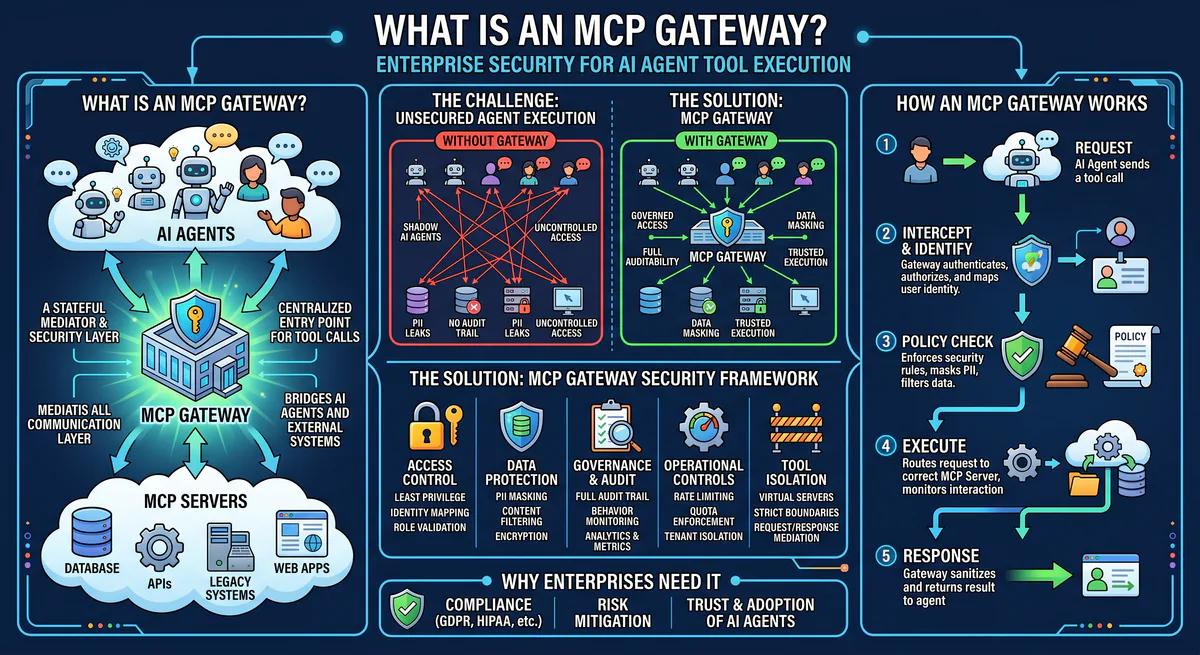
An MCP gateway is a centralized security and governance layer that sits between AI agents (MCP clients) and MCP servers. It intercepts every tool call, enforces authentication, applies Data Loss Prevention rules, classifies the semantic intent of each request, and maintains a cryptographic audit trail — all before the tool call reaches the target server. Without a gateway, AI agents operate with unmediated access to production systems, and a single prompt injection can cascade into data exfiltration, unauthorized mutations, or credential theft.
If MCP is the USB-C port for AI, the gateway is the surge protector, voltage regulator, and security scanner combined. You wouldn’t plug a random USB device directly into a production server. You shouldn’t connect an autonomous AI agent directly to your infrastucture either.
Why MCP Gateways Exist
The Model Context Protocol solved a critical integration problem: it standardized how AI agents connect to tools. But standardization created a new attack surface.
Before MCP, each custom API integration was a hand-built, one-off connector. The attack surface was fragmented and, paradoxically, contained — each integration had its own credentialing and its own guardrails.
With MCP, a single AI agent can now discover and invoke thousands of tools across databases, payment processors, CRMs, source code repositories, and communication platforms — all through one unified protocol. The power is extraordinary. The risk is proportional.
The three failure modes that MCP gateways prevent:
Credential exposure. Most MCP deployments store API keys and OAuth tokens locally — in claude_desktop_config.json, .cursor/mcp.json, or environment variables on the developer’s machine. These are plain text. If the agent is compromised through prompt injection, the attacker inherits every credential the agent has access to.
Unauthorized actions. An AI agent connected to a Stripe MCP server can process refunds. An agent connected to a PostgreSQL MCP server can run DELETE queries. An agent connected to a GitHub MCP server can merge pull requests to main. Without a governance layer, there is no mechanism to distinguish between a legitimate user request and a manipulated one.
Zero auditability. Most MCP hosts provide no forensic capability. If an agent executes a destructive action at 3 AM, there is no hash-chained, immutable log of what happened, when it happened, what parameters were passed, and which token authorized the action. Incident response becomes guesswork.
How an MCP Gateway Works
The gateway operates as a reverse proxy for MCP traffic. It does not modify the MCP protocol — it enforces policies on top of it.
Architecture
┌──────────────────────┐
│   AI Host            │
│  (Claude, Cursor,    │
│   Custom Agent)      │
└─────────┬────────────┘
          │ MCP Request (JSON-RPC 2.0)
          ▼
┌──────────────────────┐
│   MCP GATEWAY        │
│                      │
│  ┌─ Authentication ──┤  → Verify token, check permissions
│  ├─ Rate Limiting ───┤  → Throttle excessive tool calls
│  ├─ Intent Classify ─┤  → Read vs. Write vs. Destructive
│  ├─ DLP Engine ──────┤  → Scrub PII, secrets, sensitive data
│  ├─ Policy Engine ───┤  → Enforce RBAC, org policies
│  ├─ Audit Logger ────┤  → Hash-chain every action
│  └─ Circuit Breaker ─┤  → Kill switch for emergencies
│                      │
└─────────┬────────────┘
          │ Approved MCP Request
          ▼
┌──────────────────────┐
│   MCP Server         │
│  (GitHub, Stripe,    │
│   PostgreSQL, etc.)  │
└──────────────────────┘
Every MCP message passes through the gateway pipeline. The gateway never modifies the business logic of tool calls — it inspects, classifies, and enforces. If a request passes all policy checks, it’s forwarded to the target MCP server unchanged. If it fails any check, it’s blocked and the rejection is logged.
The Seven Gateway Components
1. Authentication & Token Management
The gateway issues scoped tokens to AI agents. Each token encodes:
- Which MCP servers the agent can access
- Which specific tools within those servers are permitted
- Expiration timestamps
- Rate limits
Credentials for the underlying services (API keys, OAuth tokens) are stored in the gateway’s encrypted vault. The AI agent never sees raw secrets. If the agent is compromised, the attacker gets a scoped, expiring proxy token — not your Stripe API key.
2. Semantic Intent Classification
This is the gateway’s most critical function. Before a tool call executes, the gateway classifies it:
| Intent Class | Examples | Default Policy |
|---|---|---|
| Read | List issues, query database, search files | ✅ Allow |
| Write | Create ticket, update record, send message | ⚠️ Allow with logging |
| Destructive | Delete repository, drop table, process refund | 🛑 Block — require approval |
| Exfiltrative | Export all contacts, dump database, bulk download | 🛑 Block — flag for review |
The classification engine inspects the tool name, parameter values, and semantic context. A call to stripe.refund.create with an amount of $50,000 triggers a different policy than a call to github.issues.list.
3. Data Loss Prevention (DLP)
The DLP engine scans both inbound and outbound payloads for sensitive data:
- PII detection — names, emails, phone numbers, addresses, SSNs
- Secret scanning — API keys, database connection strings, private keys
- Financial data — credit card numbers, bank account details
- Custom patterns — regex-based rules for industry-specific sensitive data
When sensitive data is detected in a response from an MCP server, the gateway can redact it before it reaches the AI model’s context window. The model never sees the raw PII — it receives a sanitized version.
4. Role-Based Access Control (RBAC)
MCP itself has no concept of permissions. Every connected client has equal access to all exposed tools. The gateway introduces organizational access control:
- Developer role → access to GitHub, Linear, Sentry. No access to Stripe, Salesforce.
- Finance role → access to QuickBooks, Stripe (read-only). No access to GitHub, databases.
- Admin role → full access with approval required for destructive actions.
Permissions are configurable per organization, per team, and per individual agent.
5. Cryptographic Audit Trail
Every tool call generates an immutable audit entry containing:
- Timestamp (UTC)
- Authenticated user/token identity
- Target MCP server and tool name
- Full request parameters
- Response status
- Classification result
- Hash of the previous entry (chain integrity)
The hash-chaining ensures that audit logs cannot be retroactively tampered with. If any entry is modified, the chain breaks and the tampering is detectable. This satisfies SOC 2 Type II requirements for non-repudiation.
6. Rate Limiting & Circuit Breakers
The gateway enforces rate limits at multiple levels:
- Per-agent: prevent runaway loops
- Per-tool: limit high-cost operations (e.g., max 10 refunds per hour)
- Per-organization: global throughput caps
- Emergency kill switch: revoke all tokens and terminate all connections instantly
7. Policy Engine
Configurable per-organization rules that combine the above components:
IF tool.category = "financial" AND action.type = "destructive"
  THEN require_human_approval
  AND notify_channel("slack", "#security-alerts")
  AND log_level("critical")
Policies can reference tool metadata, parameter values, time of day, user role, and historical patterns.
What Happens Without a Gateway
We see the same failure patterns repeatedly in organizations that deploy MCP without governance:
Scenario 1: Prompt injection → credential theft. A developer’s AI agent reads a malicious markdown file containing hidden instructions. The injected prompt instructs the agent to call the GitHub MCP server and exfiltrate the OAuth token via a tool call that encodes the token in a URL parameter. Without a gateway, the agent complies.
Scenario 2: Shadow AI proliferation. Individual developers install community MCP servers from unvetted GitHub repositories. These servers may contain backdoors, phone-home logic, or overly broad permission scopes. Without a gateway enforcing an allowlist, there is no organizational visibility into which tools are in use.
Scenario 3: Accidental destruction. An agent tasked with “cleaning up old test data” interprets the instruction broadly and drops a production database table. Without semantic intent classification and destructive action blocking, the agent executes the command without hesitation.
MCP Gateway vs. API Gateway
If your organization already uses Kong, Apigee, or AWS API Gateway, you might ask whether those solve the same problem.
| Capability | Traditional API Gateway | MCP Gateway |
|---|---|---|
| Protocol | REST/GraphQL HTTP traffic | JSON-RPC 2.0 (stdio + HTTP/SSE) |
| Traffic type | Developer-to-API | AI-agent-to-tool |
| Intent analysis | Route-based (URL pattern matching) | Semantic (understands what the AI is trying to do) |
| DLP | Limited — typically only header inspection | Deep payload inspection with PII/secret detection |
| Credential model | API keys passed in headers | Credential vault — agent never sees raw secrets |
| Audit trail | HTTP access logs | Hash-chained, immutable, per-tool-call forensics |
| Agent awareness | None — treats AI agents like any HTTP client | Full context: token identity, agent session, conversation history |
Traditional API gateways are designed for developer-to-API traffic with predictable, deterministic request patterns. MCP gateways are designed for AI-agent-to-tool traffic where the requests are non-deterministic, potentially adversarial, and require semantic understanding to govern.
They are complementary layers, not substitutes.
How to Choose an MCP Gateway
When evaluating gateways for your organization, these are the non-negotiable capabilities:
- Credential isolation — secrets must never reach the agent’s local environment
- Semantic classification — the gateway must understand the difference between reading and deleting
- Immutable audit trail — hash-chained logs for forensic integrity
- DLP at the edge — PII must be scrubbed before reaching the model context
- Kill switch — the ability to revoke all agent access instantly
- RBAC — tool-level permission control per user, team, and role
- Transport support — must handle both stdio and HTTP/SSE transports
- Open standard — must not lock you into a specific AI model or MCP client
See how our managed MCP gateway implements all eight →
Frequently Asked Questions
Do I need an MCP gateway for local development?
For prototyping on your laptop with test data, a gateway is optional. For any environment that touches production data, real credentials, or PII — yes, it’s essential. The transition from prototype to production is where most security incidents occur.
Can I build my own MCP gateway?
Technically, yes. The MCP protocol is open and well-documented. But building a production-grade gateway with DLP, semantic classification, hash-chained auditing, and credential vaulting is a significant engineering effort. Most teams are better served using a managed solution.
Does the gateway add latency?
Minimal. Policy evaluation, DLP scanning, and audit logging add single-digit milliseconds to each tool call. For the vast majority of MCP operations — API calls, database queries, file operations — this overhead is imperceptible.
Is an MCP gateway required by SOC 2 or ISO 27001?
Not explicitly. But both frameworks require access control, audit logging, and data protection for system-to-system interactions. An MCP gateway provides the infrastructure to satisfy these requirements for AI agent operations. Without one, demonstrating compliance for autonomous AI actions becomes extremely difficult.
What’s the difference between an MCP gateway and an LLM proxy?
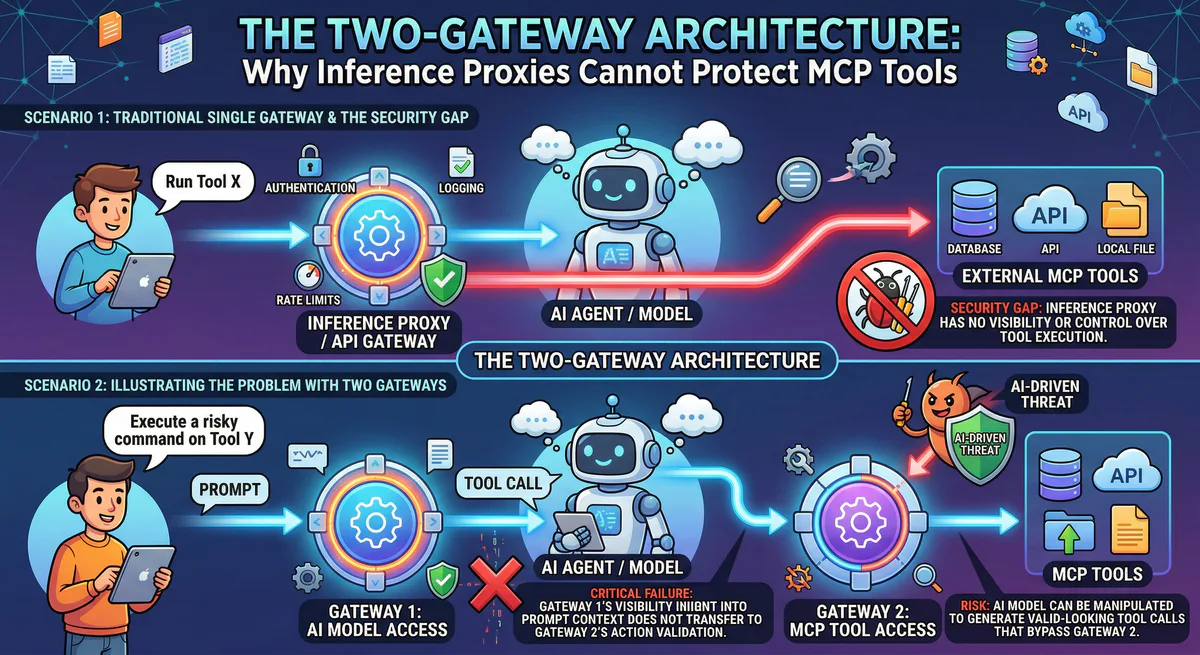
An LLM proxy (like LiteLLM or Portkey) sits between your application and the AI model, managing model selection, cost tracking, and rate limiting for inference calls. An MCP gateway sits between the AI agent and the tools it uses, managing security and governance for tool execution. They operate at different layers of the stack and are complementary.
Ready to govern your AI agents? Explore our managed MCP gateway — credential isolation, DLP, semantic classification, and cryptographic audit trails for every tool call. Connect 2,500+ MCP servers securely →
Your agents need tools. We make them safe.
Pick an MCP server from the catalog. Subscribe. Copy the URL. Paste it into Claude, Cursor, or any client. One URL — DLP, audit trail, and kill switch included.
V8 sandbox isolation · Semantic DLP · Cryptographic audit trail · Emergency kill switch