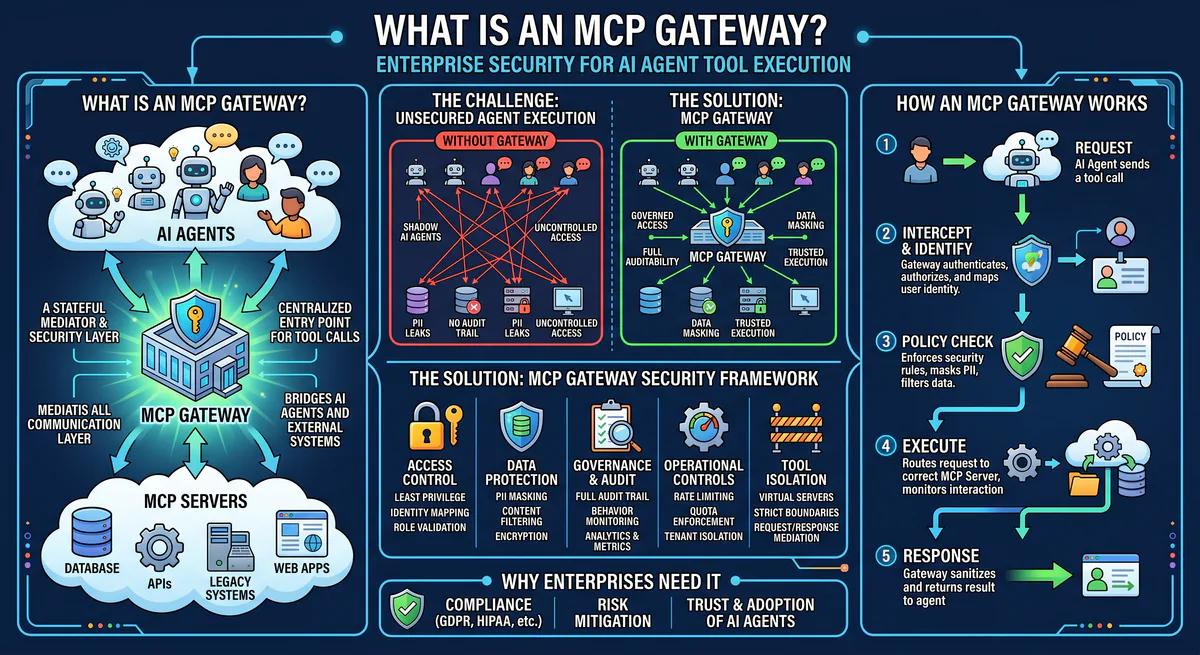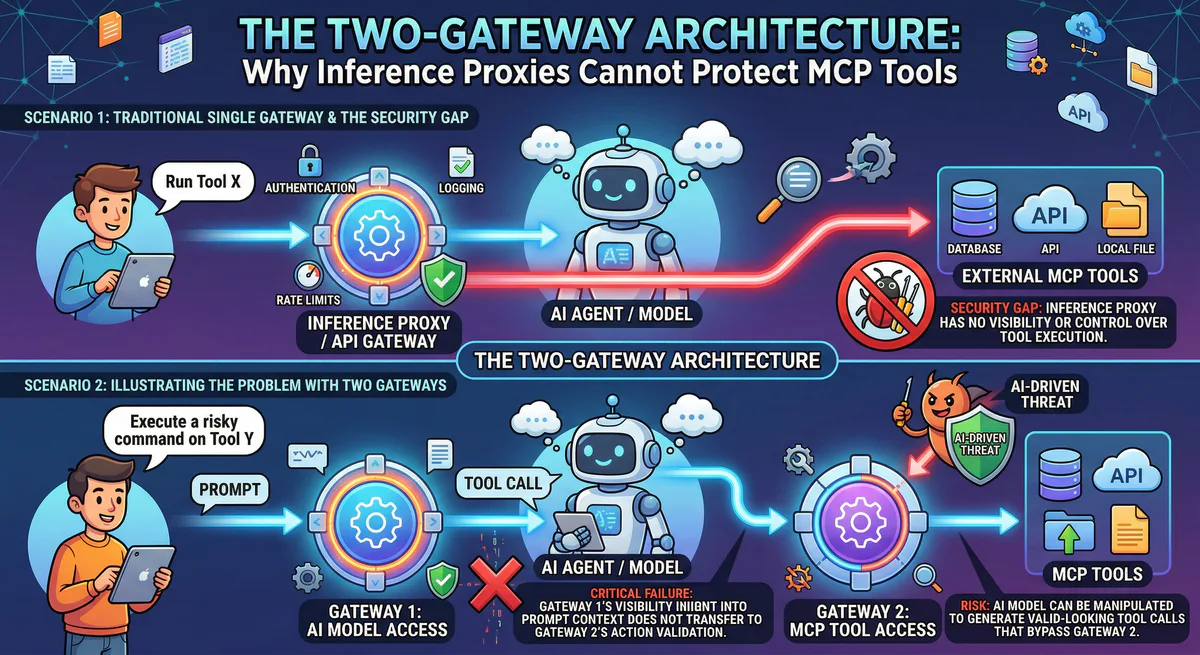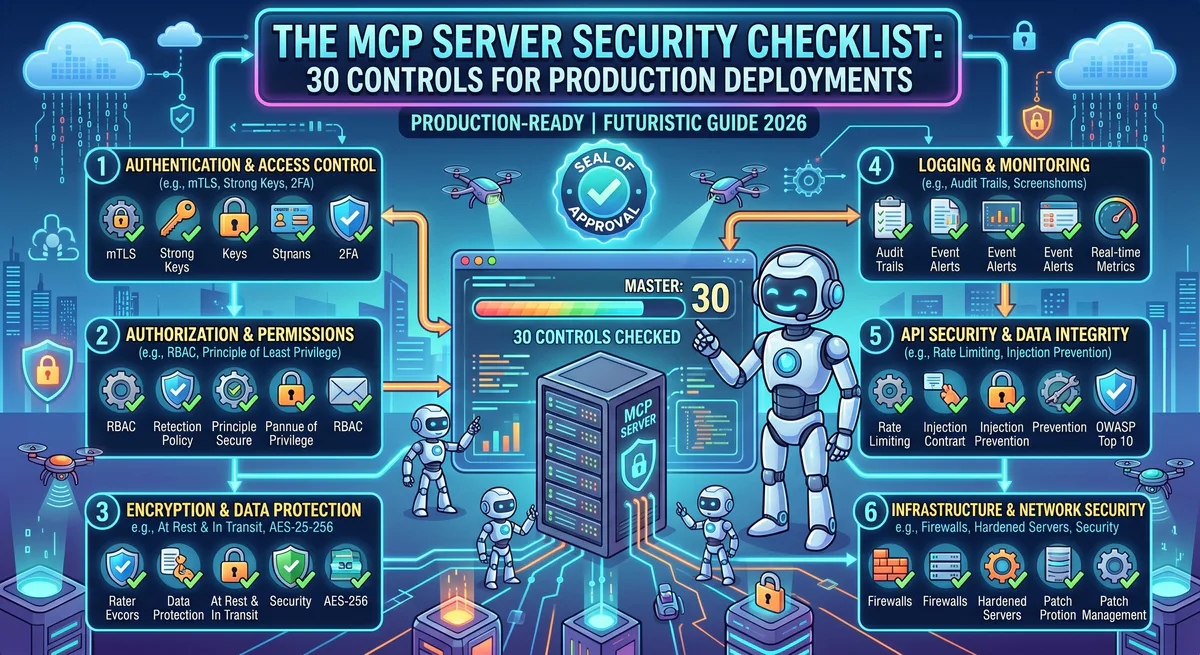
This is the security checklist we use internally before any MCP server goes live in a production environment. It covers 30 discrete controls across six security domains — from credential hygiene to supply chain verification. Each control has a specific, actionable requirement. If your deployment fails any of the critical controls, do not go to production.
Print it. Pin it to a wall. Run through it before every deployment. Security is not a feature — it’s a prerequisite.
Quick Assessment: Where Are You Today?
Before diving into the full checklist, score your current deployment:
| Maturity Level | Description | Typical Risk |
|---|---|---|
| Level 0 — Raw | MCP servers running locally, API keys in plain text, no audit logging | 🔴 Critical — one prompt injection away from breach |
| Level 1 — Basic | Environment variables for secrets, HTTPS for remote servers, some logging | 🟠 High — credentials still reachable by the agent |
| Level 2 — Managed | Centralized credential vault, gateway-mediated access, basic DLP | 🟡 Moderate — governance exists but gaps remain |
| Level 3 — Governed | Full gateway with semantic classification, hash-chained audit trails, RBAC, DLP, kill switch | 🟢 Production-grade |
Most organizations deploying MCP today are at Level 0 or Level 1. This checklist gets you to Level 3.
Domain 1: Credential Management
Credential exposure is the number one cause of MCP security incidents. API keys stored in local config files are trivially accessible to any compromised agent.
✅ Control 1.1 — No Plaintext Secrets in Config Files
Critical. API keys, OAuth tokens, and database credentials must never appear in claude_desktop_config.json, .cursor/mcp.json, mcp.json, or any client-side configuration file.
Action: Audit every MCP client configuration file on every developer machine. Search for patterns matching API keys, tokens, and connection strings. Replace with references to a secrets manager or gateway-issued tokens.
✅ Control 1.2 — Centralized Credential Vault
All MCP server credentials must be stored in an encrypted, access-controlled vault — not on developer laptops, not in environment variables, not in CI/CD pipelines.
Action: Migrate all credentials to a centralized vault (e.g., HashiCorp Vault, AWS Secrets Manager, or a managed MCP gateway with built-in credential isolation). The AI agent should receive a scoped proxy token — never the raw secret.
✅ Control 1.3 — Scoped Token Issuance
Tokens issued to AI agents must follow the principle of least privilege. Each token should encode: which MCP servers are accessible, which tools are permitted, and when the token expires.
Action: Implement token scoping at the gateway or auth layer. A developer agent should not have access to financial MCP servers. A finance agent should not have access to code repositories.
✅ Control 1.4 — Automatic Token Rotation
Tokens and API keys must rotate on a defined schedule. Long-lived credentials are ticking time bombs.
Action: Configure automatic rotation with a maximum lifetime of 24 hours for high-privilege tokens and 7 days for read-only tokens. Revoke and re-issue on every detected anomaly.
✅ Control 1.5 — Credential Isolation from Agent Context
The AI model must never see raw credentials in its context window. If credentials appear in tool responses, they must be redacted before reaching the model.
Action: Configure DLP rules to detect and scrub secrets in MCP server responses. Test by intentionally returning a fake API key in a tool response and verifying it gets redacted.
Domain 2: Transport Security
MCP supports two transports: stdio (local) and HTTP+SSE (remote). Each has different security requirements.
✅ Control 2.1 — TLS for All Remote Connections
Every remote MCP server must be accessible exclusively over HTTPS/TLS 1.3. No exceptions. No fallback to HTTP.
Action: Verify TLS configuration on every remote MCP server endpoint. Check certificate validity, chain of trust, and HSTS headers. Reject self-signed certificates in production.
✅ Control 2.2 — Mutual TLS for Internal Servers
For MCP servers running within your internal network, mutual TLS (mTLS) provides bidirectional authentication — the client verifies the server and the server verifies the client.
Action: Configure mTLS on internal MCP server deployments. Issue client certificates to authorized gateway instances only.
✅ Control 2.3 — stdio Transport Isolation
For local MCP servers using stdio transport, the server process must run in a sandboxed environment with minimal filesystem and network access.
Action: Run local MCP servers in containers or sandboxed processes. Restrict filesystem access to only the directories the server needs. Block outbound network access unless explicitly required by the server’s function.
✅ Control 2.4 — No Sensitive Data in URLs
MCP tool parameters must never be passed as URL query parameters. Sensitive data in URLs gets logged in web server access logs, browser history, proxy logs, and CDN caches.
Action: Audit all MCP server implementations. Verify that tool parameters are transmitted in JSON-RPC request bodies, never in URL paths or query strings.
Domain 3: Prompt Injection Defense
Prompt injection is the most dangerous attack vector against MCP-enabled AI agents. An attacker embeds malicious instructions in data the agent processes, causing the agent to execute unauthorized tool calls.
✅ Control 3.1 — Input Sanitization on All Tool Parameters
Every parameter passed to an MCP tool must be sanitized for injection patterns before execution.
Action: Implement input validation at the MCP server level. Reject or escape parameters containing prompt injection markers, system prompt overrides, or encoded instructions.
✅ Control 3.2 — Output Sanitization on All Tool Responses
Data returned by MCP tools (database query results, API responses, file contents) can contain injected instructions that manipulate the agent’s next actions.
Action: Configure the gateway to scan tool responses for instruction-like patterns. Flag responses that contain imperative language, role assignments, or system prompt modifications.
✅ Control 3.3 — Semantic Intent Classification
Before any tool call executes, the system must classify the intent as Read, Write, Destructive, or Exfiltrative, and apply the appropriate policy.
Action: Deploy a semantic classification engine at the gateway layer. Block Destructive and Exfiltrative actions by default. Require explicit human approval for high-risk operations.
✅ Control 3.4 — Tool Call Rate Limiting
Prompt injection attacks often involve rapid sequences of tool calls designed to exfiltrate data before detection.
Action: Implement per-tool and per-session rate limits. Alert on anomalous patterns: an agent that suddenly calls 50 tools in 10 seconds is likely compromised.
✅ Control 3.5 — Cross-Tool Escalation Prevention
An agent should not be able to use the output of one tool as credentials or authorization for another tool.
Action: Configure the gateway to detect cross-tool data flow patterns. If a response from Tool A contains a credential, and the next request to Tool B uses that credential, block the request and flag the session.
Domain 4: Data Loss Prevention (DLP)
AI agents connected to production systems can inadvertently surface PII, financial data, or trade secrets into model context windows — where they may be logged, cached, or leaked.
✅ Control 4.1 — PII Detection and Redaction
All data flowing from MCP servers to AI agents must be scanned for personally identifiable information.
Action: Configure DLP rules to detect and redact: names, email addresses, phone numbers, physical addresses, social security numbers, national ID numbers, dates of birth, and any custom PII patterns relevant to your industry.
✅ Control 4.2 — Financial Data Protection
Credit card numbers, bank account details, and transaction data require special handling.
Action: Implement PCI-DSS-compliant redaction for financial data in MCP responses. Never allow raw credit card numbers to reach the AI model’s context. Mask to last four digits at minimum.
✅ Control 4.3 — Secret Scanning in Responses
MCP tool responses may inadvertently include API keys, database credentials, or internal tokens — especially from configuration management or DevOps tools.
Action: Deploy a secret scanner (based on regex patterns for known secret formats) on all outbound MCP responses. Auto-redact detected secrets and alert the security team.
✅ Control 4.4 — Data Classification Labels
Not all data is equally sensitive. Your DLP engine should understand classification levels and apply appropriate policies.
Action: Tag MCP tool responses with classification labels (Public, Internal, Confidential, Restricted). Apply redaction and access controls based on the classification level and the agent’s clearance.
Domain 5: Supply Chain Security
The MCP ecosystem is growing rapidly. Community-built servers — while valuable — are untrusted code that runs with access to your infrastructure.
✅ Control 5.1 — Allowlist-Only Server Policy
Only approved, vetted MCP servers may be deployed in production environments. No ad-hoc installations from GitHub repositories.
Action: Maintain an organizational allowlist of approved MCP servers. Block installation of any server not on the list. Review and approve new servers through a security review process.
✅ Control 5.2 — Source Code Review
Every MCP server deployed in production must have its source code reviewed for backdoors, phone-home logic, and overly broad permission requests.
Action: Conduct a security-focused code review of every MCP server before adding it to the allowlist. Check for: outbound network calls to unexpected endpoints, filesystem access beyond stated requirements, and credential handling practices.
✅ Control 5.3 — Version Pinning
MCP servers must be version-pinned. Auto-updating to the latest version without review creates a supply chain attack vector.
Action: Pin every MCP server to a specific, reviewed version. Update only after the new version passes security review.
✅ Control 5.4 — Use a Managed Registry
Instead of sourcing servers from individual GitHub repositories, use a managed registry that performs security vetting, version management, and update notifications.
Action: Subscribe to MCP servers through a managed registry that provides security-vetted, version-controlled, pre-configured servers. This eliminates the need for individual source code reviews and ensures consistent governance.
✅ Control 5.5 — Dependency Scanning
MCP servers are software packages with their own dependency trees. Vulnerabilities in dependencies can compromise the server.
Action: Run dependency vulnerability scanning (Snyk, npm audit, pip-audit) on every MCP server’s dependency tree before deployment and on a recurring schedule.
Domain 6: Audit, Monitoring & Incident Response
If you can’t see what your agents are doing, you can’t govern them.
✅ Control 6.1 — Hash-Chained Audit Trail
Every tool call must generate an immutable, tamper-evident audit log entry.
Action: Implement hash-chained logging where each entry includes a cryptographic hash of the previous entry. Any modification to historical entries breaks the chain and is detectable.
✅ Control 6.2 — Full Request and Response Logging
Audit logs must capture: timestamp, user identity, agent identity, target MCP server, tool name, full request parameters, response status, and classification result.
Action: Configure the gateway to log the complete request-response cycle for every tool call. Store logs in an append-only, immutable storage system.
✅ Control 6.3 — Real-Time Anomaly Detection
Static logging is insufficient. Production deployments need real-time alerting on anomalous tool call patterns.
Action: Configure alerts for: unusual tool call volumes, first-time access to sensitive servers, tool calls outside business hours, sequential calls matching known attack patterns, and any blocked Destructive/Exfiltrative classifications.
✅ Control 6.4 — Emergency Kill Switch
The ability to instantly revoke all agent access and terminate all MCP connections must exist and be tested.
Action: Document the kill switch procedure. Test it quarterly. Ensure it can be activated by at least three authorized personnel. Verify that activation takes less than 60 seconds from decision to execution.
✅ Control 6.5 — Incident Response Playbook
An MCP-specific incident response playbook must exist and be rehearsed.
Action: Create a playbook that covers: compromised agent sessions, credential exposure, unauthorized data access, unauthorized mutations, and supply chain compromises. Include specific steps for MCP-related incidents — token revocation, server isolation, audit log preservation, and forensic analysis procedures.
The Printable Checklist
| # | Control | Domain | Priority | Status |
|---|---|---|---|---|
| 1.1 | No plaintext secrets in config | Credentials | 🔴 Critical | ☐ |
| 1.2 | Centralized credential vault | Credentials | 🔴 Critical | ☐ |
| 1.3 | Scoped token issuance | Credentials | 🔴 Critical | ☐ |
| 1.4 | Automatic token rotation | Credentials | 🟠 High | ☐ |
| 1.5 | Credential isolation from context | Credentials | 🔴 Critical | ☐ |
| 2.1 | TLS for all remote connections | Transport | 🔴 Critical | ☐ |
| 2.2 | Mutual TLS for internal servers | Transport | 🟡 Medium | ☐ |
| 2.3 | stdio transport isolation | Transport | 🟠 High | ☐ |
| 2.4 | No sensitive data in URLs | Transport | 🟠 High | ☐ |
| 3.1 | Input sanitization | Prompt Injection | 🔴 Critical | ☐ |
| 3.2 | Output sanitization | Prompt Injection | 🔴 Critical | ☐ |
| 3.3 | Semantic intent classification | Prompt Injection | 🔴 Critical | ☐ |
| 3.4 | Tool call rate limiting | Prompt Injection | 🟠 High | ☐ |
| 3.5 | Cross-tool escalation prevention | Prompt Injection | 🟠 High | ☐ |
| 4.1 | PII detection and redaction | DLP | 🔴 Critical | ☐ |
| 4.2 | Financial data protection | DLP | 🔴 Critical | ☐ |
| 4.3 | Secret scanning in responses | DLP | 🟠 High | ☐ |
| 4.4 | Data classification labels | DLP | 🟡 Medium | ☐ |
| 5.1 | Allowlist-only server policy | Supply Chain | 🔴 Critical | ☐ |
| 5.2 | Source code review | Supply Chain | 🟠 High | ☐ |
| 5.3 | Version pinning | Supply Chain | 🟠 High | ☐ |
| 5.4 | Use a managed registry | Supply Chain | 🟡 Medium | ☐ |
| 5.5 | Dependency scanning | Supply Chain | 🟠 High | ☐ |
| 6.1 | Hash-chained audit trail | Audit | 🔴 Critical | ☐ |
| 6.2 | Full request/response logging | Audit | 🔴 Critical | ☐ |
| 6.3 | Real-time anomaly detection | Audit | 🟠 High | ☐ |
| 6.4 | Emergency kill switch | Audit | 🔴 Critical | ☐ |
| 6.5 | Incident response playbook | Audit | 🟠 High | ☐ |
Passing score: All 🔴 Critical controls must pass. At least 80% of 🟠 High controls must pass. 🟡 Medium controls are recommended but not blocking.
Frequently Asked Questions
How long does it take to implement all 30 controls?
If you’re building from scratch: 3–6 months of engineering effort. If you use a managed MCP gateway that implements controls 1.1–1.5, 3.3–3.5, 4.1–4.4, 6.1–6.4 out of the box: you can achieve Level 3 maturity in days.
Do I need all 30 controls for a proof of concept?
No. For a PoC with test data, focus on Controls 1.1 (no plaintext secrets) and 2.1 (TLS). But do not go to production without completing the Critical controls. The transition from PoC to production is where security debt compounds.
Are these controls specific to MCP or general AI security?
Most are MCP-specific — they address the unique risks of standardized, autonomous tool execution by AI agents. General AI security (model safety, alignment, bias) is a separate domain. This checklist focuses exclusively on the infrastructure layer.
How does this checklist relate to SOC 2 and ISO 27001?
Controls in Domains 1 (Credentials), 2 (Transport), and 6 (Audit) directly map to SOC 2 Trust Service Criteria and ISO 27001 Annex A controls. We designed the checklist to be audit-compatible — each control produces evidence that can be submitted during compliance reviews.
What if my MCP servers are all running locally?
Local servers (stdio transport) are deceptively dangerous. The agent process has the same permissions as the user running it — full filesystem access, full network access, and access to any credentials in the local environment. Controls 2.3 (sandbox isolation) and 5.1 (allowlist policy) are especially critical for local deployments.
Ready to secure your MCP deployment? Our managed gateway implements 20 of these 30 controls out of the box — credential isolation, DLP, semantic classification, audit logging, and kill switch included. Browse 2,500+ governed MCP servers →
Your agents need tools. We make them safe.
Pick an MCP server from the catalog. Subscribe. Copy the URL. Paste it into Claude, Cursor, or any client. One URL — DLP, audit trail, and kill switch included.
V8 sandbox isolation · Semantic DLP · Cryptographic audit trail · Emergency kill switch