Revenue data is the lifeblood of every SaaS company. But it lives in at least four places: Stripe has the money. HubSpot has the pipeline. Google Sheets has the forecast. Slack has the context. Getting a complete revenue picture means extracting data from all four, cross-referencing it manually, and hoping the numbers align.
According to Clari’s 2024 Revenue Platform Report, revenue teams spend 68% of their time gathering data and only 32% analyzing it. The average SaaS company takes 3-5 business days to produce an accurate revenue report — by which time the data is already stale.
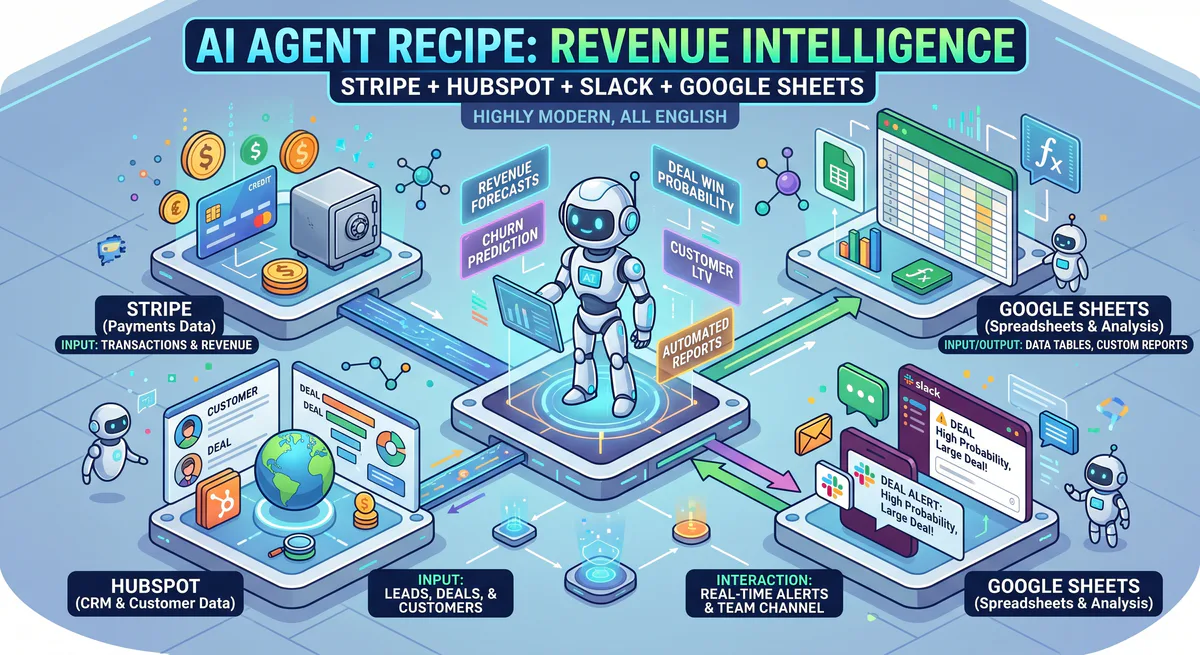
This recipe inverts that ratio. Four MCP servers connected to a single AI conversation that becomes your real-time revenue intelligence engine:
“What’s our MRR as of today? Compare it to the pipeline in HubSpot — how much of the current pipeline converted to revenue last month? Update the board forecast sheet. Post a summary to #revenue.”
Four tools. Complete revenue intelligence. The kind of cross-platform analysis that would take a Revenue Operations analyst half a day — delivered in 10 seconds.
No other platform on the market connects payment data, CRM pipeline, spreadsheet forecasting, and team communication into a single conversational experience. Zapier can move data between these tools with rigid rules. Composio requires you to code the workflow. This recipe gives you a conversation.
The Recipe
| Ingredient | MCP Server | What it provides |
|---|---|---|
| 💰 Payment Data | Stripe MCP | MRR, subscription status, churn, failed payments, refunds, invoices, LTV, cohort data |
| 📊 Pipeline Data | HubSpot CRM Full MCP | Deals by stage, win rates, deal velocity, contacts, marketing attribution, engagement history |
| 📋 Forecasting | Google Sheets MCP | Read/write forecast models, update board decks, track KPIs over time, historical comparisons |
| 💬 Communication | Slack MCP | Share summaries, alert on anomalies, post to #revenue, notify stakeholders |
Total setup time: 8 minutes. Subscribe to each → copy URL → paste into Claude, Cursor, or ChatGPT.
Why These Four Tools Together Create Something New
Individually, these tools are excellent at what they do. Together, they create insights that none of them can produce alone.
Stripe alone knows who’s paying and how much. But it doesn’t know why a customer is paying — which deal stage they came from, which marketing campaign brought them in, or whether their account owner has been engaged recently.
HubSpot alone knows the pipeline — deals, stages, probabilities. But it doesn’t know whether those deals actually converted to revenue. A deal marked “Closed Won” in HubSpot and a subscription activated in Stripe are two separate events that don’t always match.
Google Sheets alone has your forecast model. But updating it requires manual data entry from both Stripe and HubSpot. By the time it’s updated, the forecast is already behind reality.
Slack alone is where your revenue conversations happen. Without live data feeding into it, your #revenue channel is full of questions (“What’s our MRR?”) instead of answers.
The AI agent combines all four in every response:
- Stripe + HubSpot = Pipeline Accuracy — the AI validates whether closed deals actually became paying customers
- Stripe + HubSpot = Churn Early Warning — payment failures in Stripe + engagement gaps in HubSpot = high churn risk
- Stripe + Sheets = Live Forecasting — actual revenue automatically updates your forecast model
- Everything + Slack = Team Intelligence — the complete picture, shared instantly
Real-World Workflows This Recipe Unlocks
1. The CEO’s Morning Revenue Briefing
Your CEO doesn’t want to log into Stripe and HubSpot and a spreadsheet every morning. They want the answer:
“Revenue update: MRR, new subscriptions this week, churned customers, pipeline forecast, and anything I should worry about.”
What the AI does:
- Stripe: Pulls current MRR, new subscriptions, churned subscriptions, failed payments
- HubSpot: Pulls pipeline value by stage, weighted forecast, deal velocity
- Google Sheets: Updates the Q2 forecast with actual data
- Slack: Posts the summary to #revenue
AI response: “Revenue update — April 14, 2026:
Current MRR: $147,200 (↑3.2% from last month)
| Metric | This week | Last week | Trend |
|---|---|---|---|
| New subscriptions | 12 ($4,800 MRR) | 9 ($3,600 MRR) | ✅ +33% |
| Churned | 3 ($1,200 MRR lost) | 2 ($800 MRR lost) | ⚠️ +50% |
| Net new MRR | +$3,600 | +$2,800 | ✅ +29% |
| Failed payments | 7 ($2,100 at risk) | 4 ($1,400 at risk) | ⚠️ +75% |
Churn detail: 2 of 3 churned customers cited ‘switching to competitor’ in cancel survey. 1 company closed (confirmed in HubSpot notes).
Pipeline forecast (HubSpot):
- Deals in ‘Proposal’: 8 deals, $89,000 weighted value
- Deals in ‘Negotiation’: 3 deals, $45,000 weighted value
- Expected close this month: $67,000 (based on historical stage probabilities)
⚠️ Alert — Failed payments trending up: 7 failed payment attempts this week (vs. 4 last week). 3 are card expiration (auto-retry enabled). 4 are insufficient funds — these need manual outreach. Largest: TechFlow Inc ($3,600/mo), card declined 3 times since April 8.
Q2 forecast sheet updated with April actuals.
Summary posted to #revenue.”
One prompt replaced the CEO’s entire morning routine across four tools.
2. Pipeline-to-Revenue Conversion Audit
Before the quarterly business review, your CRO needs to know how accurate the pipeline was:
“Last quarter, how much of our HubSpot pipeline actually converted to Stripe revenue? Break it down by deal stage. How accurate was each stage’s probability weighting?”
What the AI does:
- HubSpot: Pulls all deals that reached each stage in Q1
- Stripe: Checks which of those deals became paying subscriptions
- Cross-references by company name, email, or deal ID
- Calculates actual vs. predicted conversion rates
AI response: “Q1 Pipeline → Revenue Conversion Audit:
| Stage | Deals entered | Converted to Stripe subscription | Actual rate | HubSpot predicted rate | Gap |
|---|---|---|---|---|---|
| Qualified | 47 | 8 | 17% | 20% | -3% ✅ Close |
| Proposal Sent | 31 | 14 | 45% | 50% | -5% ✅ Close |
| Negotiation | 18 | 13 | 72% | 75% | -3% ✅ Close |
| Verbal Commit | 9 | 7 | 78% | 90% | -12% ⚠️ Over-weighted |
Key finding: ‘Verbal Commit’ is significantly over-weighted at 90%. Two deals that reached verbal commit churned within 30 days of signing:
- Deal A ($8,400 ARR): Signed but cancelled 18 days later. Stripe shows a full refund — was a pricing mismatch discovered after contract.
- Deal B ($4,200 ARR): Signed but downgraded to free tier within 22 days. HubSpot shows no onboarding calls were scheduled.
Recommendation: Adjust ‘Verbal Commit’ probability from 90% to 80%. Add mandatory onboarding call before marking a deal as ‘Closed Won.’
Total pipeline that converted to sustained revenue: $312,000 out of $890,000 pipeline (35%).
Conversion tracking sheet updated.”
This analysis is impossible in any single tool. Stripe doesn’t know deal stages. HubSpot doesn’t know whether subscriptions stuck. Only by combining both can you audit pipeline accuracy — and the AI does it in seconds.
3. Churn Early Warning System
The most powerful workflow — correlating payment health with CRM engagement:
“Which paying customers show churn signals? Cross-reference Stripe payment failures with HubSpot activity — flag customers with failed payments AND no recent sales engagement.”
What the AI does:
- Stripe: Pulls all customers with failed payments, downgrades, or declining usage
- HubSpot: Checks engagement history for each — last call, last email, last meeting, last deal note
- Correlates the two datasets to produce a risk-ranked list
AI response: “⚠️ Churn Early Warning — 4 customers showing combined risk signals:
| Customer | MRR | Stripe Signal | HubSpot Signal | Risk |
|---|---|---|---|---|
| TechFlow Inc | $3,600 | 3 failed payments (card expired Apr 8) | No activity since Feb 12 (62 days) | 🔴 HIGH |
| DataPeak | $1,200 | 1 failed payment (insufficient funds) | CSM logged call: ‘exploring alternatives’ | 🔴 HIGH |
| CloudBase | $800 | Downgraded Pro → Basic last week | No calls, no emails in 45 days | 🟡 MEDIUM |
| NovaTech | $2,100 | Payment current | Support escalation Mar 28; NPS: 3/10 | 🟡 MEDIUM |
Total at-risk MRR: $7,700 (5.2% of total MRR)
Immediate actions:
- TechFlow: Account owner James needs to reach out TODAY. 62 days without contact + expired card = imminent churn.
- DataPeak: CSM already noted competitor interest — escalate to VP Sales for retention offer.
Post churn alert to #customer-success?”
Stripe sees payment failures. HubSpot sees engagement gaps. Neither alone tells the full story. Together, they create an early warning system that catches churn 30-60 days before it happens — when there’s still time to save the account.
4. Automated Board Report Generation
The night before the board meeting:
“Generate the monthly board revenue report: MRR trend (last 6 months), net revenue retention, CAC payback period, pipeline coverage ratio, and top 5 deals closing this month. Write it to the ‘Board Report — April’ tab in our Q2 spreadsheet.”
What the AI does:
- Stripe: Pulls 6 months of MRR data, calculates NRR from subscription expansions/contractions
- HubSpot: Pulls pipeline coverage, deal velocity, top deals by weighted value
- Cross-calculates CAC payback from Stripe LTV data + HubSpot marketing attribution
- Google Sheets: Writes the formatted report to the specified tab
- Slack: Notifies #leadership that the board deck is ready
Your CFO wakes up to a finished, data-backed board report — written from live data, not two-week-old exports.
Data Security for Revenue Operations
Revenue data is among the most commercially sensitive information in any organization. Customer lists, deal values, pricing negotiations, and financial forecasts are data your competitors would pay to see.
Our security stack ensures:
- Stripe financial data (revenue, subscription amounts, payment details) is logged with every AI access
- Customer payment methods (card numbers, bank details) are automatically redacted by our DLP engine — the AI sees revenue figures without seeing card data
- Deal values and competitive pricing from HubSpot are protected by audit trails
- Board forecast data in Google Sheets is accessed through the same encrypted channel
- All API credentials (Stripe secret key, HubSpot API key, Google OAuth) are stored in our encrypted vault — never in config files on your machine
- Kill switch — disable any connection instantly if an employee leaves or a breach is suspected
How to Set It Up
- Go to our App Catalog
- Subscribe to these 4 servers:
- Copy each connection URL
- Paste all four into Claude, Cursor, ChatGPT, or VS Code
- Ask your first revenue question
Total setup: under 10 minutes. Zero code.
Variations of This Recipe
Salesforce instead of HubSpot: Swap HubSpot CRM Full MCP for Salesforce Sales Cloud MCP — same workflows, different CRM.
Add Chargebee or Recurly: For complex subscription billing, add Chargebee MCP or Recurly MCP alongside Stripe.
Add Gong: For revenue intelligence with conversation data, add Gong MCP to correlate deal outcomes with sales call quality.
QuickBooks or Xero: For full financial reporting (not just subscription revenue), add QuickBooks MCP or Xero MCP.
Internal Linking: Related Guides & Recipes
- The Fleet Intelligence Recipe → — Tesla + Google Maps + AccuWeather + Slack
- The DevOps War Room Recipe → — Sentry + Datadog + PagerDuty + GitHub + Slack
- The E-Commerce Command Center → — Shopify + Klaviyo + Gorgias + AfterShip
- CRM & Sales MCP Servers → — Full CRM cluster guide
- Finance & Accounting MCP Servers → — Full finance cluster guide
- The Complete MCP Server Directory → — 2,500+ apps
Start Building Your Revenue Intelligence Agent
Your pipeline questions deserve 5-second answers. Your forecast meetings deserve real-time data. Your churn signals deserve to be caught 60 days early, not 60 days late. This recipe makes all of that possible — with four connections and zero code.
Need a custom revenue stack? Email support@vinkius.com — we help teams build custom revenue recipes every week.
Your agents need tools. We make them safe.
Pick an MCP server from the catalog. Subscribe. Copy the URL. Paste it into Claude, Cursor, or any client. One URL — DLP, audit trail, and kill switch included.
V8 sandbox isolation · Semantic DLP · Cryptographic audit trail · Emergency kill switch